


 View Profile
 View Forum Posts
 Visit Homepage

How to rip or extract the mpg video from VCD or SVCD CDs or BIN/CUE images using Isobuster.
VCD(DAT) to MPG
SVCD(MPG) to MPG
VCD BIN/CUE to MPG
SVCD BIN/CUE to MPG
VCD(DAT) to MPG
This method will let you copy the VCD video to compliant mpg file(s). If you just copy the .dat file(s) with windows explorer you may experience problems because windows copies all sectors in "raw mode" instead of "vcd mode".
Tools: Isobuster.
Install and run Isobuster.
Select your CD/DVD Drive.
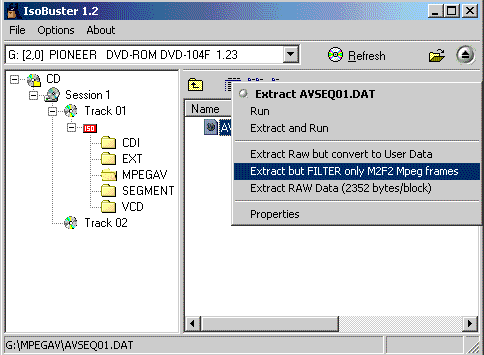
Click on the MPEGAV folder.
Select all dat files and right click and select Extract but filter only M2F2 Mpg frames.
Save the new file as filename.mpg. It will automatically be converted to a compliant mpg file.
SVCD(MPG) to MPG
This method will let you copy the SVCD video to compliant mpg file(s). If you just copy the .mpg file(s) with windows explorer you may experience problems because windows copies all sectors in "raw mode" instead of "svcd mode".
Tools: Isobuster.
Install and run Isobuster.
Select your CD/DVD Drive.
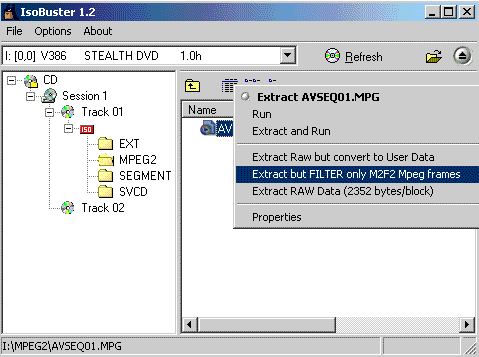
Click on the MPEG2 folder.
Select all mpg files and right click and select Extract but filter only M2F2 Mpg frames.
Save the new file as filename.mpg. Remember that you must have a MPEG2 codec or a software DVD Player installed to be able to play SVCD mpg files.
BIN/CUE VCD to MPG
How to extract the mpg video file(s) from BIN/CUE VCD file.
Tools: Isobuster.
Install and run Isobuster.
Select File->Open Image File and open the CUE file.
Click on the MPEGAV folder.
Select all dat files and right click and select Extract but filter only M2F2 Mpg frames.
Save the new file as filename.mpg. It will automatically be converted to a compliant mpg file.
BIN/CUE SVCD to MPG
How to extract the mpg video file(s) from BIN/CUE SVCD file.
Tools: Isobuster.
Install and run Isobuster.
Select File->Open Image File and open the CUE file.
Click on the MPEG2 folder.
Select all mpg files and right click and select Extract but filter only M2F2 Mpg frames.
Save the new file as filename.mpg. Remember that you must have a MPEG2 codec or a software DVD Player installed to be able to play SVCD mpg files.
+ Reply to Thread
Results 1 to 30 of 46
-
I'm a MEGA Super Moderator

- Aug 2000
- Sweden


-
Baldrick,
Just been looking at the guide for SVCD to MPEG.
The problem I have is very simple but you may be able to help. When going to the Isobuster download page there are loads of mirrors. What are these? Im in the UK and am not sure what to do -
You can just use TMPGEnc>MPEG Tools>Simple Multiplex to remultiplex the AVSEQ01.MPG file directly from the SVCD. It will net you a somewhat smaller file in the process. Use the type - MPEG-2 Program (VBR) - to produce a regular mpeg2 mpg. The free Elecard mpeg2 DirectShow filters are at http://www.elecard.com/download/
-
Mirrors are just alternate places to get stuff. Click one
-
 You can also do almost the exact same thing by using daemon tools to "mount" the cd image
explore with explorer then simply copy the avseq001.dat file to your hard disc and then renaming it to xxx.mpgCorned beef is now made to a higher standard than at any time in history.
The electronic components of the power part adopted a lot of Rubycons. -
you could also use vcdgear
-
As mentioned many times in the forums before, the DAT file isn't the same as the source MPEG -- mainly in terms of headers and how the data is arranged. This can be a problem for some programs. It is always better to used a specific program that can extract the actual MPEG data off the disc/image and turn it back into a standard MPEG (e.g., CDXA2MPEG in VCDImager, VCDGear or ISOBuster).Originally Posted by RabidDog
The other advantage is that these programs can handle (to some degree anyway) corrupted blocks that can occur while a simple disc copy with Windows Explorer will fail if unreadable sectors are encountered.
Regards.Michael Tam
w: Morsels of Evidence -
hi. i am trying to open the cue file,but keep getting, THE PRIMARY VOLUME DESCRIPTOR (PVD) IS UNREADABLE. READ ERROR AT ADDRESS:16 DEVICE REPORTED ERROR : / 05/63/00.
what know? how do i fix this?
thanks alot -
Guys,
I used IsoBuster to extract an SVCD from an iso image file, but with option Extract Video... I get a 0 size file and with a raw extract, I get the whole file, but in this case my media player cannot play it!
I downloaded an mpeg2 codec, and installed, but it didn't work.
I tried both windows media player and powerDVD.
Anyone can help?
TIA. -
I'm a MEGA Super Moderator
- Aug 2000
- Sweden
-
Try remultiplex the mpg file with tmpgenc, in tmpgenc under file->mpeg tools choose simple multiplex and choose your svcd mpg file as both audio and video source and hit run to make new working one.Originally Posted by rw13 -
I use VCD Easy 1.1.4 go to tools and use VCDxRip option to rip the mpeg out of
the cue. bin. files (well the .bin file )
pretty basic stuff -
Hi guys,
Problem here. I used Isobuster to extract MPG from .cue. Seems to work OK. Whe I tried to author DVD using TMPGenc DVD Author, the program cannot open the MPG file. It says something about resolution -- "The resolution 480X480 cannot be used for standard DVD" I don't know how to fix that or did I do something wrong extracting from .cue? Any help would be great!
BTW, I am authoring NTSC DVD.
Thank you so much!
-
Hello,
I am trying to follow the guide in order to extract the video from a VCD. Isobuster is supposedly finished (no success message after 100% of extract, right?) but my output file is 0KB.
What to do ?
Thanks
Kostas -
I checked its website and I think I have found my answer, it seems I have to use plain extract instead. Thanks
-
u can do this if you keep that video file to watch from your PC only but if you copy it to another CD and give it to someone to play, their PC might not be able to play the video file properly. I did it before and my friend can see the video but it has no audio.Originally Posted by RabidDog
-
If you are going just to *watch* the file on your computer, why detruncate it back? Just copy the .dat file from your vcd to your hdd as is, any WMP will be able to play it.
You need to to 'fix' it only if you are going to use the source mpeg file for i.e. re-encoding, splitting, joining etc etc. Then you really need to truncate it (add headers etc) and use something to transfer VCD/SVCD's .DAT/.MPG files to a proper .MPG file, and thats where Baldrick's guide above comes handy.
But other than that, if youre just going to playback the files from your hdd, there is no need for that, simply copy the VCD's .DAT file (or SVCD's .MPG file) to your hdd and open it with Windows Media Player 6 or newer. Im actually sure that any other software players capable of playing MPEG-1/2 files will play such files without any problems too. -
When i convert bin or cue to mpg, then it saves as a .dat file, i want it as avi or mpeg. Please Help ME
-
VH Wanderer

- Jan 2006
- Somewhere on VideoHelp...
-
If cameras add ten pounds, why would people want to eat them? -
Nevermind i got it
Thanks for the help everybody
Great Guide
Peace Out! -
-
Hello.
First i want to say that the advise was awesome. I am new to this so bear with me. I was able to convert some vcd files to mpg. I transfere the files over to OSX and they play fine. However, when i import them into Final Cut Pro, there is no sound. Wot might the problem be? -
please does anyone know the following. I have a .dat file copied from a cd to hdd. I now want to author it onto a dvd. Please do i need to convert it using eg isobuster or is it ok just to rename it to mpg for that purpose.
Kind wishes
Ian -
If the files are VCDs all you need is to upsample audio to 48kHzOriginally Posted by kasfig
(demultiplex files, reencode only audio, and multiplex them back or use original video stream with new audio stream - depend what dvd authoring soft you'll use). Why? Because VCD's video resolution and MPEG-1 encoding is perfectly within DVD's specifications. Only the VCD's audio have to be resampled because 44kHz is not compatible with DVD's specs.
Use informations posted above to de-truncate your .dat files.
Use SSRC (Shibatch Sample Rate Converter) to upscale 44.1->48k audio. -
Try loading the .dat as is (possibly renamed to .mpg) in TDA - Not sure it'll take .dat files as source, but if it will, it'll automatically resample the audio for you, and author as DVD.
/Mats -
I thought about it too, but I think TDA require rather expensive "Audio Plugin" to do any audio conversions?Originally Posted by mats.hogberg
(Im not sure, haven't use it for ages) -
Nope, std TDA can upsample without plugin. AFAIK, the plugin is for AC3 encoding. MP2 is built in.
/Mats -
hi there,
I just tried this with isobuster and could play the file back fine. However it played back with a 4:3 ratio, when the origional SVCD was 16:9
Is there a way to keep the aspect ratio?
regards,
greg -
Played back using what? Some players ignore DAR flags. The DAR flag of mpg2 can be checked/set with DVDPatcher.Originally Posted by gregh34
/Mats -
thanks, DVDpatcher identified the source as 16:9 but the file that isobuster created as 4:3, so editing that with DVDpatcher has fixed the issue

-
Hi Everyone,
I am looking for a free and basic software that converts my vcd cd`s straight to dvd files. Just that, no complications. I know and have the necessary softwares for rest of the process. but suggestions would be welcomed.
Regards,
Measuring worth, not cost
 Quote
Quote


Similar Threads
-
cue and bin files
By natty in forum Newbie / General discussionsReplies: 2Last Post: 21st Jun 2011, 15:25 -
Having trouble with .bin/.cue files
By UncleBose in forum Software PlayingReplies: 8Last Post: 12th Jan 2008, 06:06 -
cue,bin converting to dvd?
By zziem in forum Newbie / General discussionsReplies: 5Last Post: 7th Aug 2007, 10:36 -
What files/settings do I need for bin/cue
By Choppa in forum Authoring (VCD/SVCD)Replies: 9Last Post: 23rd Jun 2007, 21:29 -
How to merge 2 cue/bin to one DVD
By motleycool in forum Newbie / General discussionsReplies: 5Last Post: 7th Jun 2007, 21:26