


 View Profile
 View Forum Posts
 Visit Homepage

Updated 23 April 2003! Added joining with vobedit. It should then work better to play the vob trailers on your standalone DVD Player. Thanks to max64 for the tips and derrow for vobedit/ifoedit.
If you have some VOB/DVD Trailers or just some VOB files that you would like to burn on a DVD you can either demultiplex them to video and audio files that you can author with any DVD author tool or you can use Vobedit and Ifoedit as I will explain here. Ifoedit does not support any menus, you will only get a DVD with the trailers/files.
Tools required:
Vobedit
Ifoedit
DVD Burning tool like Recordnow Max, Nero or imgtool(freeware) with DVD Decrypter(freeware).
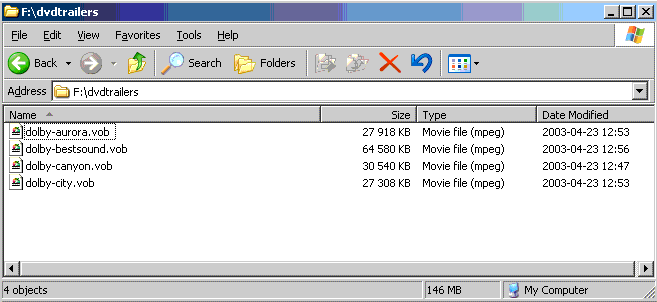
First you have to put all your vob trailers/files in a folder.
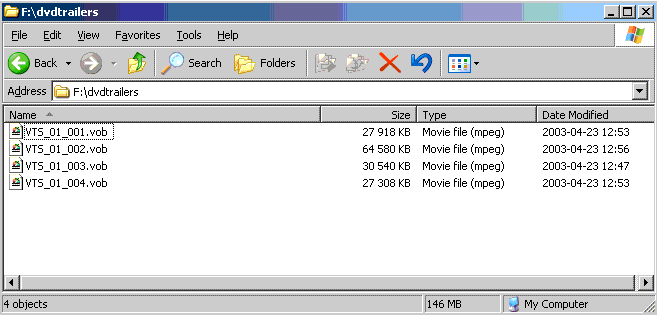
And then rename all files to VTS_01_001.vob...VTS_01_002.vob...VTS_01_003.vob and so on. Each vob will be a separate chapter.
Now start Vobedit to fix the vobs so it will play okey on your player.
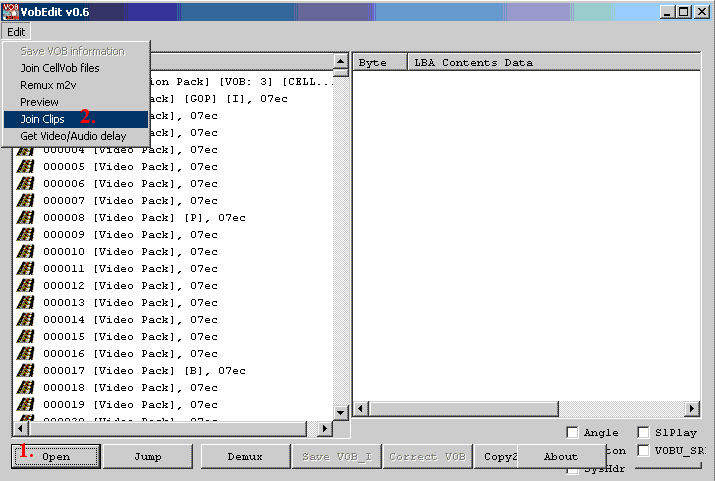
1. Click open and open the first VTS_01_001.vob
2. Select File->Join Clips
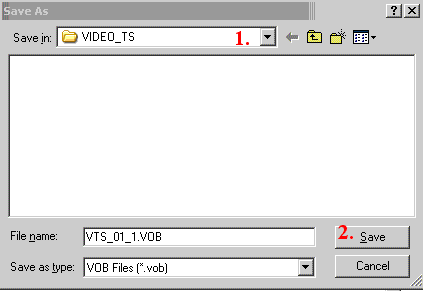
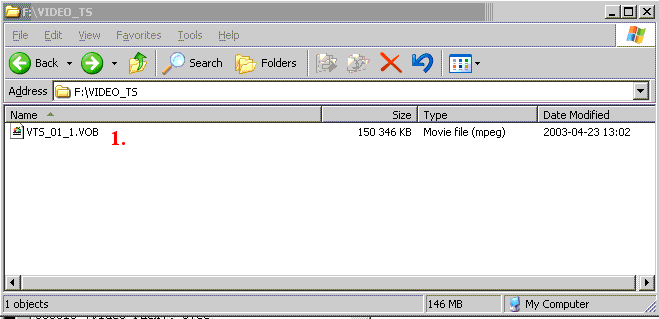
1. Choose a new folder and name it VIDEO_TS
2. Save the new VOB_01_1.vob file.
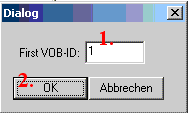
A dialog popups
1. Check so it says 1
2. Click OK.
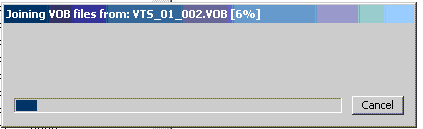
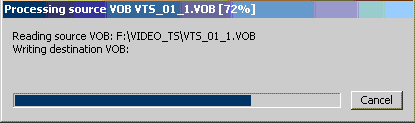
Vobedit will make the new working vob.
You should now have one vob or some vob file(s).
Now start Ifoedit
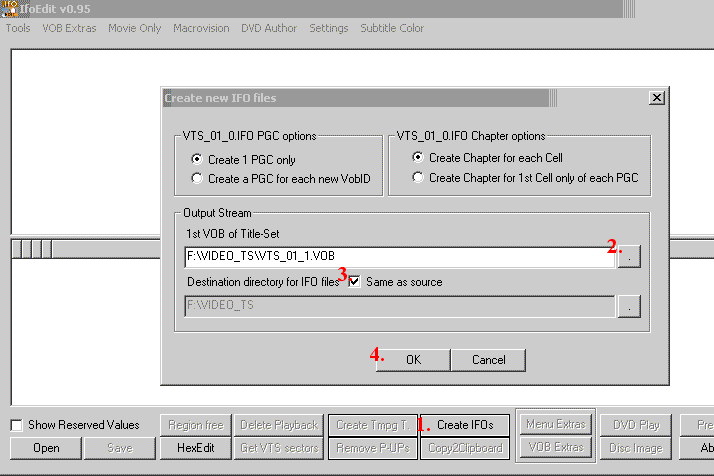
1. Click on the Create IFOs button.
2. Open the first VTS_01_1.vob
3. Select use same as source
4. And hit OK
Ifoedit will make the new .ifo files.
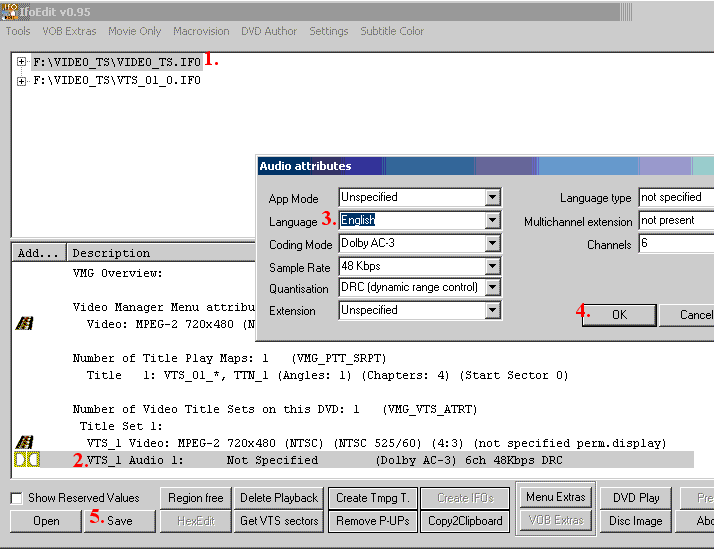
You must now set the default language. First for the VIDEO_TS.ifo
1. Click on VIDEO_TS
2. Double click on the audio
3. Set the languague to english
4. Hit Ok
5. Click save and owerwrite the VIDEO_TS.IFO
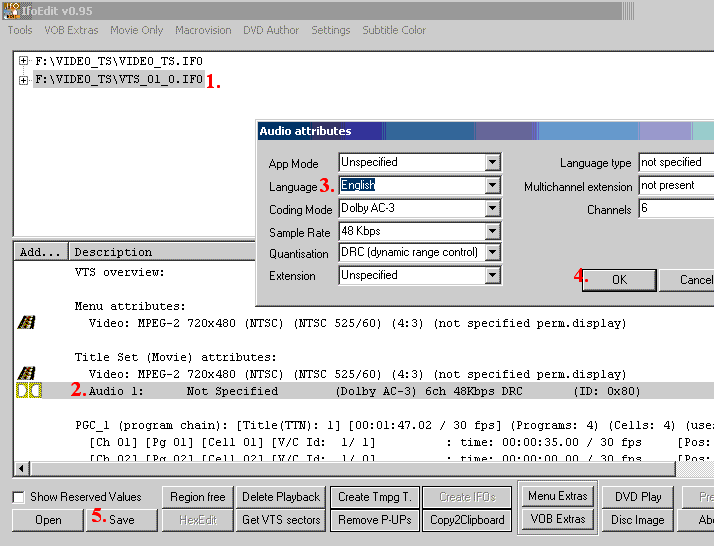
Do the same for the VTS_01_1.IFO
1. Click on VTS_01_1.IFO
2. Double click on the audio
3. Set the languague to english
4. Hit Ok
5. Click save and owerwrite the VTS01_1.IFO
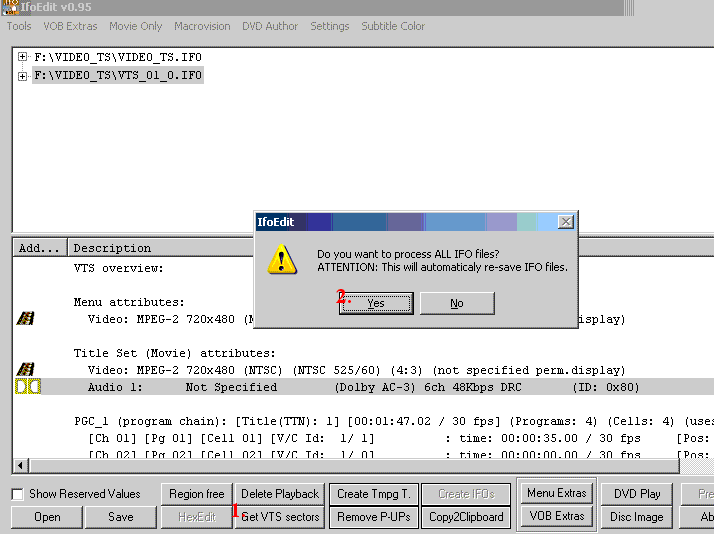
Last fix the VTS sectors
1. Click on Get VTS Sectors
2. Select YES to process all IFO files
Close ifoedit.
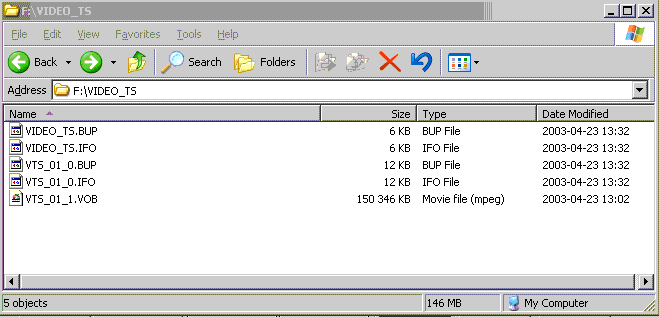
You should now have some ifo and bup files and the vob file.
You have now a (hopefully) a working DVD on your HD. To burn it using ifoedit and dvddecrypter(freeware), read here how. Or burn the created VIDEO_TS folder with InstantDVD or some other DVD Burning app and your are done, read more here how to burn to DVD-Video standard.
You can also test the DVD before burning it, use WinDVD or PowerDVD and select the partition with the VIDEO_TS as the default drive and play.
+ Reply to Thread
Results 1 to 30 of 63
-
I'm a MEGA Super Moderator

- Aug 2000
- Sweden


-
what if you wanted to separate 2 sets of trailors...the way i would like to do it is to use vts01_1.vob vts01_2.vob etc for the first batch and then vts02_1.vob , vts02_2.vob for the second batch...
(this also applies for example if you have 2 movies in vob format and you want to burn it on one dvdr...)
how would you go about creating ifo files for those 2 sets..? -
For testing purposes I followed exactly your good description using three different vob-files. Creating everything as described I got a file structure (\VIDEO_TS) with only one chapter. This chapter includes all files in the right order. So there's no way to jump between trailers/files using the next/previous chapter function. I checked this using WinDVD, so I never created a real (mini)DVD. Is there a way to get a new chapter for each separate vob-file?
Nevertheless, IfoEdit is great in (mini)DVD-authoring my WinTV PVR created MPEG2-files. -
Is there a way to get a new chapter for each separate vob-file?
PLEASE SOMEONE REPLY!!!!! -
yeah, somebody answer this please..............
-
i found the solution.................
Nobody here knows but i found out..................
Use Vobedit and Join Vob
Then ifo edit to create new ifo -
Hey ive done the thing, NOT THE CHAPTER THING the trailer/vob burning tecnique, i burned it after authering it with IFO EDIT thingy, and it plays fine, but on my mates DVD player which works fine with other copied dvd's, itll play the first vob and then stops, so i fast foward it to the main movie, and it stops every now and again and you have to start from the beggning can you help me?
DVD'S HAVE SOMETHING FOR US ALL, HELP AT THE FORUMS TO GET SOMEWHERE IN LIFE! -
Are there any audio delay issues? I know that when you follow the ifoedit method after you demuxed the audio and video streams, at times you have to correct for the audio delay. Also, does this method give you subtitles?
-
I tried this and it worked. I did notice that the files played out of order. vts_01_3 played first, then 4 , 5 then 1 , 2.
Anyway to make the files play in the right order. (Does this have to do with VOB IDs?)
ThanksPatrick -
First download vobedit here
http://ifoedit.wh.fr0zen.com/
Then follow this tutorial to join the VOB's (this will make the chapters available in your final DVD.
http://ifoedit.wh.fr0zen.com/joinclip.html
After that follow the create new IFO files tutorial
http://ifoedit.wh.fr0zen.com/createifo.html
and finally burn it all....
I followed every detail and it works. I have burned 9 VOB trailers and now I have 9 chapters and they all follow in sequence.
No more out of order chapters and making my DVD player stop at random.. -
I'm a MEGA Super Moderator
- Aug 2000
- Sweden
-
I maybe should update the guide with vobedit...seems to be a lot of problem with my method...
-
Baldrick,
I think you should...
I tried your method a least 10 times (very frustrating and very long time especially burning on +RW to test first)..
I had problems with the chapters playing out of order, random stopping on different chapters, some chapters just didn't play...
I've noticed on the forum that I'm not the only one with this problem so at least it reassured me it was not me doing something wrong.
These were all different VOB trailers I gathered from the internet.
Max -
I'm a MEGA Super Moderator
- Aug 2000
- Sweden
-
Okey, but it will probably take some days...or maybe weeks to fix. I'm busy with 2903209 other things right now.
Or you or some other could post new a guide....and I could remove this. -
Max64's post of march25 is right on the money, it worked first try and the free software is worth a donation, no questions asked. Also the other method worked for me after I played with it a while and I am a real newbie. Good methods, both of them.
Plugger1Trust in Allah.....but tie your camel -
HI there,
I am trying to put a dolby digital trailer before a menue system that I have created in DVD architech.
From reading through the forums on this subject I understand that if I want to do this I wont be able to have any extras on the DVD? is this right? I have a scene selection menu. is that classes as an extra. The video on the disk is only approx 25 mins long.
Does anyone one know if this is possible.
Thanks for the fantastic help so far on the forums.... Everyone has been really helpful and the how to gudes are great!
Cheers
Andrea
Rochdale UK -
I followed your guide in order to join 2 vob files and play it on my standalone. But for some reason, I ended up with TWO new vob files in my new folder after joining the clips??? If anyone can help, I would greatly apreciate it.
-
I'm a MEGA Super Moderator
- Aug 2000
- Sweden
-
Just continue as usual, it can be more than one vob if the vob becomes bigger than 1 GB. I added that to the guide also.Originally Posted by SoCalMK -
I have some individual VOB files which I'd like to combine them into one DVD. I followed the guide to join the vob files and it worked beautifully. I tested with my computer using PowerDVD, the video played well and all chapters were created as expected.
However, when I burned it into DVD and play back on my DVD player using VOB InstantDVD, the video quality is good, but it froze after each chapter, I had to skipped to next chapter, then skipped back, then it worked for that particular chapter, then froze again at the beginning of each chapter.
Can anyone teach me how to resolve this problem? Or perhalps, I didn't use the correct software to burn into a DVD?
Thanks for all your help and suggestions. This site is the best for this stuff.
// backkhoa. -
what if i want to add just one vob before the movie but after the menu for example a dolby digital, thx or a dts trailer, how would i do that?
-
I have three one-hour shows (tv captures) on separate DVDs I am trying to combine to one disc. These are the steps I took.
1) After copying files to hard drive, ran each set through DVD Shrink to cut extras from front and back (pieces of commercials, theme/opening, etc.) After cropping and minimal re-encoding, all three sets fit within the 4.38 GB space.
2) Moved three sets of VOBs (six in all) to same folder.
3) Renamed to VTS_01_001.VOB, VTS_01_002.VOB,...VTS_01_006.VOB.
4) Joined clips in VobEdit v0.6. Ended up with 5 VOBs (VTS_01_01.VOB, VTS_01_02.VOB,...VTS_01_05.VOB, .
5) Created IFOs in IfoEdit v0.95 (default settings). Corrected language. Saved IFOs. Got VTS sectors.
6) Ended up with VIDEO_TS.BUP, VIDEO_TS.IFO, VTS_01_0.BUP, VTS_01_0.IFO, and 5 VOBS. Moved all files to a VIDEO_TS folder.
To check the files, I opened DVD file VIDEO_TS.IFO on hard disc in PowerDVD. Unfortunately, it appears I have done something wrong, as only part of the first show plays. The VOBs play fine as media files.
If there is anyone out there who can help me correct my error, I would greatly appreciate it. If there is any information I forgot to include, please let me know. Thanks for any help... -
HI,
Does this method only works with one audio stream?
How can I author several VOBs that have more than one audio
streams? (e.g. Karaoke chapters)
Appreciate any input. Thanks!
Regards,
Ricky -
i gove 20 files and would like to join them, but it only joins 9 files then stop, why? is there any setting i should change?
-
anyways, after posting the previous message i went to rename the file name from 10 up to 010 instead of 0010, 0011..... and it worked.
-
I'm a MEGA Super Moderator
- Aug 2000
- Sweden
-
tmpgenc
-
I got the same problem as you, did you find out how to solve the problem yet? if you do can you share with me?
Originally Posted by chrisstemp -
Hi all,
A great guide. But for some reason I am unable to proceed further. Here is what I did so far as per the guide:
(1) Put all the VOB files in one folder
(2) Renamed all the files
(3) Started VOBEDIT, open the first file, join clips, save as and the popup box which says 1. Clicked OK.
(4) Now as per the guide, it is supposed to make the new working VOB. BUt in my case it does absolutely nothing.
Am I missing some setup or something. I can't seem to proceed any further.
Any help would me more than welcome.
Thanks. -
Hi, I've used this method and it works great when ripping just a specific version of a movie so as to need new .bup and .ifo files to make it play right. IFOEdit has saved the day! BUT, every time I load one of these new perfectly playing discs in my set top player, it starts up with subtititles. And not the normal white classy font, but some ugly dark green weird jagged font. I can turn this off with the remote, of course, but I'd like to be able to start a movie with the subtitles already off. I know there must be a setting to change inside IFOEdit, like when selecting English for the audio streams. Can someone please tell me what it is and how to do it? I just need a quick answer... Thanks!
-
Is there a way to use this method for episode dvds and keep the menus?
If not then no big deal
Im basically going to use dvdshrink to cut up the episodes. -
This guide rocks and works very good!!! But there are 2 things that I'd like to ask...???
First of all, if i have a episode with "PCM" as audio it won't work along with other episodes. While playing on the standalone player all the files works fine, the sounds are very nice, even with 2 or more audio options (like karaoke). But the one episode with "PCM" audio doesn't work, there is picture but it doesn't produce sound!!!
The second question I'd like to ask is if there is any possibillity to add a menu to it or creating a menu with a third-part programme so it will be play on the standalone player with menu. Cauz' i think a dvd without a menu kinda sucks don't u guys think???
I hope someone could improve this guide more...???
Calvin -
Is there a way to use both widescreen & fullscreen clips without the widescreen getting squished?
Black holes were created when God divided by zero
 Quote
Quote


Similar Threads
-
Does re-authoring VOB files with TMPGEnc DVD Author, or DVD-lab better
By MarcMiller in forum Video ConversionReplies: 6Last Post: 16th Nov 2010, 00:31 -
Burn - VOB without IFO & BUP files?
By Miss Sherlock in forum Authoring (DVD)Replies: 25Last Post: 24th Aug 2009, 00:20 -
Need to merge several VOB files, then shrink the final VOB file & burn
By pmolson in forum Video ConversionReplies: 7Last Post: 21st Oct 2008, 19:10 -
Burn VOB files with included Subtitles
By psyget in forum ffmpegX general discussionReplies: 1Last Post: 24th Jun 2008, 17:49 -
Want to burn 2 .VOB files to one DVD??
By herbster in forum Authoring (DVD)Replies: 4Last Post: 7th Aug 2007, 22:58