


 View Profile
 View Forum Posts
 Private Message


👨*💻 Author
Author: FOX
Version: 3.0
📋 Project Description
MKV Muxer v3.0 is an advanced Python tool for automatically muxing (combining) video, audio, and subtitle files into MKV format. The script was created for users who regularly download TV shows and movies from the internet and need a convenient way to add Polish audio tracks/subtitles and organize their multimedia library.
✨ Key Features
🔄 Automatic Muxing
• Combining video files (MKV, MP4, AVI, MOV, WMV, FLV, WEBM) with audio and subtitle files
• Detecting and merging tracks from internal MKV/MP4 files
• Automatic audio track sorting (Polish as default)
🎚️ Audio Conversion to AC3
• Converting audio tracks to AC3 format with quality selection:
-192 kbps (good quality)
- 384 kbps (very good quality)
- 640 kbps (best quality)
• Preserving original audio channels (stereo, 5.1, 7.1)
• Automatic audio parameter detection from source files
🌍 Language Recognition
• Support for over 80 languages based on ISO 639-2 codes
• Automatic language detection from filenames
• Polish audio always set as default
• Intelligent subtitle management (forced, full, hearing-impaired)
📁 File Organization
• For TV shows: automatic folder structure creation:
folder
Show_Title/
└── Montmartre.2025/
└── 1080p/
└── Montmartre.2025.S01E01.mkv
Montmartre.2025.S01E02.mkv
Montmartre.2025.S01E03.mkv
Montmartre.2025.S01E04.mkv
Montmartre.2025.S01E05.mkv
• For movies: generating filenames with title and year
• Automatic season and episode number detection from filenames
📊 User Interface
• Animated ASCII logo
• Colorful interface using rich library
• Progress bars for all operations
• File information preview before muxing
• Operation logging to files
🛠️ Technical Requirements
• Required System Tools:
- MKVToolNix (required for muxing)
- FFmpeg (optional, for audio conversion)
Supported Systems:
• Windows (main target)
• Linux (with MKVToolNix installed)
• macOS (theoretically, requires testing)
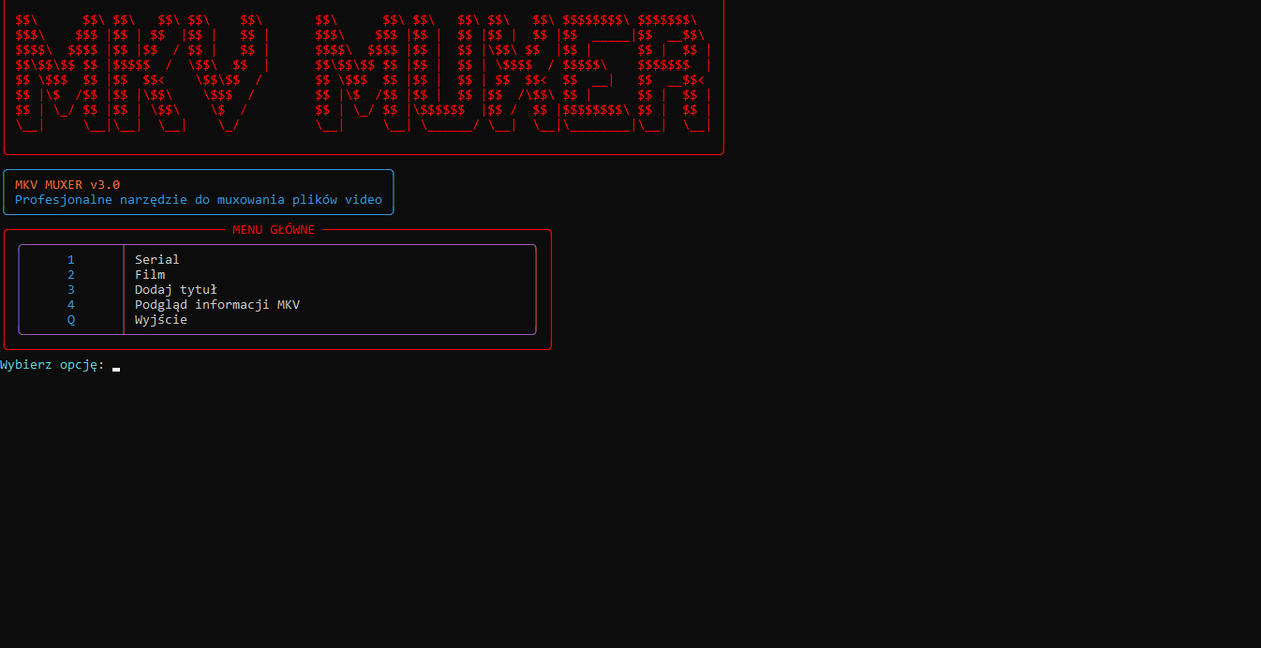
Main Menu
1. TV Show - Process multiple episodes
2. Movie - Process movies
3. Add Title - Add title to MKV file
4. MKV Info Preview - Analyze MKV files
Q. Exit
TV Show Usage Example:
1. Select option "1. TV Show"
2. Enter example episode name (e.g., Montmartre.2025.S01E01.PL)
3. Script automatically detects:
• Show title
• Season number
• Video quality
• Starting episode number
4. Specify number of episodes to process
5. (Optional) Choose audio conversion to AC3
6. Script processes all episodes and creates organized folder structure
🔧 Advanced Features
Extended Language Detection
Script recognizes language codes from:
• 2-letter codes (ISO 639-1): pl, en, de, fr, etc.
• 3-letter codes (ISO 639-2): pol, eng, ger, fre, etc.
• Full names in various languages
• Special markers in filenames
Subtitle Management
• Distinguishing forced and full subtitles
• Automatic setting of forced subtitles as default
• Support for hearing-impaired subtitles (SDH/HI/CC)
• Grouping subtitles by language
Safe Muxing
• Input file validation
• Write permission checking
• Error handling with readable messages
• Logging all operations to file
• Cleaning temporary files
👨*💻 SCREEN
[Attachment 90739 - Click to enlarge]
[Attachment 90740 - Click to enlarge]
[Attachment 90741 - Click to enlarge]
[Attachment 90742 - Click to enlarge]
[Attachment 90743 - Click to enlarge]
[Attachment 90744 - Click to enlarge]
[Attachment 90745 - Click to enlarge]
+ Reply to Thread
Results 1 to 1 of 1
 Quote
QuoteSimilar Threads
-
How to decrypt YouTube Movies & TV files
By user10thousand in forum Video Streaming DownloadingReplies: 84Last Post: 3rd Sep 2024, 19:42 -
JVC VCR Repair Service 7000 & 9000 Series & Professional Line
By Deter in forum RestorationReplies: 9Last Post: 24th Apr 2023, 07:21 -
A TV series from mewatch.sg
By CrymanChen in forum Video Streaming DownloadingReplies: 14Last Post: 25th Oct 2022, 01:13 -
Does anyone have this viki series?
By dami3n in forum Video Streaming DownloadingReplies: 3Last Post: 8th Apr 2022, 13:35 -
Recreating a Series
By kirkmc in forum Authoring (DVD)Replies: 28Last Post: 3rd Aug 2021, 15:04