


 View Profile
 View Forum Posts
 Private Message


Hello and greetings to you all, I'm new to this forum and and also a newb in the realms of LCD TVs
I am trying to connect my PC (graphics card with dvi, VGA, TV/S-video out [with adapter]) to the Panasonic TX32LXD60 LCD TV.
This TV has no PC-in port but has HDMI ports. I was wondering if I should go for the striaght DVI-to-HDMI connection or the VGA.
Also I would like to know if I do use the DVI-HDMI method will the LCD TV perform exactly the same as a LCD monitor (i.e. clear text and video).
I will be greatful for any replys and also more advice.
Cheers
+ Reply to Thread
Results 1 to 20 of 20
-
-
I now have seen some of the posts and am starting to worring that DVI-to-HDMI will not work because of the TV restrictions. Is there any way to unblock it?
Looking at the table it seems VGA is not an option afterall. Can anyone help me out and tell me which connect will be the best im this situation? Will I be able to use the max resolution of the TV using the otehr methods of connection and with my graphics card (PNY Geforce Verto 7800GT)?
Thanks in advance for any advice and help
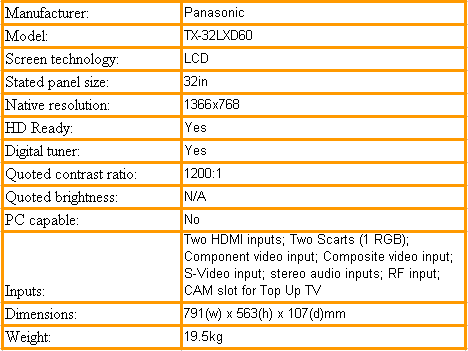
Here is a longer spec for my lcd:
http://www.play.com/Electronics/Electronics/HP/3-/924490/Panasonic_32_TX32LXD60_Freevi...d/Product.html
And here is the 3D card
http://reviews.cnet.com/PNY_Verto_GeForce_7800_GT_256MB/4507-8902_7-31474210.html?tag=sub

I am getting confused by the resolution matching between the LCD TV and my graphics card... -
I can use both vga and dvi and output to my lg 32 works with me i just use a converter. at the tv end, no problems with resolutin and text is clear i use my tv as my monitor when theres nothing on tv, which is most nights. i dont see any reason why it shouldnt work with you.
-
So will it be save to use a DVI-to-HDMI cable to directly connect the 2 devices? I just thought this would contradict the sepc of saying no PC input.
thanks for the reply , please do give more advise -
Most HDTV sets overscan on the DVI/HDMI port. The display card must be able to compensate by shrinking the desktop.
The VGA port is intended for computer display cards and doesn't overscan. -
does my graphics card have that function? sry I know is a dumb question, excuse my newbness XD
-
The newer "AVIVO" and "Purevideo" cards do this well but all pixels do get scaled (interpolated). Check your overlay menus.
This is just one example of why an LCD-TV is not a true computer monitor. -
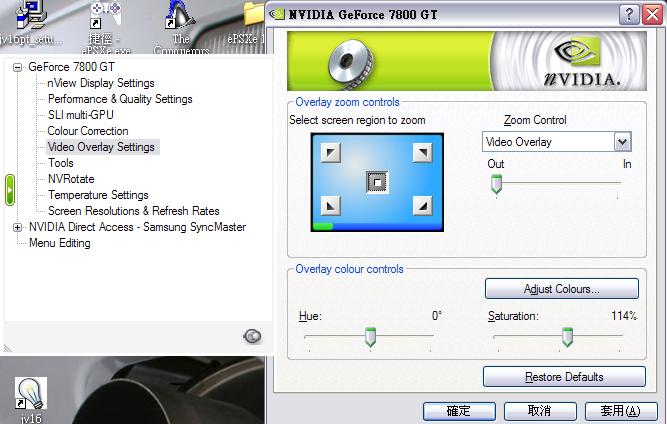
He is the overlay settings of my card:
-
Yes, those settings will allow you to zoom and position the desktop.
The HDMI port is usually used for your cable box or other HD video input. The VGA port is intended for computer and game boxes.Recommends: Kiva.org - Loans that change lives.
http://www.kiva.org/about -
According to the link, your graphics card also gives an S-Video output and S-Video is available on your TV too. You could try using that. I've just tried it on my Panasonic TX42DX60 plasma (which is the bigger brother to yours), and it looks great!
-
S-Video is limited to analog PAL bandwidth and resolution. VGA and DVI/HDMI offer >30MHz bandwidth per component. VGA is wideband analog, DVI-D/HDMI is digital but both are adequate at HDTV resolutions.Originally Posted by Richard_G
-
I thought panasonic only do LCDTVs up to 32" as they claim is the limit size for an LCD. There is no 42" Panasonic LCD TV
Wouldn't HDMI be better quality as they are digital. Just wondering
-
Possibly in theory but the need to reinterpolate (downsize) the desktop due to overscan probably tosses the computer quality edge to VGA. Plus it keeps the HDMI port free for real HDTV devices.Originally Posted by at221
-
thx for the advice!!
But I think my LCDTV does not have VGA so will you go for the HDMI or the S-Vid?
and also if I set the resolution to 1,366 x 768 what distance will I have to be away from the monitor to get the ideal (clear and eye-safe) view?
Thx -
That is the problem with huge moderate resolution monitors. You need distance to equalize what you would see from one foot with a normal 1280x1024 computer monitor. You need to experiment.Originally Posted by at221
This site calculates distance based on theatrical experience (movies), but not for reading a 10 point newspaper.
http://www.myhometheater.homestead.com/viewingdistancecalculator.html -
That's right, Panasonics up to 32" are LCD, larger (37", 42") are plasma. But, the DX60 series are all virtually the same, it's just as you go up in size the display panel changes. There isn't a lot to choose though, my brother has the 32", my father the 37" and I've got the 42". As we live in different houses we can't try them side by side, but there doesn't seem a lot to choose in picture quality.Originally Posted by at221
Yes, HDMI probably would give better quality but as I don't have anythng with an HDMI output, can't try it. The S-Video does look good though when the graphics card is set to output the native resolution of the TV. -
wow, your familay loves panasonic. The same as me. But will I go blind using a 32" as a pc monitor?
-
Not if you put it more than a meter away from you.Originally Posted by at221
-
Does your LCD TV have RCA ports? If yes then you may try VGA pc to tv converter. Look at www.pctotvconverter.com for more info.
Originally Posted by at221 -
its too expensive
 Quote
Quote

Similar Threads
-
Connecting Analogue hd lcd tv to freesat
By keats in forum Newbie / General discussionsReplies: 0Last Post: 26th Jun 2009, 13:30 -
Connecting an lcd to a comcast tv box?
By Gplracer in forum DVB / IPTVReplies: 0Last Post: 10th Aug 2008, 21:58 -
connecting my laptop to my plasma and lcd
By krisyrfc in forum Newbie / General discussionsReplies: 2Last Post: 19th Jan 2008, 14:23 -
Connecting my MacBook Pro to an LG LCD TV.
By JustSomeGuy in forum ComputerReplies: 0Last Post: 2nd Sep 2007, 21:30 -
Problem connecting PC and LCD tv
By rozenokolis in forum DVB / IPTVReplies: 1Last Post: 26th Jul 2007, 17:37