


 View Profile
 View Forum Posts
 Private Message
 Visit Homepage


I have a film that was trasferred to video frame-by-frame using a DV camera. Each frame of film should result in a frame of video, and it does. However, the AVIs have the sawtooth effect associated with interlacing in all frames, even where there is no motion.
If I leave it this way, and encode it in TMPGEnc as Interlaced source and Interlaced output, this sawtooth effect is reduced on the TV but still very evident. If I use the deinterlacer in VirtualDub, the sawtooth effect is completely gone but maybe the image is softer. I can't use a smart deinterlace because the effect is in all frames, not just motion.
Is this the correct way to go about deinterlacing? Is there a better way to deinterlace this AVI which is directly from film?
Once I have the AVI deinterlaced should I encode in TMPGEnc with Progressive source and Interlaced output for TV?
I realise this seems strange to deinterlace the AVI only to reinterlace when encoding. But leaving it interlaced has a sawtooth effect on the TV. And this is film with each frame having 2 fields belonging to that 1 film frame. I don't see any other way. Suggestions?
+ Reply to Thread
Results 1 to 17 of 17
-
-
I would try adding an unsharp filter after the deinterlace, to bring back some of the detail.
Read my blog here.
-
I guess another question is, why should there be loss of detail with deinterlacing this way? The single frame of film was split into 2 fields causing the sawtooth effect. When I deinterlaced in VirtualDub, it should just have put the 2 fields back together into 1 frame just as it was on film. No?Originally Posted by guns1inger
-
Try swapping the fields instead of deinterlacing,they might have been switched during capture.When you deinterlace you throw away half the fileds reducing picture quality.
I think,therefore i am a hamster. -
I tried that but it looks crazy that way, more of a fine comb instead of a sawtooth. I know it's interlacing since the deinterlace filter in VirtualDub makes it go away, but I can't figure out the best way to deinterlace...or maybe I shouldn't deinterlace.Originally Posted by johns0

-
Did you try playing it on the tv after swapping fields?
I think,therefore i am a hamster. -
No, but it doesn't seem like a swapped field problem as the sawtooth effect is seen in the still areas too. And when I swap the fields in VirtualDub, it looks worse and with a fine combing instead of just the sawtooth/starway effect.Originally Posted by johns0
-
VirtualDub's deinterlacing filters either blur fields or remove fields. "Blend" simply blurs the two fields together leaving you with a fuzzy image. The two "Duplicate Fields" options drop a field and duplicate the remaining one to restore the original height. The two "Discard Field" options throw away a field and leave you with a half high image. All forms of deinterlacing, except inverse telecine, are destructive and should be considered only as a last resort.Originally Posted by kinglerch
The "Swap Fields" option is for fixing a very specific problem found in some old Matrox cards. It is not a normal "field order" swapper. Unless you have one of those Matrox cards this will not fix your problem.
If this is true then you don't have a normal interlace issue. I suggest you post a sample image.Originally Posted by kinglerch -
Then, I guess I'm a little confused about fields and interlacing. I have a single frame of film that is showing interlace lines. I thought it looked something like this:Originally Posted by junkmalle
AAAAA-
-BBBBB
AAAAA-
-BBBBB
I just want to recreate the progressive film image and put the fields back together as one frame. Can I do this without blending? -
Then you want "inverse telecine", not deinterlace.Originally Posted by kinglerch
You only get interlace comb lines when something is moving (including the the camera). If you are truely seeing interlace comb lines on still scenes you don't have the normal interlace problem. That's why I suggested you post a sample.
Movies that have been telecined usually show a pattern of 3 progressive frames followed by two interlaced frames. The pattern repeats over and over. This type of 3:2 pulldown can be corrected with inverse telecine. -
I think this is correct, but I have discinct frames from a film source. i.e. each frame is showing 2 fields belonging only to that frame. Maybe I need 2:2 inverse telecine?Originally Posted by junkmalle
-
I read that as "each captured video frame is showing 2 fields belonging only to that film frame." If that's the case then you have progressive video and there should be no field artifacts.Originally Posted by kinglerch
What are you capturing from? -
I didn't capture it. A film transfer lab captured it and sent me this AVI. But maybe something's wrong with the AVI. Here are 3 screenshots of what I see in VDub, it's not very different from the TV display. It is of a few microphone stands. The diagonal stand has many horizontal lines while the vertical stand and cord show no such lines.Originally Posted by junkmalle
The second picture is with VDub's deinterlace filter to show what it's probably going to look like when a TV sees it. The third picture is with TWO VDub deinterlace filters.
Maybe I'm looking at the interlace thing and it's totally wrong, maybe VDub is just smoothing the picture and making the lines go away. I dunno.
Have you ever seen something like this?
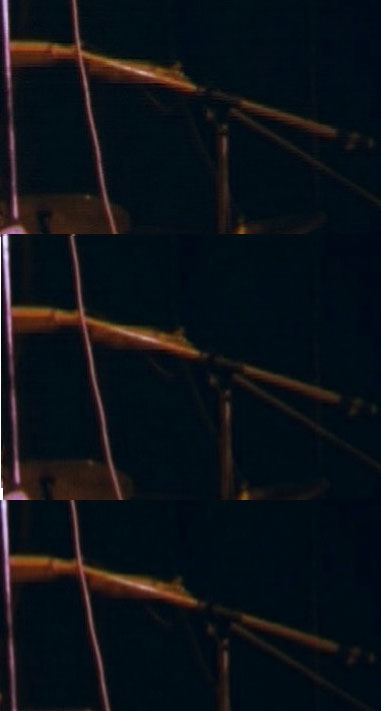 [/img]
-
Are those crops of the original frame or shrunken frames? Was everything perfectly still during that frame? Or was the camera moving, zooming, panning, etc.?Originally Posted by kinglerch
-
This are cropped to show the affected area, much of the rest of the scene is ok. But they are actual size, not zoomed in or out.Originally Posted by junkmalle
No, the camera was not moving at this time. The part that's hard to describe is when the scene does move, the horizontal line effect does not move. As if you watch the scene through a wavey glass, or something.
Looking at this problem more makes me think it has nothing to do with interlacing, only that VDub's deinterlace filter softened the lines that were causing the problem.
Maybe some sort of color effect? -
I think your problem is related to interlacing but it's nothing to do with your handling of the video. I think the people that did the film-to-video transfer screwed something up. It looks a little like they captured as interlaced then performed a drop-field/resize deinterlace. Or maybe they captured in PAL then resized badly to NTSC, or vice-versa.
Did they start with 24 fps film? What are the specs of your AVI file? 720x480, 29.97 fps DV AVI? -
It was supposed to be 25 fps PAL 720x576 with no change in framerate, interlace, size, etc. The DV AVI file I have is in this mode, but I don't know the steps they took to get it there.Originally Posted by junkmalle
 Quote
Quote

Similar Threads
-
Question about x264's interlaced encoder vs. progressive
By Asterra in forum Video ConversionReplies: 4Last Post: 9th Jul 2011, 17:13 -
Handbrake and interlaced question
By ultraman36 in forum DVD RippingReplies: 14Last Post: 7th Jun 2011, 18:04 -
Anime FPS/Interlaced question...
By alcOre in forum Newbie / General discussionsReplies: 6Last Post: 4th Apr 2009, 10:05 -
Question - Resizing an interlaced video.
By 1gnition in forum Newbie / General discussionsReplies: 26Last Post: 6th Jun 2007, 11:12 -
DV type2 --> interlaced --> hybrid (FILM) ?
By PudyCat in forum Video ConversionReplies: 2Last Post: 16th May 2007, 10:36