


 View Profile
 View Forum Posts

I recently bought some verbatim hub printables. How do I measure them to see what I set the inner circle at when I print?
?mm & 119mm print surface...
I used Prodisc hubs before, but as we all know they are poor quality right now. I used 22mm & 119 on those..
+ Reply to Thread
Results 1 to 20 of 20
-
[url=http]text[/url]

- Feb 2003
- Right Behind You. . .


What We Do In Life, Echoes In Eternity.... -
Just use the same settings as you did on the prodisc, there shouldn't be any difference, especially on the full face printables.
I Have Always Been Here
Toshiba Regza 37Z3030D, Toshiba HD XE1 + EP-10 ( Both Multiregioned), Samsung BD-P1500 Blu Ray. OPPO DV-983H -
Hello Ladies

- Jul 2003
- Studio 54
-
measure it with any tape measure or ruler you have lying around. Then google the conversion to mm
-
Or use a ruler/tape with mm markingsOriginally Posted by stiltman

(or don't you have them in the U.S. )
)
-
My Verbatim Photo Printable hub has it printed on the tub 119mm, 21mm. Full face printable
-
Hello Ladies
- Jul 2003
- Studio 54
-
Those are special orders.....Originally Posted by bugster
metric system sucks!
Damn Europeans trying to force their system on us Americans!
-
This is exactly what I use for Verbatim +R 8x MCC 003.Originally Posted by tim6661234
The center is perfect, but there is a very small noticeable white spot on the OD. IMO, the ideal OD setting would be 119.2mm. I do not want to set the OD to 120.
What setting (paper type) do you use (cd/dvd, premium, photo, etc)? -
LOL!Originally Posted by stiltman

-
Actually, every ruler/tape measure I have is both metric and imperial. I find metric measurements better/easier for fine measurements, but I was brought up using imperial. I can pretty much convert most things with acceptable accuracy in my head.Originally Posted by stiltman
-
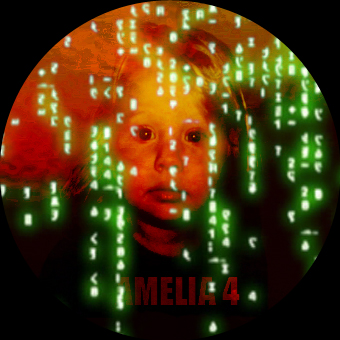
I usually use the normal CD/DVD setting rather than the premium setting. I've played around with the offsets to get the prin centered but I can't remember if I had to increase the outer diam to 120 to fill get full coverage. When you look at these things the quality is really good. The printer has performed way better than I though it would. Produced by home movie to bore everyone at christmas and this year did all the covers.Originally Posted by RickTheRed
-
Emotions aside if you think for a while the metric system actually is simple and makes much more sense:
1km=1000m
1m=100cm
1cm=10mm
or
1ton=1000kg
1kg=1000grams
as opposed to
1mile=4770feet
1ft=12inches
or
1ton=2207lbs
1lb=16oz
1inch=2.54cm
1mm=1/25 inches
1cm~0.4 inches
The non-metric system is not better we're just used to it and that's it.
Most of the office supply stores sell inch/centimeter rulers for less than a dollar. I hope this helps. -
Sort of, but a metric "Ton" is spelt...Originally Posted by Gregg
Tonne...
Trust em to spell it diffrent..
Brought up on Imperial but chugging along quite happy Metrically now.... Some things were designed to make lif easier.Not bothered by small problems...
Spend a night alone with a mosquito -
Only if you have really big feet!Originally Posted by Gregg
-
[url=http]text[/url]
- Feb 2003
- Right Behind You. . .
-
My print outs seem lighter than those done on Prodisc...what is your quality/color settings set at?Originally Posted by tim6661234
My settings
Quality is set to text...
Advanced options
Color mode=Epson Vivid
Color Controls all=0What We Do In Life, Echoes In Eternity.... -
Hello Ladies
- Jul 2003
- Studio 54
-
Try setting it to photo or best photoOriginally Posted by Denvers Dawgs -
[url=http]text[/url]
- Feb 2003
- Right Behind You. . .
-
trying that next thanx...
What We Do In Life, Echoes In Eternity.... -
I usually use photo option
-
[url=http]text[/url]
- Feb 2003
- Right Behind You. . .
-
just tried photo seemd a bit blurry, going to try best photo next....What could be making it blurry. should I try less ink.....and how would I set up for less ink?
What We Do In Life, Echoes In Eternity.... -
119x21 is dead nuts for me too. Tim, nice cover, but that 21mm looks like it's right smack in the kisser. Instant yawn.....but nice work. Like the Matrix overlay.Originally Posted by tim6661234
-
Your right the mouth does get hit right in the centre. Maybe given more time I'd have re jigged it. The Matrix overlay is off the title sequence to the movie. The front cover was basted on the DVD image so you got to see the whole picture there.119x21 is dead nuts for me too. Tim, nice cover, but that 21mm looks like it's right smack in the kisser. Instant yawn.....but nice work. Like the Matrix overlay.
 Quote
Quote
 Visit Homepage


Similar Threads
-
Measure distance from target in different video formats.
By Adventuredad in forum Newbie / General discussionsReplies: 5Last Post: 19th Apr 2010, 10:52 -
Measure the frequency response of phone speaker
By siluet in forum AudioReplies: 17Last Post: 29th Jan 2010, 09:57 -
Visual Hub interlaced video to DVD
By chrjohns in forum MacReplies: 1Last Post: 29th Jun 2008, 22:42 -
looking for silver hub printable DVD media
By PharmBoy in forum MediaReplies: 6Last Post: 30th May 2008, 06:31 -
Glossy hub printable DVD+R
By PharmBoy in forum MediaReplies: 9Last Post: 27th May 2008, 09:06