


 View Profile
 View Forum Posts
 Private Message


I got a region2 dvd image on my computer, but I'd like to convert it to region1 before I burn it. is that possible?
+ Reply to Thread
Results 1 to 28 of 28
-
-
rip it with dvd shrink with no compression. it will then make the dvd region free then burn with your fav burning program.
-
why whould you want to do that?
why not make it region free?
anyway, i think you can do both if you run it through DVD Shrink,
you dont have to compress it if it fits on a dvdr.HELL AINT A BAD PLACE TO BE -
Don't forget that some players will only play region-set discs (and not region-free discs) by default
 If in doubt, Google it.
 -
Because some DVD players are region locked(especially older Sony models) and will ONLY play a DVD that has the correct region code.Originally Posted by Heavensent
A friend of mine in America has such a Sony DVD Player. It spits out region free discs(ALL region free discs including factory pressed region free discs) but plays a DVDR set to Region 1 perfectly.
Jim beat me to it....he types faster and more "to the point"..
-
lets buy the guy a 30$ multizone dvd and send it to him,
will save him a lot of hassle !
:PHELL AINT A BAD PLACE TO BE -
I can't rip it, I only have the image. will dvdshrink still work?
-
Mount the image on a virtual drive using Daemon tools and rip the virtual drive.
Regards,
Rob -
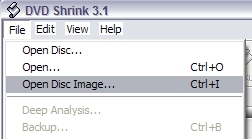
Newer version do:Originally Posted by Amaze
-
jimmalenko wrote:
I dont see how that would be possible. What about playing home made movies, a wedding dvd, etc etc.. Those dvds are region free as they are home made, so you're saying some dvd players aren't capable of playing these discs.Don't forget that some players will only play region-set discs (and not region-free discs) by default -
Yes.
Some (though mostly older model) DVD Players are region locked and will only play a region coded disc. My friend has one in America....an older Sony with no region free hack available. -
WHAT? A DVD PLAYER WITH NO REGION-FREE HACK???
Ha... DVD Decrypter or DVD Shrink should rip your movie into ANY region you want! No degradation of quality!!! -
My JVC XVS300 has no region hack

But then I've got another 2 DVD players to watch region 1 stuff on
Regards,
Rob -
cool, I'll try it out...
-
ok, I don't see how I can make it into region1 or region-free. do I just the iso after opening it or what?
-
Yep. exactly. These players need region-encoded discs. If you put region-free DVDRs into them, they'll just look at you with a "NO_DISC" look on their faces.Originally Posted by waheed
@Amaze:
Start DVDShrink. Go to File > Open Disc Image, specify the ISO and let DVDShrink open it. Click the Backup! button, and one of the tabs will look like the following:
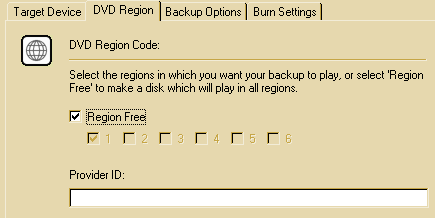
If you can play region-free discs, leave region free ticked. If you can only play region 1 discs, you need to untick the region free box and tick the region 1 box. When you're happy with your settings on all of the tabs, click OK and DVDShrink will do its thing. I've got a funny feeling IFOEdit could change the region for you also, but AFAIK to do it is not real NOOB-friendly.If in doubt, Google it. -
thanks, worked like a charm, it was fast too...
-
no problemo
If in doubt, Google it. -
one issue had to come up though of course. see, the dvd is in pal, and doesn't like to play on ntsc-tv's. can I reencode it into ntsc?
-
that seems to deal with ifo-files only?
-
What does ?Originally Posted by AmazeIf in doubt, Google it.
-
pal to ntsc dvd conversion. it uses ifoedit
https://www.videohelp.com/forum/viewtopic.php?t=221928 -
OK. So what ?
The IFOs are what controls how the DVD will display, so follow the guide perhaps ?If in doubt, Google it. -
I don't have any ifo-files, I have one iso.
-
... and inside that ISO are the IFO, BUP and VOB files. You need to either extract these files from the ISO using WinRAR or ISOBuster, or mount the ISO with Daemon tools.Originally Posted by AmazeIf in doubt, Google it.
-
I see, thank you for your patience...
-
sorry to bring this up again, but it didn't work too well. how do I go about this the hard way, as in encoding?
 Quote
Quote


Similar Threads
-
Code to allow DVD use on all regions
By eaglet in forum Newbie / General discussionsReplies: 2Last Post: 29th Mar 2009, 12:04 -
Data DVD Regions?
By cyberdrugi in forum Newbie / General discussionsReplies: 3Last Post: 3rd Dec 2007, 15:06 -
viewing DVDs from other regions?
By Bansaw in forum Newbie / General discussionsReplies: 3Last Post: 9th Jul 2007, 06:03 -
How to change regions on a DVD or TV?
By SnowStormWolf in forum ProgrammingReplies: 1Last Post: 8th Jul 2007, 18:11 -
All Regions Hack
By Mickey11 in forum DVD & Blu-ray PlayersReplies: 1Last Post: 26th May 2007, 03:26