


 View Profile
 View Forum Posts
 Private Message


I've tried the latest version of DVD rebuilder along with the guides on doom9 after the program ask me to transcode I get a error message saying there's nothing to do I must prepare dvd for transcoding first. Why is this??
+ Reply to Thread
Results 1 to 30 of 59
-
Live Life 2 The Fullest, Live The Life U Luv & Luv The Life U Live!
-
Are you using the one-click method (i.e do you have a single transcode button at the bottom) or the standard method (Thre buttons - Prepare, Transcode, Rebuild) ?
If you are using the standard method, did you hit Prepare first ?Read my blog here.
-
I'm using the 1 click method of transcode. After selecting transcode the proggy indicate's it's reading .2dv file it goes through the process so fast then gives the aforementioned error. Another error is (Nothing to do DVDrb didn't locate appropriate files in working directory you must prepare and encode first ,Aborting) very strange
Live Life 2 The Fullest, Live The Life U Luv & Luv The Life U Live! -
Check the encoder path in your settings.Originally Posted by Jah_Rankin
-
Encoder path is set to CCE 2.50 Sp with the same settings as the guide.
Live Life 2 The Fullest, Live The Life U Luv & Luv The Life U Live! -
You need to download ECLCCE if you're using CCE 2.5 SP. Search the DOOM9 website for ECLCCE.Originally Posted by Jah_Rankin
-
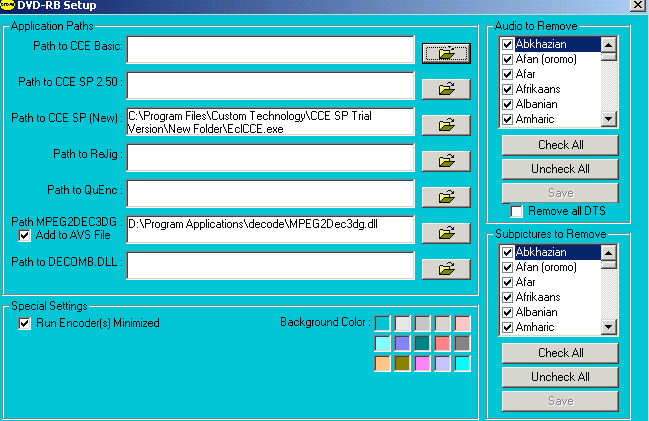
copy and paste the ECLCCE into your CCE folder. CCE will open up after that then just close it. If you do it correctly it will look like the pic below.
-
I'm using the registered version of CCE 2.50.01.00, I will try using CCe sp new settings and see what happensOriginally Posted by jyn999Live Life 2 The Fullest, Live The Life U Luv & Luv The Life U Live!
-
Check the previous posting by budz. The screenshot tells you exactly what you have to do with ECLCCE and how.Originally Posted by Jah_Rankin
A picture is worth a thousand words. -
I was under the impression that ECLCCE is only needed if u are using the trial vs of CCESP?Originally Posted by jyn999Live Life 2 The Fullest, Live The Life U Luv & Luv The Life U Live!
-
you need EclCCE for the trial versions of 2.66 and above AND for 2.50 trial and retail.I was under the impression that ECLCCE is only needed if u are using the trial vs of CCESP?
Something was no clear before: Run EclCCE, and when prompted point to the CCE exe file. So EclCCE knows where your cce file is.Newbie to DVD backup -
That's why I posted a pic of what it's suppose to look like after you run ECLCCE.Something was no clear before: Run EclCCE, and when prompted point to the CCE exe file. So EclCCE knows where your cce file is.
-
Originally Posted by budz
I think we have found the exception to the rule.Quote:
A picture is worth a thousand words.
-
I'll try this 2 night.
Live Life 2 The Fullest, Live The Life U Luv & Luv The Life U Live! -
Even with this set up, still isn't functionalOriginally Posted by budzLive Life 2 The Fullest, Live The Life U Luv & Luv The Life U Live!
-
1. Did you set the correct path for ECLCCE in the box for CCE SP 2.50?
2. Did you set the correct path for MPEG2DEC3.DLL in its box?
3. Did you set the correct path for DECOMB.DLL in its box?
Some guides suggest that they should be copied to the DVD Rebuilder folder. If you didn't, it should still work as long as DVD Rebuilder knows where to look for them. See points 1, 2, and 3.
EDIT
Read https://www.videohelp.com/forum/viewtopic.php?t=233220&highlight=mpeg2dec3dg+dll
There may be a problem with MPEG2DEC3DG.DLL -
[quote="jyn999"]1. Did you set the correct path for ECLCCE in the box for CCE SP 2.50?
2. Did you set the correct path for MPEG2DEC3.DLL in its box?
3. Did you set the correct path for DECOMB.DLL in its box?
1.Yes
2.YES, but the MPEGCDEC3.DG.DLL
3. No, Do I need this proggy?Live Life 2 The Fullest, Live The Life U Luv & Luv The Life U Live! -
Ummm if the program isn't working for you yet and you haven't installed the MPEGCDEC3.DG.DLL that's where your problem is. Yes, you need to install the MPEGCDEC3.DG.DLL!but the MPEGCDEC3.DG.DLL
3. No, Do I need this proggy?
-
[quote="Jah_Rankin"]
Originally Posted by jyn999 -
He was answering the question about DECOMB.DLLOriginally Posted by budz
-
Loaded the path to the new MPEG file, I'm still getting the same error message in reference to appropriate files not found in working directory, how do I post a snapshot of what's taken place on my set up? Maybe I should try the step by step method oppose to the 1 click mode in rebuilder settings.
Live Life 2 The Fullest, Live The Life U Luv & Luv The Life U Live! -
Thanx to every one that replied or reviewed this posting, seems as though it's on the way now. Problem was the MPEG file.
Live Life 2 The Fullest, Live The Life U Luv & Luv The Life U Live! -
If you're certain that you're pointing to the right folder, then it could be an entry in your registry that's overriding the setting in Rebuilder. Search the registry with regedit for any keys that refer to MPEG2DECDG.DLLOriginally Posted by Jah_Rankin
-
Please explain what your problem was and how you resolved it. It will help other members if they should have the same or similar problems.Originally Posted by Jah_Rankin
Thanks -
I got it to work ... the video I backed up was 3 hours long and I didn't want to lose any quality.
The files ... Decomb521.dll and MPEG2Dec3dg.dll [ version 1, 0, 1, 0 ] are in the AviSynth 2.5 plugins folder.
Locations are .....
C:\Program Files\AviSynth 2.5\plugins
C:\Program Files\EclCCE 1.81
C:\Program Files\Cinema Craft Encoder SP
I did get a error at first about not finding CCE so I did this and it started working.

I hope this is helpful ... I am using CCE 2.5 ... it's a couple of years old.
Really didn't take that long neither ... while my main computer was doing the processing ... I was also moving files and folders to different locations to allow more room in case it was needed.
I'm happy ... cool cool. Oh ... I used the ONE Click method.
And I used all the links Doom9 provided ... but that DeComb package ... it was a 404 webpage ... so I went a different route ... and found another zip file called ... decomb521.zip ... in same general area.
All the files I downloaded are in one folder ... using 4 megs. Doesn't include CCE 2.5 .... it was already stored on my computer in a different area.
If needed ... I could zip or winrar the folder and email the contents to somebody if they don't want to go through the hassle of searching around for the files.
Oh and the extracted vob files "7.63 Gigs" ... are on my K drive ... the DVD Rebuilding Working folder is located at ... F:\DVD Rebuilder Working Path Folder
and the other folders are located in the ... C:\Program Files
The end result was a ... F:\DVD Rebuilder Working Path Folder\VIDEO_TS ... folder of 4.36 Gigs.
What was the video ??? ... "Rocco's F---king Funny" Video ... 3 hrs and 5 minutes long ... LOL
Now I don't have to worry about lending it to somebody and not getting it back ... I can keep the original and let my buddies watch the backed up version. -
Simply put I tried a different DVD file and followed the instructions given in the snapshot posted, I also changed the MPEG fille to the .dll and it appeared to have solveThe problem, However, now the PC is freezing before encode is complete????Originally Posted by Jah_RankinLive Life 2 The Fullest, Live The Life U Luv & Luv The Life U Live!
-
Any DVD RB error messages? Do you have enough free disc space? You need about 15 GB for the temporary and working files generated by DVD RB.
-
Jah_Rankin
If you are using CCE SP 2.5 you only need set the path to EclCCE in the CCE SP 2.50 box or Rebuilder setup. The others boxes are for CCE Basic (does not need EclCCE) or for CCE SP 2.66 and above (EclCCE only for the trials).
If you have for example CCE SP 2.50 and CCE SP 2.66 trial in your computer, you need EclCCE for both, but they can not be the same EclCCE: You need two separated copies of EclCCE installed in different directories and each of them set to point to the corresponding version or CCE SP.
Second, you have to select in Rebuilder, in Options\CCE Options what version of CCE you are going to use.Newbie to DVD backup -
The disc space is enough and there's no error message @all the pc is just froozen and have to be reboothed.Originally Posted by jyn999Live Life 2 The Fullest, Live The Life U Luv & Luv The Life U Live!
 Quote
Quote


Similar Threads
-
DVD Rebuilder overflow
By RickyPinxt in forum Video ConversionReplies: 14Last Post: 27th Apr 2011, 14:43 -
DVD in BD Rebuilder!!!
By fjmr in forum Blu-ray RippingReplies: 3Last Post: 18th Aug 2009, 10:22 -
dvd rebuilder
By dvd1304 in forum Newbie / General discussionsReplies: 2Last Post: 20th Jul 2009, 12:31 -
DVD Rebuilder (free)
By maja_the_bee in forum DVD RippingReplies: 1Last Post: 27th Jul 2008, 10:12 -
problem with dvd rebuilder!
By jonkiller in forum DVD RippingReplies: 1Last Post: 2nd Aug 2007, 08:58