


 View Profile
 View Forum Posts
 Private Message
 Visit Homepage


Hi,
I have noticed that when I convert a video to XviD, the result is that the colors get noticibly dulled, as though someone turned down the contrast. Here are screenshots of the original and converted videos:

You’ll notice that the XviD one is decidedly duller, and even more confusing, it has an extra line at the bottom that the original does not seem to display.
I encoded it using XviD’s default settings (Q4, etc.). I understand that if you encode a video badly, you could encouter degredation (which there seems to be very little of in this case), but I did not realize that the colors could get so dulled.
Any idea on what happened and how to avoid it?
Thanks.
original.jpg
xvid_encoded.jpg
+ Reply to Thread
Results 1 to 18 of 18
-
-
While I have no answer for your problem I can offer this bit of advice. Those pictures of your computer screen are hard to see. You would be better off taking a screenshot.
Here is how to guide
Hopefully when you get some better screenshots ,so people can actually see what is going on, someone with experience encoding in xvid will be able to help you.Donadagohvi (Cherokee for "Until we meet again") -
Xvid doesn't dull the colors. You have a colorspace or black level problem somewhere along your conversion path. You will have to outline your procedure.
One other thing to consider: How did you compare the two? Opening both at the same time in media players (looks like VLC)? If you did, it's likely one player is using video overlay and the other isn't. Video overlay has it's own brightness, contrast, and color controls. So that could be the source of the differences. -
I don’t understand. What’s hard to see? There are supposed to be two thumbnails which lead to imageshack’s page where the full 1024x768 pics are stored (but for some reason the board is not displaying them anymore). I also uploaded them as attachments.Originally Posted by freebird73717
I open the video in VirtualDub, select Video->Full Compression, Video->Compression->Xvid MPEG-4 Codec (there are two in there, one has a FOURCC code of xvid, the other yv12), Save as AVI. I tried using the Load Defaults option with the same results. I’ve got GraphEdit if that can help narrow it down.Originally Posted by jagabo
I was wondering if someone would bring that up. You can’t take screenshots of the overlay surface, so I figured that it would be obvious that I had made sure to occupy the overlay beforehand.Originally Posted by jagabo I use Karsten Sperling’s great Alpha program which not only provides a cool feature, but is an easy way to both test for overlay usage (it gives an error if it’s in use) as well as occupying it for testing purposes.
I compared them by using MPC to load the two videos and seeking to the same frame, then taking a screenshot, then flipping between the caps with IrfanView. -
What is hard to see is it looks like you took a digital camera and took a picture of your computer screen. You can get a shot of just the active window (i.e. what ever player you used to play the xvid) and it would be much easier to see details.
Have a look at the link I provided and you will see what I mean.
By the way I applaud you for at least trying to give screen shots. Lots of people don't even try.Donadagohvi (Cherokee for "Until we meet again") -
It looks like the EXACT same photo to me....
Just one was dulled a little more... overall, not just the little video window on the desktop..... -
To tell the truth, I didn't know what part of your sample images I was supposed to be looking at. Beyond that, photographing the screen isn't a good technique because it's hard to control what the camera does. In your samples, the desktop background is lighter in one of the pictures too.
To grab a frame in VirtualDub navigate to the frame of interest and select Video -> Copy Source Frame To Clipboard. Then open a paint program, paste the data into an image, and save it.
The procedure you described to convert your video with VirtualDub sounds correct. One possible problem I see is in colorspace conversions. I believe VirtualDub always uses the rec.601 matrix to convert YUV video to RGB. MPG files (I don't think you said what your source was) can specify whether the video is rec.601 or rec.709. This would cause color shifts but not black level problems. HD video usually uses rec.709. The difference is usually very subtle. Note the differences in the red background:
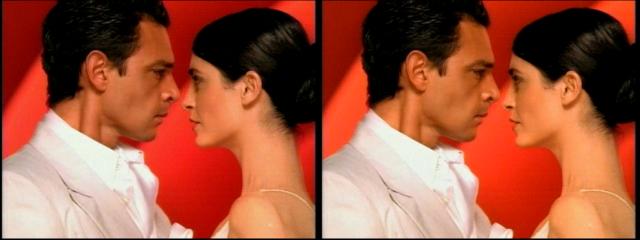
There could be decoding issues within MPC. It can use internal decoders or external decoders. It's possible the different decoders are handling the two codecs differently (rec.601 vs pc.601 for example). -
Oh, that’s what you mean.Originally Posted by freebird73717
 It looks like that because that’s what the video is of, a video of the screen. I played the video back with MPC and took a screenshot of the full-screen frame.
That’s the point, the encoded video is dull. However, it is not EXACTLY the same, there are slight difference beyond just the overall contrast reduction.Originally Posted by Noahtuck
It didn’t photograph the screen, I recorded a video of it, encoded the video to XviD (the original form the camer was >60MB, the comrpessed one was <10MB), then played the video in MPC and did a screencap of the frame.Originally Posted by jagabo
I can do that, but the result will be the same.Originally Posted by jagabo
Sorry, I forgot to say that the original was an MJPG encoded AVI from a digital camera.Originally Posted by jagabo -
Why didn't you spell all this out in the original post instead of making us guess what you were doing? You could have saved all of us a bunch of time.Originally Posted by Synetech
The issues are the same. Given the latest information above I would guess you have black level and colorspace issues in your MJPEG decoder. Note that VirtualDub uses VFW codecs. MPC uses directshow or internal (I don't think it includes an MJPEG decoder) codecs. What MJPEG decoders do you have installed?Originally Posted by Synetech -
Ya just gotta love itOriginally Posted by jagabo
-
Same reason that everyone does this sort of thing: because it was obvious to me since it was already in my head and it didn’t occur to me that you wouldn’t understand since you don’t have the same information in yours. Haven’t you ever said something to someone using the term “it”, “he”, etc. where you knew what it/he/etc. was, but they didn’t?Originally Posted by jagabo
That sounds logical. Here’s what GSpot gives:Originally Posted by jagabo
Code:MJPG MEDIATYPE_Video {73646976-0000-0010-8000-00aa00389b71} MEDIASUBTYPE_MJPG {47504a4d-0000-0010-8000-00aa00389b71} -------------------- DSH MJPG MJPEG Decompressor {301056D0-6DFF-11D2-9EEB-006008039E37} 0x00600000 quartz.dll - - Type DSH - - Function Decoder DSH 4CC MJPG DSH Friendly Name MJPEG Decompressor DSH DirectShow CLSID CLSID_MjpegDec {301056D0-6DFF-11D2-9EEB-006008039E37} REG Driver File C:\WINDOWS\System32\quartz.dll REG Merit 0x00600000 -------------------- DSH MJPG AVI Draw {A888DF60-1E90-11CF-AC98-00AA004C0FA9} 0x00600064 quartz.dll - - Type DSH - - Function Other DSH 4CC MJPG DSH Friendly Name AVI Draw DSH DirectShow CLSID CLSID_AVIDraw {A888DF60-1E90-11CF-AC98-00AA004C0FA9} REG Driver File C:\WINDOWS\System32\quartz.dll REG Merit 0x00600064 -
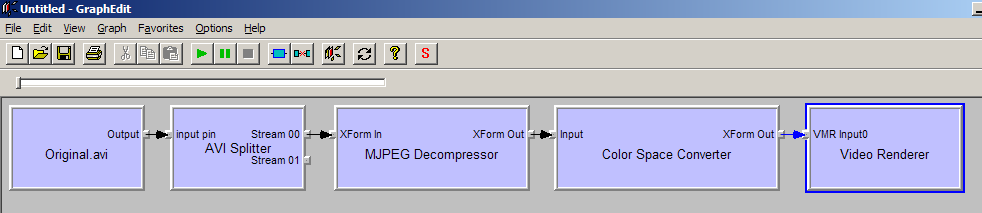
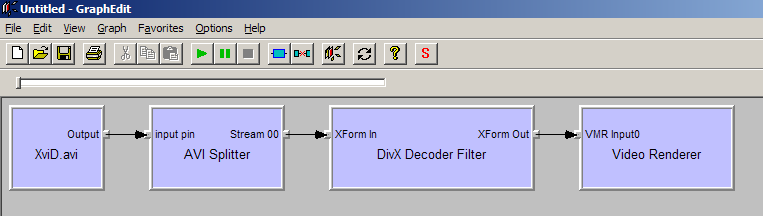
Hmmm, looks like you’re on the right track. GraphEdit is giving a clue (I cut out the audio filters from the original to make the cap smaller):
-
VirtualDub's internal MJPEG decoder uses a PC.601 matrix to convert to RGB. That results in a higher black level than the rec.601 matrix used for most video. You can verify that VirtualDub is using its internal MJPEG decoder by selecting File -> File Information after opening your MJPEG file.
You can get around the PC.601 issue by using an MJPEG decoder that outputs RGB converted with the rec.601 matrix. Or you can use AviSynth to open the file with:
DirectShowSource("filename.avi")
ConvertToRGB() #default is rec.601
Or you can just use VirtualDub's Levels filter to do the contrast stretch.
Another issue is which matrix is right. Your "original" sample contains blacks near zero and whites over 240. So VirtualDub PC.601 matrix may be correct. Even if it is, you may want to adjust the contrast to your liking. -
Yes, you’re right. It says Internal Motion JPEG decoder.Originally Posted by jagabo
You mean find another MJPG decoder? I took a quick look and there don’t seem to be many around and pretty much none that are free. I’ll check my camera’s CD to see if there is some software or something.Originally Posted by jagabo
I tried that (in VDubMod) but it looked the same.Originally Posted by jagabo
I’d rather not customize the video at this point. I only want to compress it and save the modifications for later.Originally Posted by jagabo
The original was what was actually recorded, so it should be what is right.Originally Posted by jagabo
If it is an incompatibility between the matrix used to decode the MJPG video, then it should not be a problem if I re-encode other videos like DivX or MPEG with VDub right? I was worrying that all the videos I had compressed to XviD with VDub were duller. -
ffdshow contains MJPEG decoders for both VFW and DirectShow.Originally Posted by Synetech
As it turns out, Microsoft's MJPEG decoder converts to RGB when using AviSynth. And it uses the PC.601 matrix. If you install ffdshow and enable its DirectShow MJPEG decoder (decodes to YV12) you will see a difference.Originally Posted by Synetech
You would only be matching the rec.601 matrix. And if you're not doing any filtering you should be using Fast Recompress mode.Originally Posted by Synetech
No, you have never seen the YUV data. You have only seen it converted to RGB by different programs. Some use the rec.601 matrix, some use PC.601.Originally Posted by Synetech
No. Just about every standard definition codec uses rec.601. VirtualDub normally uses rec.601. MJPEG seems to be the exception.Originally Posted by Synetech
Here's a thread about the same problem:
https://www.videohelp.com/forum/archive/mjpeg-to-mpg2-color-issue-t342710.html
And lastly, try using AviDemux. It has it's own built in MJPEG decoder and uses the rec.601 matrix (or passes the YUV data directly to the encoder). -
What I meant was that the original video had encoded what came through the lens, rather than output from another program.Originally Posted by jagabo
Thanks for the suggestions. I haven’t used Avidemux for a month or two, so I forgot to try that out. Hopefully that will be an easy way to handle these camera videos.
I’m sure it fits with your analysis, but it seems that the difference is only present when played back (it’s the same in VLC and WMP as in MPC), because they look the same when I load the original and XviD versions into VDub.
*UPDATE*
I just encoded it with Avidemux and it was perfect. The results looked the same in media players as in VDub. The only issue was that the resulting video from Avidemux was 64% larger than the one from VDub (also, it used Q4 even though I set it to Q1, it won’t seem to accept Q1). At first I thought the problem was that I can’t figure out how to encode a video with no audio in Avidemux, so the extra space was due to the audio, but that turned out to be very small (less than a 1MB). GSpot shows that it has a higher bitrate than the VDub encode. I tried another encode, specifically setting it to Q4 and it still ended up 64% bigger.
I was converting a DVD clip to AVI today, so since I had AutoGK running, I gave it a go at this video. I suppose it’s not a shock that it resulted in a dulled video since it uses VDubMod.
Thanks a lot. Avidemux is a nice, easy solution to compressing the videos from this camera, and I learned some useful information.
-
You may still be misunderstanding. Obviously, the file you have is what was output by the camera. But you have only ever seen that file converted to RGB for display. It might be that the software you used to view the original was using the wrong YUV->RGB conversion matrix. VirtualDub's handling of the video may in fact be correct (I suspect it is although I haven't found any definitive references on MJPEG colorspace) and the Xvid result is the first time you've seen the video displayed correctly. Just because the others look better doesn't mean they're right.Originally Posted by Synetech
-
That makes sense. It would also explain why they both look the same in VDub, but not in players.


 Quote
Quote
Similar Threads
-
Convert Vc1 to xvid via AviSynth -> colors slipped ??
By housemusic in forum Video ConversionReplies: 0Last Post: 24th Sep 2010, 13:36 -
How do I convert xvid framerate 23,967 to xvid framerate 25.000?
By QuickstartDK in forum Newbie / General discussionsReplies: 16Last Post: 4th Nov 2009, 17:57 -
Convert Xvid versions to Xvid 1.1.2
By mdavenport in forum Video ConversionReplies: 23Last Post: 11th May 2008, 18:01 -
convert 2cd Xvid to 1cd xvid Avi
By mehargags in forum Video ConversionReplies: 6Last Post: 14th Apr 2008, 10:55 -
How to convert XVid v1.1.2 to XVid v1.0.3 ?
By cornelius in forum Video ConversionReplies: 4Last Post: 5th Sep 2007, 01:36