


 View Profile
 View Forum Posts


For those of us with HDTV now do you use the "fill" mode on your tv while watching hd channels? I have started to do that more and more. ON a lot of channels there are annoying artifcats on the top or bottom of the screen. Sometimes there are no lines at the top or bottom but a white edge on the left of the screen. So in order to correct this I need to use the fill mode to get rid of the blemish. I still feel like I'm being robbed of the "full" picture by doing that. However I do understand the "overscan" deal with non hdtv sets.
Another complaint is with on screen graphics - especiallly sports. They still format them for 4:3 sets. Instead of having them on the edges for a clearer view of the action they're all cramped in the middle.
On a side note I watched the Red Wings playoff game yesterday on the high def nbc channel. The odd thing was the local post game show was broadcast in widescreen for the studio portion but the interviews with players was 4:3 and the REPLAYS were 4:3!!! What gives, they were on the same network, why couldn't they get the widescreen broadcast from their own network for the replays? The game was broadcast widescreen so whats up? Is it a bandwidth issue? Also they had the post game interviews with the coaches and they were 4:3 and so low bitrate that it looked like a webcam broadcast! What gives???????
+ Reply to Thread
Results 1 to 21 of 21
-
Donatello - The Shredder? Michelangelo - Maybe all that hardware is for making coleslaw?
-
I haven't experienced that.Originally Posted by yoda313
They format the graphics for 4:3 so they can "center cut" for the SD feed.Originally Posted by yoda313
They must not have the ability to record HD yet, and used up-converted SD video.Originally Posted by yoda313 -
Never used fill mode on HD. The only time I've seen anything like you describe is WNBC with a white line on the left side of the screen.
Are you sure your TV isn't set to display the picture instead of having some overscan?
What they call it depends on the TV and not all have it. Some sets have a setting that displays every pixel onscreen.
On letterboxed SD channels I hit the zoom button on my DVRs remote and it fills teh screen keeping the proper AR and not chopping off the ends of the video. On 4:3 I choose gray pillarboxes on the DVRs remote as I find that the least annoying.
YMMV. It is also possible that your HDTV is out of adjustment from the factory and needs warranty service. They are not set up as delivered to show what you describe. -
@ TBoneit - that could be it's not perfectly tuned. It has three modes - standard, fill and overscan. The standard leaves some channels with the disturbance I mentioned. The fill mode bumps it out so its not there. The overscan enables the letterboxed 4:3 shows to display properly on widescreen without distortion.
Donatello - The Shredder? Michelangelo - Maybe all that hardware is for making coleslaw? -
It's also called Native,1:1 or Full mode depending on the manufacturer.
I don't like overscan because I want to see HD in all it's glory. -
I have Comcast cable, and the quality is POOR!! I have been fortunate to have Comcast latest 3rd gen HD DVR, since New Years, yet the HD is not improved, although Comcast says "Yes-but we offer more channels, now". When comcast arrived to replace my gen 1 and gen 2 boxes, the tech "set" the tv's to the FULL setting. He stated that the best picture veiwing with the comcast signal was in the "full" setting. I agree with Yoda313 WHY All the 4:3 on the HD Channels? My Sony 36" HD tube tv died in August, and when I bought my 52" HD LCD I expected NO 4:3 when I switched to HD, yet there it is. I couldn't find any HD sets that were 4:3 in Dec, but I didn't look too hard either.
No worries, in '09, we are all promised to have only HD signals, peace, and free gasoline.Wink Dinkerson PhD.
_____________________________________
Cinderella story. Outta nowhere. A former greenskeeper, now, about to become the Masters champion. It looks like a mirac... It's in the hole! It's in the hole! It's in the hole! -
Video Restorer

- Jun 2003
- dFAQ.us/lordsmurf


I see no overscan area at all.
Want my help? Ask here! (not via PM!)
FAQs: Best Blank Discs • Best TBCs • Best VCRs for capture • Restore VHS -
Contact your provider, something is up there. You shouldn't be seeing noise like that. With WoW and TimeWarner on 3 different sets, there is no noise on the HD channels.
I don't see that much 4:3 content on actual HD channels. The locals broadcast programs every now and then in SD, but the HD channels are HD, besides the occassional upscaled/stretched commercial + TNT.
It won't be all HD, only digital. Because digital can be compressed all to hell to save bandwidth by the providers.No worries, in '09, we are all promised to have only HD signals, peace, and free gasoline.Linux _is_ user-friendly. It is not ignorant-friendly and idiot-friendly. -
And this only effects over-the-air broadcast.Originally Posted by disturbed1
-
"No worries, in '09, we are all promised to have only HD signals, peace, and free gasoline."
No we are not. We are going to lose our OTA SD transmissions. We will only have them as digital transmissions. Notice, your HD stations are now called WABC-DT or KABC-DT.... substitute your own local call letters. The DT means Digital Transmission. HD is transmitted digitally. Not all programming will be in HD. Much of it will be upconverted SD as is currently being offered. The only difference is we will turn off our SD transmitters. Programming will continue as it is now.
Certainly, you don't expect those old reruns and syndicated shows to all be in HD, now, do you?
Personally, the black bars on the top and bottom or sides does not bother me. I want to see the whole picture in it's original form, whatever that is. If it is widescreen, I want to see the whole picture to the ends. If that leaves bars at top and bottom, that is fine. I do not want to see stretched video just to fill the screen. You cannot take a 4:3 and fill to both ends without stretching/compressing one axis, keeping the same aspect ratio of the original picture. The same as you cannot take a 16X9 (Letterbox) on a standard tv and remove the black bars at top and bottom without either overscanning significantly on the sides or stretching the video vertically. -
Why all the 4:3 on HD channels? Easy to answer. 50+ years of 4:3 content including many movies as well as the TV shows. You would have a very limited selection if they all only showed things that are 16:9 AR. My guess is you also don't like the 2.35;1 movies because of the black bars top and bottom. Would you ratrher have them butcher off the ends to be a 16:9 video? or chop off the tops of peoples heads on 4:3 content so it becomes 16:9?
AFAIK 4:3 is a valid HD ratio. One of the HD Onlty channels was showing Northern Exposure in HD the True 1080i logo was mainly in the black side bars. The Show never looked so good.
What you should be afraid of is that complaints that the 4:3 content leads to more video like TBS where they stretch the Video to fill the screen non-linearly. So that when the camera pans across a circular object it starts out oval, morphs to a circle in the center of the screen and becomes oval on the other side of the screen again.
Their claim is that they do it because of customer complaints about the screen having side bars. So instead it is a channels I can not stomach watching due to the distortion. Right after i go my HDTV and then a HD Service & DVR I tuned to TBS and said OMG my Tv set is defective. Then I watched a few other HD channels and said to myself what the heck are they thinking about at TBS headquarters?
So if something I want to see is on TBS I just watch the SD version. At least it isn't distorted. -
Are you saying there won't be world peace and free gasoline either?
 Wink Dinkerson PhD.
_____________________________________
Cinderella story. Outta nowhere. A former greenskeeper, now, about to become the Masters champion. It looks like a mirac... It's in the hole! It's in the hole! It's in the hole! -
Unless you watch the all HD channels like UniversalHD or MOJO, you will be seeing plenty of upscaled SD 4:3 and some native 4:3 HD like Northern Exposure.Originally Posted by yoda313
National networks usually have better upscalers than local stations and also process the images to crop out side, top and bottom artifacts.
Local stations are usually just upscaling their SD NTSC feed and often fail to crop out the vertical interval data lines containing closed captions, program ID and TV rating info.
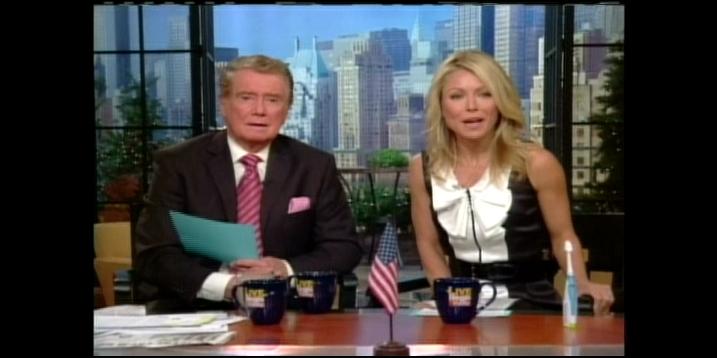
This four sided black bar mode is the result of lazy local master control techs who fail to switch to 16:9 mode during breaks.
Look at this one, they go to a letterbox NBC promo while failing to blank data lines. Pure incompetence.

Much of this will be corrected after Feb '09 when they don't have to dual feed NTSC and upscaled 4:3 at the same time. They can concentrate on correctly formatting their DTV feed. Until then, we will be living with a lot of 4 side crops on the upscaled HD local channel.
They must do this or the 4:3 sets just see cropped action. Programs framed for 16:9 need to be shown letterbox on 4:3 sets. Programs shot for both like TV series or news must keep the center 4:3 crop action safe.Originally Posted by yoda313

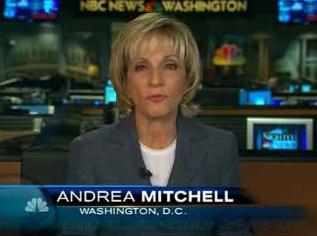
HD recording decks cost $59K and the sports dept probably has no HD edit suite. Stations budget first for the new DTV transmitter and network to air HD master control equipment. Some stations do HD studio News but use mostly upscaled SD field footage. Few can originate and edit local HD yet.Originally Posted by yoda313
HDTV sets vary in modes and the names used so pictures better tell the story.Originally Posted by yoda313Recommends: Kiva.org - Loans that change lives.
http://www.kiva.org/about -
Thanks eddv.
Actually the local nbc station does broadcast news in hd and has many location shots in hd widescreen.
If the local hd studio recorders are 59k than I can understand not having replays in widescreen.Donatello - The Shredder? Michelangelo - Maybe all that hardware is for making coleslaw? -
My HDTV has no "fill" mode at least not in the sense that I think you are explaining.
My HDTV does have a mode to stretch 4:3 so it fits the 16x9 screen (which I never use). It also has a mode that blows up 4:3 proportionally to fit from left to right while cutting off the top and bottom. That mode is good for converting 4:3 Letterboxed to 16x9 Widescreen. I will use this mode sometimes on 4:3 Letterboxed sources like some DVD discs and channels showing 4:3 Letterboxed movies (like TCM).
There is a 16x9 Zoom Mode that zooms into a 16x9 image but I never use that mode ... it looks retarded and cuts off image from all four sides.
I also notice that some HDTV channels will have junk on the top and/or bottom. Usually it appears during the commercials (which are often 4:3) than the actual HDTV show itself. Basically the same as the first two images posted by EdDV.
- John "FulciLives" Coleman"The eyes are the first thing that you have to destroy ... because they have seen too many bad things" - Lucio Fulci
EXPLORE THE FILMS OF LUCIO FULCI - THE MAESTRO OF GORE
-
I have a similar question, i have a 42" Vizio hdtv with Comcast. My brother also has a 32" Vizio and comcast. Why on his tv does he keep the input on HDMI and he can bounce from HD and non hd channels and the scrren for the most part always automaticly adjusts to the video ratio. When he is on non hd channels and using HDMI the picture is stretched to fit the screen, and also HD channels show proper.
In my case using the HDMI input on non HD channels I have a 4:3 pitcure and it does not stretch, the only way i can see to do that is zoom or switch to cable input and not use HDMI unless i am watching HD channels.
The only thing i can think is that he has a older different DVR box and or his tv is 720 and mine is 1080p.
Any thought? -
Cable boxes can often be set to pass signals through in thier original format, convert to a specific format, or some combination of the two. Your cable box may be converting everything to 1080i, upscaling and pillarboxing 4:3 content.Originally Posted by kicko
TVs often keep track of the zoom/stretch mode for different format on an input. So 1080i and 720p may appear normal (full screen) but 480i will always be stretech, zoomed, or pillaboxed, whichever you last chose. -
Cable box menu. I'll explain after the week ends.
Recommends: Kiva.org - Loans that change lives.
http://www.kiva.org/about -
I think your right with the cable box. Mine has format options, 480i, 480p, 720i or 1080i. Naturally i have it in 1080i so it must be converting everything to 1080. I wish it didn't so i can just keep one input and not bother switching back and forth but maybe in feb'09 it might be different.
I have looked at option in the cable box and i do not see anything but the button on the front with the format modes i described before. -
Sorry but that really only effects aerial broadcasts not cable. And that only effects transmissions, not screen ratios.Originally Posted by kickoDonatello - The Shredder? Michelangelo - Maybe all that hardware is for making coleslaw?
 Quote
Quote

 Visit Homepage


Similar Threads
-
Set "Output filename" As Default Global "File/segment title" In MkvMerge?
By LouieChuckyMerry in forum Video ConversionReplies: 0Last Post: 9th Jul 2011, 01:52 -
WMV files: Changing "Recorded Date", "Media Created" fields in metadata
By axhack in forum EditingReplies: 5Last Post: 18th Sep 2010, 01:27 -
What Vdub filter can get rid of the green "Ghosting"?
By Brainiac in forum RestorationReplies: 5Last Post: 3rd Sep 2009, 18:08 -
HD video from laptop to HDTV - "Clone" or "Single?
By mr-scarface in forum Software PlayingReplies: 1Last Post: 1st Jun 2009, 22:06 -
Fill in missing parts of mpeg with "dummy" data
By nagihcim1 in forum Newbie / General discussionsReplies: 3Last Post: 15th Sep 2007, 00:33