


 View Profile
 View Forum Posts
 Private Message


Basic Blu-Ray Authoring with HDV source
This is a very basic guide to making a Blu-Ray compatible disk using your HDV (1440 x 1080i ) footage and burn it to a standard DVD+R disk. Quality in not compromised, no re-encoding necessary. You can fit up to 20 min on a single layer and 40 min on a dual layer disk. This guide is very basic and the disk will have no menu and will play the video clip when the disk is inserted in the Blu-Ray player. I tested it on two players and it worked fine.
If you want multiple clips and a menu, then I suggest alternative methods like using Nero Vision to create an AVCHD disk with menus. You’ll have to encode to AVCHD for that option, but it will give you 40 min on a single layer disk.
Step 1)
Demux your m2t. You can use your favorite demuxer. I like ProjectX., it’s free and does a great fast job. It will demux your streams to xxxx.m2v and xxxx.mp2 without need for audio delay. You can create a shortcut to ProjectX on your desktop and simple drag and drop your m2t there. It will extract the streams to the same folder as your m2t.
Step2)
Convert your mp2 audio to ac3 with your favorite encoder. You can use ffmpegGUI or whatever to make a 48khz ac3. I use 256 kbps. AC3 is perfectly compatible with Blu-Ray standards, but mp2 is not.
Step3)
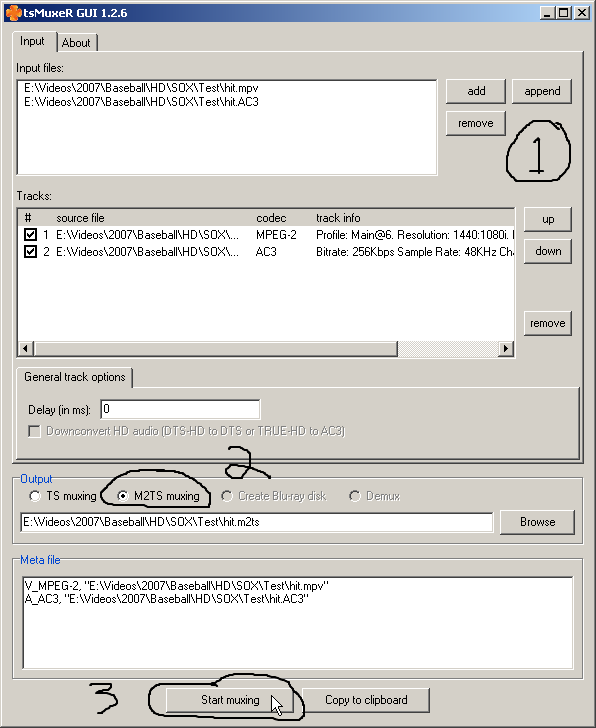
Mux your streams back together with tsMuxer. Change the extension on your xxxx.m2v to xxxx.mpv and import into tsMuxer. Then also import xxxx.ac3.
Start Muxing and you’ll be left with a xxxx.m2ts file.
Step 4)
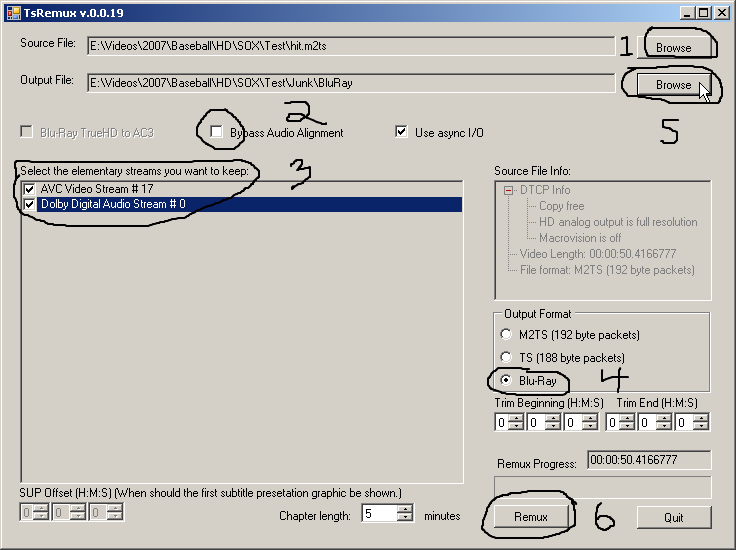
Create your Blu-Ray file structure with TsRemux. Browse to your xxxx.m2ts and open it. Now deselect Bypass Audio Alignment (very important or you wont have audio in your Blu-Ray player). Select all streams. Select Blu-Ray. Browse to where you want to create the directory and choose a name for your folder. Finally, hit the Remuxer.
You’ll end up with a BDMV and CERTIFICATE folders. Your video will be in “STREAM” sub-folder in the “BDMV” folder.
Step 5)
Burn Blu-Ray structure with Nero. You’ll need Nero 7 or up because it has to support UDF v2.50 for the disk to work.
Set it up as above and burn both BDMV and CERTIFICATE folders to the ROOT. If you’re using XP, it won’t be able to read the UDF 2.5 disk you just created, but your Blu-Ray player should play it just fine.
+ Reply to Thread
Results 1 to 28 of 28
-
Got my retirement plans all set. Looks like I only have to work another 5 years after I die........
-
ImgBurn can do UDF 2.50 also, but I don't see a place in it to specify "physical partition" as with Nero above. And that's probably why my first test disc doesn't seem to work in my HTPC's BluRay drive. I don't have a standalone BluRay player handy to test there.....
-
I think I've read on doom9 that home made BluRay discs don't play on full spec (2.0) stand-alone players. It's not a problem, it's by design. The few stand alones that can play burnt authored discs are not to spec (or built to the interim spec).
EDIT it was wikipedia...
http://en.wikipedia.org/wiki/Blu-ray_Disc#Blu-ray_Disc_recordable
If this is true, I don't think BluRay is much use to us HD camcorder owners.Consumers should be aware that most commercial players, like the Samsung BD-UP5000, will not play a BD-R or BD-RE disk at all. In other words, the only media they will play are commercial Blu-ray movie disks, not movies made on a computer Blu-ray recorder. As a result, consumers cannot buy a Blu-ray disk recorder for their home movies and watch them on most commercial Blu-ray players. Some early -player models permitted this, but after a grace period, new versions of player firmware prohibit it.
However, BluRay format discs, and raw files, appear to play fine from DVD-Rs. Whether this is correct on 2.0 spec players, I have no idea, as none exist yet!
I'm happy to let someone else test out these expensive and potentially useless toys.
Cheers,
David. -
I'm glad to see discussions like this starting. The dual HD formats and ridiculously high prices on media and burners have been a major turnoff for DIY HD. As a result, the "how to" base of knowledge has been very limited. This is understandable because who wants to play around learning HD disc creation and backup at ~$20 a pop for media!
At least the dual format war seems to be winding down but until there are MAJOR drops in media and burner prices, this whole DIY HD thing is going to languish on the fringes. -
And without the mass support that Homeuse/DIY and business-class use provides, the whole HD thing will probably languish also--just like DVDA/SACD! (or atleast never achieve the type of stellar attraction that regualr DVD has)
Scott -
I made a blu-ray format DVD with ImgBurn UDF 2.50 and it worked in a Sony burner with Power DVD V7.3 using XP.
The DVD worked in a PS3 which doesn't accept BD-R/RE blu-ray format discs. It will read BD-R/RE data discs.
The video worked but no audio when playing the DVD in a Philips BDP9000. This player will accept BD-R/RE blu-ray format discs but not data discs. -
Megahurts wrote:
Check step 4 of my guide - "Now deselect Bypass Audio Alignment (very important or you wont have audio in your Blu-Ray player)". The same thing happened to me when I didn't de-select "Bypass Audio Alignment"............The video worked but no audio when playing the DVD in a Philips BDP9000. This player will accept BD-R/RE blu-ray format discs but not data discs.
Just so everyone knows, I don't own a Blu-Ray player yet. I play all my Hi-Def footage through my set top media player w/500 GB HDD. I shoot a lot of sports with my Canon HV20 and distribute downsampled DVD versions and archive full HDV versions for myself. I am just looking for ways to distribute full HD versions for people that do have Blu-Ray players. I've been experimenting a bit lately and came up with this method that preserves full quality at a cost of 20 min per single layer DVD+R. I tested the disk in a friends Sony Blu-Ray player and a Blu-Ray player in Circuit City. They both played it fine, but as anything else, there are no guaranties it will work on all players. I just wanted to share my method so maybe others can benefit..............................Got my retirement plans all set. Looks like I only have to work another 5 years after I die........ -
Interesting...Originally Posted by Megahurts
Both my attempts with ImgBurn with UDF 2.50 were unsuccessful upon (attempted) playback in my HTPC with Vista, the LiteOn BD-ROM drive, and PowerDVD 7.3.
When I put the disc in the drive, PowerDVD came up right on schedule, but just showed a black screen 'til I had to kill it with Task Manager. -
Robert Simandl,
Have you tried playing the "00001.m2ts" file in the "STREAM" folder directly?
My Nero Showtime will stutter when playing the Blu-Ray file structure, but will play the file directly with no problems......Got my retirement plans all set. Looks like I only have to work another 5 years after I die........ -
Well, my situation just got "curiouser."
Seems PowerDVD no longer wants to play ANY of my BluRay movies, including commercial releases that played fine a week ago.
Guess I'll have to drop out of this thread 'til I find out what's wrong with my HTPC.... -
Originally Posted by Megahurts
I said the PS3 won't recognize BD-R/RE blu-ray formated discs and I was wrong. I was testing a BD-RE disc bruned as UDF 2.0. It will play 2.5 burned discs.
The Philips player played back video choppy and when switched from bitstream to pcm audio, the audio was aslo choppy. So this player is out for this project.
The PS3 played back the DVD but I noticed it was skipping about 2 frames every second. Same thing happend when burned to a BD-RE disc. Am using clips from a Cannon HV20.
The strange thing is the 00001.m2ts file burned to a DVD data disc plays fine on the PS3.
I took a trailer from a blu-ray disc and using TsRemux and ImgBurn burned it to a blu-ray structured DVD and it played fine on the PS3. Took the same trailer and put it thru TsMuxer and skipping frames appeared on the blu-ray structured DVD. I'm suspecting TsMuxer is causing the skipping prdoblem but can't verifiy without another remux program.
Racer-x, have you noticed the skipping when playing back on a standalone player? -
During my testing of my disk in Circuit City, one of the players I tried (I don't remember the brand) would play fine for about 5 sec and then would start to stutter. If I hit the pause button and then play, it would play fine for about 5 sec and then stutter again. It was as if the Chipset couldn't keep up with the 25 mbps stream. When I tried it on a friends Sony Blu-Ray player, it played perfectly fine and the chapter points also worked fine.
I chalked it up to a weak player in Circuit City, but that might not be the case. From what I've read, TsRemux produces an AVCHD file structure. It could be that the player expected AVCHD files when it was really Mpeg2. I don't own a Blu-Ray player, so I can't experiment too much on that. I'm waiting for the prices to come down quite a bit before I buy one..........................Got my retirement plans all set. Looks like I only have to work another 5 years after I die........ -
Thanks for sharing your experience. The only comment I have for this process is that if one uses Nero in the last step then it may be more convenient to use Nero (version 8) from the beginning to create an AVCHD disk using HDV footage. That would provide:Originally Posted by racer-x
- A menu and options to merge/trim clips
- Twice the length of video (40 min vs 20 min) in AVC h.264 format which is more common in Bluray disk these days and almost comparable quality to MPG2 (used in earlier Bluray disks)
-A more simple work flow
Your guide, however, may be useful for PCs with less muscle since there is no recoding involved (MPG2 stays as MPG2). The process is likely to be faster on any PC. -
Well, seems my problem was a codec issue. I uninstalled PowerDVD, ffdshow, and a few other things, then reinstalled PowerDVD, and now I can play BluRays again. Though now Vista Media Center can't play XviD's but that's another story.
BTW, the second half of this guide works great for MPEG-2 transport streams recorded from ATSC OTA HDTV here in the US. I took my recording of this week's LOST episode, loaded it into TSremuxer according to the guide, and I got a BluRay disc of the episode that plays great in PowerDVD.
I'm gonna take it into the local Costco and see if their Sony 301 display can play it later this week.
Thanks for the guide! -
Robert Simandl,
I had an episode of Lost so I did what you did. Was wondering how a blu-ray player would handle a 60fps source. It worked perfect on the PS3.
What was interesting, the PS3 outputed at 1280x720p 60fps which is the original source. -
what is the current price for a blu ray dvd recorder?
-
I've found some nicely priced ones on this site http://www.newegg.com/Product/ProductList.aspx?Submit=ENE&DEPA=0&Description=Blu-Ray+Burner&x=0&y=0
The burners are getting cheaper but I haven't seen the price on media budge. -
Get windows XP UDF 2.5 drivers here:
http://www.digital-digest.com/articles/Xbox_360_HD_DVD_Windows_page1.html
Now you can see what's on your Bluray UDF 2.5 disks. -
Hi everyone
I have create a Bluray folder with Adobe Encore DVD and I have bured the two folders (BDMV and CERTIFICATE ) with nero on a DVD-RW with UDF 2.5.
Put the disc in the PS3 and it's not see as BD-vIDEO but like a data disc.
So the menu and the video is not automatically show. With the ps3 I can play see the video by manually entering the stream folder in the disc.
Someone here as played the disc on PS3, I'm doing something wrong?
Thanks -
Is there any guide for new tsmuxer 1.8.8 and what "add picture timming info" & "continually insert sps/pps" means.
General a full guide for the tsmuxer 1.8.8
A lot of thanks. -
My blu-ray player doesnt play disks burnt this way. Any sugestions? I dont want to have to reencode video before transferring, itll take days to convert 10 HDV tapes to 264 video to play it that way

-
maybe this will help
https://www.videohelp.com/forum/archive/clip-video-hdv-m2t-to-avchd-on-dvd-r-t349614.html
and/or
multiAVCHD -
Originally Posted by swraman
This is the same problem I'm having, except mine play, but they "hiccup" irregularly, about every 3 sec. or so.
Are you using a Sony player (other than PS3)?
Wibo -
Do you use a Sony player?Originally Posted by zoobie
Are you able to get your HDV content to play smoothly on bluray compliant DVDs - without transcoding into MPEG-4/H.264?
I need to find a solution, but I think the problem resides in Sony BD player's poor firmware...
Wibo -
PS3 is the only Blu-ray player that can handle 25 Mbps of HDV video stream from DVD disk.
This is because PS3 spins DVD disk faster than any other stand alone BD player. -
I used a Sony BD stand-alone player with AVCHD support like how most are now made.Originally Posted by wibo.video
The solution is to re-encode to spec...namely h264 which will then play properly as AVCHD on DVD.
I saw in another post where you're trying to use mpg which simply won't play as AVCHD on DVD in stand-alone BD players.
PS yes...but not BD stand-alones...that's where everyone is getting cornfused -
Apparantly Panasonic players handle MPEG-2 25Mbps without a hitch...Originally Posted by MozartMan
W -
Great article and responses. I'm trying to learn as much as I can before I transfer my Canon HV20 HDV tapes to my PC and then Blu-Ray disks. Some questions:
1. What software do you use to transfer the HDV to the PC?
2. TsRemux doesn't re-encode the video, right?
3. If I want to add title and menu pages that appear in between the video (meaning, I don't put any titles overlaid on existing video), do all 3 Blu-Ray video codecs support this? Is re-encoding necessary, given that it seems like it's just a concatenation?
4. If I want to put overlaid titles on video, do all 3 BR video codecs support this? I assume re-encoding is required?
5. I can transfer all of my HDV tapes as m2t files onto my computer and then select whatever codecs I need to encode later on, right? I'll put them on DVDs as data files ...
6. Except for the case where commercial Blu-Ray players stop supporting MPEG2, is there any reason why I'd encode MPEG2 into H.264? I'm not going to get better quality, after the source encoded it as MPEG2, right?
7. When responses make references to H.264, they're not talking about the modified H.264 on Hi-Def Hard Drive camcorders, Correct?
Thx,
Bill

 Quote
Quote


Similar Threads
-
Scenarist basic blu-ray without menus?
By uridylylator in forum Authoring (Blu-ray)Replies: 2Last Post: 12th Apr 2011, 03:46 -
Premiere CS3 HDV to H.264 Blu-ray
By foochuck in forum Video ConversionReplies: 5Last Post: 24th Nov 2009, 10:32 -
GUIDE: How to Decrypt/store/playback HD-DVD and Blu-Ray Discs
By devilcoelhodog in forum Blu-ray RippingReplies: 7Last Post: 3rd Sep 2008, 05:43 -
Web page for Guide for MKV to Blu-ray no longer works?
By dwisniski in forum Authoring (Blu-ray)Replies: 8Last Post: 10th Jul 2008, 21:44 -
HDV to Blu Ray
By pred02 in forum Camcorders (DV/HDV/AVCHD/HD)Replies: 0Last Post: 15th May 2008, 15:28