


 View Profile
 View Forum Posts
 Private Message


What it Does:
* Demuxes stereo (2 track) mp3 from Divx/Xvid AVI and upmixes the audio to AC3 5.1
* Resamples the audio to be compatible with Mpeg2 DVD - (48000hz), 384kbs
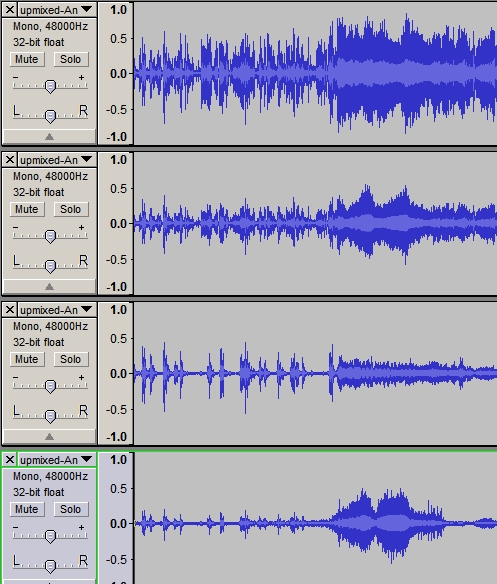
If you're skeptical, have a listen to the individual tracks it creates. Here's the exact same moment in the audio in these three synthesized channels:
-First, the Center Channel -
center-example.mp3
-The Surround (Rear Channel) with the Dialogue Removed ! - (Pretty Cool, huh ?)
sr-left-example.mp3
-The LFE channel-
lfe-example.mp3
Required:
Avisynth 2.57 or later
http://downloads.sourceforge.net/avisynth2/AviSynth_070518.exe?modtime=1179503068&big_mirror=0
Download the Script Here:
Note: Latest Version V07 Released on Jan 14th, 2010. Updated Aften and now uses ffmpeg to do the final A/V muxing.
http://www.mediafire.com/file/zgd1ztmd5y4/2_0_to_5_1_upmixV07.zip
Earlier Version
http://www.mediafire.com/file/ymnytl32tmu/2_0_to_5_1_upmixV06a.rar
Seven Different Upmixing Configs from which you can choose. See the instructions below on testing out a different configuration.
Props go to the doom9 audio scholars and jagger for the upmix functions
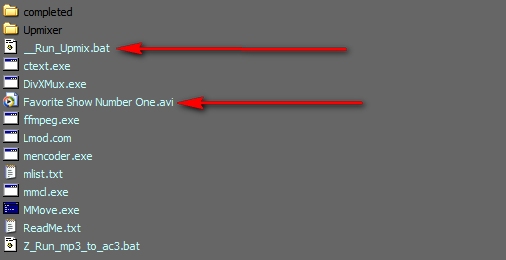
1) Copy AVI into Same Folder and Click _Run_Upmix.bat
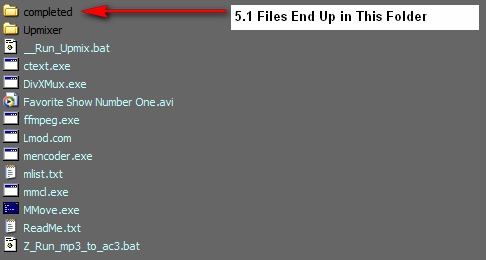
2) When Complete, You'll Find a New AVI with 5.1 AC3 Sound in the Completed folder. You can also use the .AC3 File for a DVD conversion
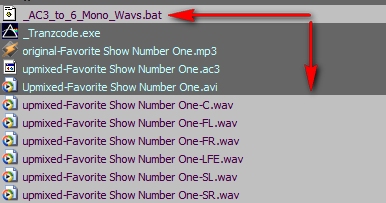
The Completed Folder Will Look Like This...
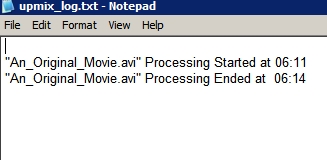
3) Upmix_log.txt will Display the Processing Time
4) If you Want to Analyze Each Track in the AC3, Run _AC3_to_6_Mono_Wavs.bat
5) You can Load and Listen to Each Track or the Complete Mix in Audacity
+ Reply to Thread
Results 1 to 30 of 202
-
-
Thanks.
Bestsharing mirror fails CRC in ffmpeg. -
The Aften in the wikiupload Zip at 201.728 KB ? is producing an app compatability error before continuing on to produce no AC3 output.
Replacing it with Aften 0.5 from the source Rar at 58.368 KB fixes the error but still produces no AC3 output.
BePipe stage gives:
***************************************
BePipe by dimzon
***************************************
Script used:
# BEGIN
import("upmix.avs")
# END
Scanning for Audio Stream...
Found Audio Stream
Channels=6, BitsPerSample=16, SampleRate=48000Hz
Writing Header... <------ no audio.ac3 is written
Writing Data...
Done!
The system cannot find the file specified.
Failed to open file: a
ERROR: DIVXMUX_OPEN_FAILURE File: audio.ac3
Could Not Find C:\Program Files\2_0_to_5_1_Upmixer\audio.ac3 -
Thanks a lot for that info. I'll make some changes to the aften exe. I chose the SSE2 optimized one, but I'll see if I can set something up to work automatically based on the user's CPU.
In the meantime, try these svn builds of aften:
http://win32builds.sourceforge.net/aften/index.html
I think your CPU will work with the MMX version in the SVN .rar
Should have mentioned, the source AVI can't have spaces in it -
Bad: This Is My.AVI
Good: This_Is_My.AVI -
Updated package to use the most CPU compatible version of Aften.exe . This won't affect the performance, since the bottleneck is in the upmixing and filtering process rather than the encoding. New link above in 1st post, also here:
http://www.wikiupload.com/download_page.php?id=114654 -
Thanks again, using build 449 sse.
Very comparable to AC3Filters upmix matrix.
Only major difference seems to be a slightly lower volume in the center channel with this script.
I've always wanted to be able to record the output of AC3Filter, This is easily close enough to satisfy my needs. -
Changing the center channel volume is very easy. Edit the upmix.avs file with notepad or similar text editor.
Look for this line
A3=MixAudio( SuperEq( A1, "CENTER.FEQ" ), SuperEq( A2, "CENTER.FEQ" ) )
Add this to the end:
A3=MixAudio( SuperEq( A1, "CENTER.FEQ" ), SuperEq( A2, "CENTER.FEQ" ) ).amplify(1.4) -
I started editing the avs after 1st test

This is what I finished with so far:
function UpMix( clip C )
{
Assert( C.AudioChannels == 2, "This clip must have 2 audio channels" )
A1=GetChannel( C, 1 ).amplify(0.6)
A2=GetChannel( C, 2 ).amplify(0.6)
A3=MixAudio( SuperEq( A1, "CENTER.FEQ" ), SuperEq( A2, "CENTER.FEQ" ) ).amplify(5.0)
A4=MixAudio( SuperEq( A1, "LFE.FEQ" ), SuperEq( A2, "LFE.FEQ" ) ).amplify(0.1)
A5=SuperEq( A1, "SURROUND.FEQ" ).amplify(0.4)
A6=SuperEq( A2, "SURROUND.FEQ" ).amplify(0.4)
# === WAV, AAC Order === L R C LFE SL SR =============================
A=MergeChannels( A1, A2, A3, A4, A5, A6 ).Wavgainlimiter(1.6)
# === AC3, OGG Order === L C R SL SR LFE =============================
# A=MergeChannels( A1, A3, A2, A5, A6, A4 )
Return( C.HasVideo ? AudioDub( C, A ) : A )
}
This produces levels comparable(on average) to AC3Filter upmixing an MP3.
Might try mixing both FL and FR levels into each SL SR tomorow.
EDIT:
I couldn't wait till tomorow so just made this one.
function UpMix( clip C )
{
Assert( C.AudioChannels == 2, "This clip must have 2 audio channels" )
A1=GetChannel( C, 1 ).amplify(0.7)
A2=GetChannel( C, 2 ).amplify(0.7)
B1=GetChannel( C, 1 ).Amplify(0.4)
B2=GetChannel( C, 2 ).Amplify(0.1)
C1=GetChannel( C, 2 ).Amplify(0.4)
C2=GetChannel( C, 1 ).Amplify(0.1)
A3=MixAudio( SuperEq( A1, "CENTER.FEQ" ), SuperEq( A2, "CENTER.FEQ" ) ).amplify(6.0)
A4=MixAudio( SuperEq( A1, "LFE.FEQ" ), SuperEq( A2, "LFE.FEQ" ) ).amplify(0.1)
A5=MixAudio( SuperEq( B1, "SURROUND.FEQ" ), SuperEq( B2, "SURROUND.FEQ" ) )
A6=MixAudio( SuperEq( C1, "SURROUND.FEQ" ), SuperEq( C2, "SURROUND.FEQ" ) )
# A5=SuperEq( A1, "SURROUND.FEQ" ).amplify(0.4)
# A6=SuperEq( A2, "SURROUND.FEQ" ).amplify(0.4)
# === WAV, AAC Order === L R C LFE SL SR =============================
A=MergeChannels( A1, A2, A3, A4, A5, A6 ).Wavgainlimiter(1.3)
# === AC3, OGG Order === L C R SL SR LFE =============================
# A=MergeChannels( A1, A3, A2, A5, A6, A4 )
Return( C.HasVideo ? AudioDub( C, A ) : A )
} -
Wow, 6.0 . I hope others chime in on this. If the levels need to be boosted that much, I'll be happy to include those values as defaults.
-
 Thanks, can't wait to try it......................
..............of course I can't help but think of all the AC3 5.1 porn that's going to start showing up. LOL
-
sammie - Whatever, as long as it is stuff you paid for. No content judgements from me.
j4gg3rr - took your inspiration and made some major enhancements to the upmix.avs script, thanks to the wunderkinds over at Doom9. In addition, the processing runs 5-10 times faster than the original script.
1)download the following upgraded file: (1MB)
Removed. Download the newest version in first post.
2) both the upmix.avs and soxfilter.dll file should be placed it the UPMIXER folder. Make a backup copy of the original upmix.avs file if you wish.
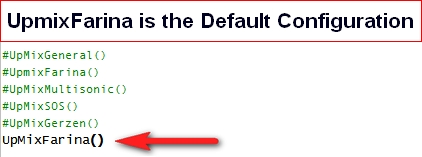
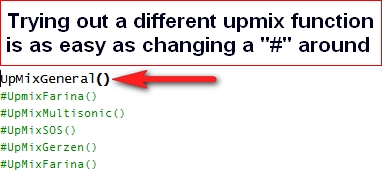
3) There are 5 different kinds of upmix configs you can test out. They all sound different, so experiment and find one that pleases your ears. Open the new upmix.avs with notepad.
I'll probably update the master beta (bit of a pun for you, sammie) in a day or so if the feedback is good on the new script. -
Trying to convert a Pink Floyds 60MB MP3 "Echo's" for testing.
Disk cache get too large for me(1.5GB and growing). With 512MB to AVISynth the best its done so far is 30% before giving up on me.
Currently running it with 256MB for AVISynth and Azureus off, that just keeps my head above water on the physical RAM side of things. Well it's past 30% now anyway.
May be better with 2GB of RAM or more!
EDIT: Awe it made it to 37% before stopping. Will try your new script.
I also edited the main batch to output an elasped time(only cause mine was taking so long) and make cmd window change colours. Blue while working and green when done.
Code:@echo off Color 1F & ECHO. & set Beg=%time% rem A/V Sync Tester v 0.0 if exist v1deo.avi del v1deo.avi if exist avilist.txt del avilist.txt dir *.avi /b >avilist.txt for /f %%a in (avilist.txt) do call :process "%%a" goto End :process if exist audio.ac3 del audio.ac3 if exist audio.mp3 del audio.mp3 if exist upmixer\audio.ac3 del upmixer\audio.ac3 if exist upmixer\audio.mp3 del upmixer\audio.mp3 if exist video.avi del video.avi mmcl --unpack --always-write "%1" "c-%1" mencoder -O "x-%1" -forceidx -oac copy -ovc copy "c-%1" del "c-%1" mencoder "x-%1" -ovc copy -nosound -o video.avi ffmpeg -i "x-%1" -vn -acodec copy -y audio.mp3 del "x-%1" copy audio.mp3 upmixer /y cd upmixer mp3gain /f /c /r audio.mp3 if exist audio.ac3 del audio.ac3 bepipe.exe --script "import(^upmix.avs^)" - | aften.exe -acmod 7 -v 0 -b 384 -dynrng 2 - audio.ac3 cd.. copy upmixer\audio.ac3 /y divxmux -o "Upmixed-%1" -v "video.avi" -a o-0 "audio.ac3" if exist upmixer\audio.ac3 del upmixer\audio.ac3 if exist upmixer\audio.mp3 del upmixer\audio.mp3 del video.avi del audio.mp3 del audio.ac3 goto :eof :End Color 2F & ECHO. & set ND=%time% Call :Timer ECHO UpMixing Completed! ECHO. ECHO Elapsed time %RunTime% ECHO. pause goto :Exit :Timer set "BHour=%Beg:~0,2%" & set "BMin=%Beg:~3,2%" & set "BSec=%Beg:~6,2%" set "NDHour=%ND:~0,2%" & set "NDMin=%ND:~3,2%" & set "NDSec=%ND:~6,2%"+ set /a EL=((NDHour*3600+NDMin*60+NDsec )-(BHour*3600+BMin*60+BSec)) IF %EL% LSS 0 set /a EL=((NDHour*3600+NDMin*60+NDsec+86400)-(BHour*3600+BMin*60+BSec)) set /a Hour=EL/3600 set /a Min=(EL-(Hour*3600))/60 set /a Sec=(EL-(Hour*3600))-Min*60 IF %Hour% EQU 1 set Hours=an hour IF %Hour% GTR 1 set Hours=%Hour% hours IF %Min% EQU 1 set Minutes=one minute IF %Min% GTR 1 set Minutes=%Min% minutes set RunTime=%Hours%%Minutes%%Sec% seconds. goto :eof :Exit exit
-
Try 100x faster for me with my limited RAM and heavily fragmented H/D caching. And it completes 100%Originally Posted by Soopafresh

Playing with new levels now.
EDIT:
This seems close to AC3Filter, Only the LFE/Bass redirect could perhaps be made to have a greater range and lower volume.
Code:#Profile made by jagger to emulate levels outputed by AC3Filter. function UpMixJagger( clip a ) { Assert( a.AudioChannels == 2, "This clip must have 2 audio channels" ) back = a.soxfilter("filter 100-7000") fl = a.GetLeftChannel() fr = a.GetRightChannel() cc = mixaudio(a.GetRightChannel(),a.GetLeftChannel,0.707,0.707) lfe = ConvertToMono(a).SoxFilter("lowpass 480","vol 5.0") sl = mixaudio(back.GetLeftChannel(),back.GetRightChannel(),0.5,-0.5) sr = mixaudio(back.GetRightChannel(),back.GetLeftChannel(),0.5,-0.5) return MergeChannels( fl, fr, cc, lfe, sl, sr) }
Not saying it's the best sound just it's close to AC3Filter, Ill do larger samples of some Floyd
and maybee some Neil Peart drumming tonight but I'm going to play America's Army for a bit. No more testing for now.
-
Thanks, j4gg3rr. I'll include it in the next release (tomorrow).
-
For me this is pretty close to perfection for PC playback of 5.1 through headphones on compatable 5.1 hardware. But it won't stop me trying more variables.
I'm using my favorite sound setup, nVidia onboard 5.1 CineSound and good quality Altec Lansing headphones. Hence no delays for rear channels.
Also note the LFE I made into Filter rather than lowpass, I just could'n't get what I was after with lowpass.
With this one the AC3Filter Voice, surround and LFE volume controls can really fine tune alot of different types of sounds and default levels are really pleasing to the ear. Havn't even gone near the nVidia mixer and equalizer yet.
It rocks
Code:#Profile made by jagger designed for 5.1 through headphones. function UpMixHeadphones( clip a ) { Assert( a.AudioChannels == 2, "This clip must have 2 audio channels" ) front = a.soxfilter("filter 500-10000") back = a.soxfilter("filter 100-7000") fl = a.GetLeftChannel() fr = a.GetRightChannel() cc = mixaudio(front.GetRightChannel(),front.GetLeftChannel,0.707,0.707) lfe = ConvertToMono(a).SoxFilter("filter 20-3000","vol 1.3") sl = mixaudio(back.GetLeftChannel(),back.GetRightChannel(),0.5,-0.5) sr = mixaudio(back.GetRightChannel(),back.GetLeftChannel(),0.5,-0.5) return MergeChannels( fl, fr, cc, lfe, sl, sr).wavgainlimiter(1.0) } -
Okey Dokey. New release, Ten Times faster than the original on large files.
http://www.wikiupload.com/download_page.php?id=116703 -
Hey Soopafresh,
Just letting you know you left Aften sse2 in.
And 256 bitrate in the \Upmixer\_UpMix.bat.
I never noticed mp3gain missing from _UpMix.bat till now that it has been included. Must add it to my -b 448 _UpMix.bat file and test some more.
OK ready to unrar most of it now.
EDIT:
Guess I'll need a del and copy line to get a fresh mp3 for each test with mp3gain running too
-
Thanks for the heads up. Modified. Yeah, that mp3gain exe is just an experiment.
-
I think mp3gain will do a good job on some rogue loud mp3's.
I already tested a drumming solo that it pegged down 2 points.
Wavgainlimiter at 1.0 still saw my loudest channel (C) in the red every so often. -
Hey Soopafresh,
Tell me what your soundcard/chip or software players do with this one.
Weather they impose thier own frequency ranges and delays to channels or not.
Test using soundcard/chip channel volumes.
I don't use WinDVD/PowerDVD ot HTPC so can't test those.
This would be pretty useless for CD/DVD authoring for non PC playback as 5 channels have the same frequency just different levels.
Only use I could see for it would be for HTPC using a software player that changes the frequency with thier audio settings.
It's of no use on PC playback either because AC3Filter does this to the original MP3.
Code:#Profile made by jagger for mixing only and no frequency filtering on FL,FR,CC,SL,SR. Only LFE is forced to standard levels at 120hz. #Once again this one has no delays because it's taken care of by WinDVD/PowerDVD sound settings, soundcards, ffdshow's mixer, etc. etc. function UpMixMix( clip a ) { Assert( a.AudioChannels == 2, "This clip must have 2 audio channels" ) fl = a.GetLeftChannel() fr = a.GetRightChannel() cc = mixaudio(a.GetRightChannel(),a.GetLeftChannel,0.7,0.7) lfe = ConvertToMono(a).SoxFilter("lowpass 120","vol -0.5") sl = mixaudio(a.GetLeftChannel(),a.GetRightChannel(),0.5,-0.5) sr = mixaudio(a.GetRightChannel(),a.GetLeftChannel(),0.5,-0.5) return MergeChannels( fl, fr, cc, lfe, sl, sr).wavgainlimiter(1.4) }
-
Hey jagger, what application would it be useful in ?
-
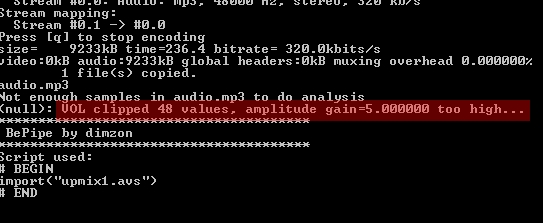
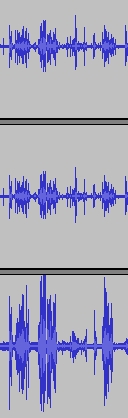
Had to cut down the LFE volume on UpmixJagger()
-
-
New Version V05 Released. Lots of Audio Quality Improvements.
1) Audio is Scanned for Volume Levels and Prevented from Clipping. Dialnorm setting determined automatically.
2) Default Configuration Creates Pretty Impressive Sounding Pseudo 5.1, including vocal removal on the SL and SR channels.
3) LFE channel Lowpassed to 90hz instead of 120 for better separation
4) AC3 File Is No Longer Deleted so you can use the file for a DVD project or you can convert it to 6-mono WAV files with the _AC3_to_6Mono_Wavs.bat File.
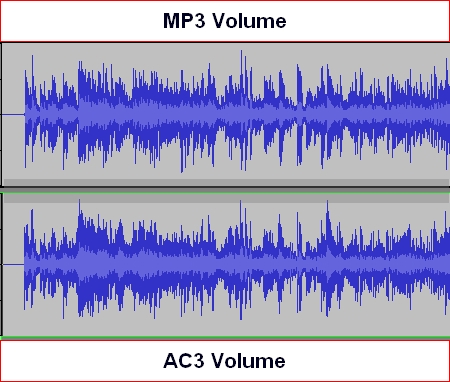
5) And most importantly, you'll see that the volumes of Mp3 and AC3 are THE SAME. If your PC or AC3 decoder isn't playing the levels back equally, it isn't the fault of the batch file.
* Download link in First Post
-
Minor Update - Full version in first post. Dialnorm test wasn't actually applying Dialnorm setting when it was time to encode to AC3. If you have V05 already, you only need to download this:
__run_upmix.rar -
Hello soopafresh, this is my first post here.Originally Posted by Soopafresh
Uhm, i am still using the "old" version of upmixer, https://forum.videohelp.com/images/guides/p1683994/wav_upmixer.zip
Cause the rar files on the wikiupload.com site are corrupt,
I can download them, but can't open them, can't repair them with Winrar.
Is it possible to repost 2_0_to_5_1_upmixV05b on this forum instead of wikiupload?
That would be great.
This forum is a real joy for audio/video fantatics, keep up the good work!
Richard -
Sure. Welcome to the forums, Richard.
http://www.savefile.com/files/778961 -
I just combined 2_0_to_5_1_upmixV05.rar and the __run_upmix.rar fix and put it on a temporary RapidShare mirror for you.
EDIT:
Removed RS link due to V6 release!! -
Thanks, jagger. Yeah, depends on the prevailing tradewinds, these uploads. I always test downloading after I upload. That wikiupload site used to be pretty reliable, but when I downloaded the file from there it was only 153 bytes. Weird...
-
Gosh Upmix-Aften-BePipe etc, Really works like a dream.
I have never known that a semi-automatic-upmix-algorithm-tool could output such Sparkling-pure-5.1-channel-audio from just a 2 channel Mp3 file, its amazing.
I will send my Adobe audition installation on vacation haha.
It sounds nearly like 96khz/24b/5.1 dts
I'm erhm, speecheless.
Thanks for the Posts people! Outstanding!
Richard

 Quote
Quote
 Visit Homepage
Similar Threads
-
To Script or Not To Script, that is the Question... (Custom Videos)
By TheMcD in forum EditingReplies: 2Last Post: 21st Oct 2010, 10:11 -
Does my script look right? I am trying a new script
By rocky12 in forum Newbie / General discussionsReplies: 11Last Post: 25th Sep 2008, 19:10 -
Script error
By buddycat in forum Video ConversionReplies: 8Last Post: 18th Nov 2007, 07:38 -
avisynth script
By magenta2007 in forum SVCD2DVD & VOB2MPGReplies: 7Last Post: 25th Sep 2007, 11:29