


 View Profile
 View Forum Posts
 Private Message


Just installed OK in Vista Ultimate edition and got this error when I tried to run it....
Version: SVCD2DVD 2.1
Build: 2.1.2474.30525
Type: System.UnauthorizedAccessException
Source: mscorlib
Message: Access to the registry key is denied.
InnerException:
StackTrace: at Microsoft.Win32.RegistryKey.Win32Error(Int32 errorCode, String str)
at Microsoft.Win32.RegistryKey.SetValue(String name, Object value)
at x3284ccece41ee22b.x2f5590cb48bb0c53..ctor()
at x3284ccece41ee22b.x2f5590cb48bb0c53.xc447809891322 395(String[] xce8d8c7e3c2c2426)
I was not able to register it as it did not allow me to get that far.
Installed NOT on OS drive as recommended, please advise.
+ Reply to Thread
Results 1 to 30 of 40
-
-
Solved my own problem and did a search. Ran for the first time AS ADMINISTRATOR and it seems OK now

-
Tried to install on VISTA ULTIMATE x32 and i get this error.
Version: SVCD2DVD 2.1
Build: 2.1.2474.30525
Type: System.UnauthorizedAccessException
Source: mscorlib
Message: Access to the registry key is denied.
InnerException:
StackTrace: at Microsoft.Win32.RegistryKey.Win32Error(Int32 errorCode, String str)
at Microsoft.Win32.RegistryKey.SetValue(String name, Object value)
at x3284ccece41ee22b.x2f5590cb48bb0c53..ctor()
at x3284ccece41ee22b.x2f5590cb48bb0c53.xc447809891322 395(String[] xce8d8c7e3c2c2426)
Any forthcoming solutions???
Regards,
Steve... -
Have you tried a search on the error in this forum (like the poster above you)??
This has been asked, answered and fixed previously. Let us know if your error is different.Dwight
"A positive attitude may not solve all your problems, but it will annoy enough people to make it worth the effort."
- Herm Albright
www.martialconcepts.com -
Either:
Go the the actual exe file (SVCD2DVD.exe) and do Right Click-> "Run as administrator"
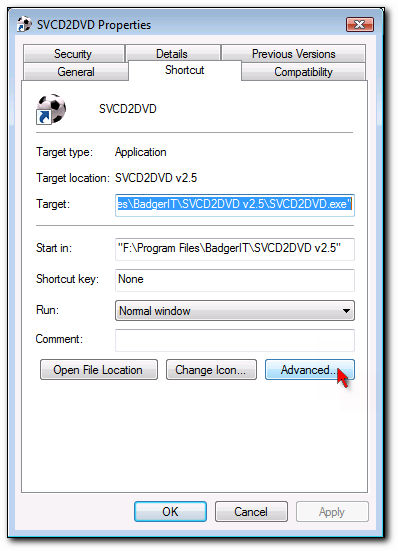
Or Create a shortcut (on your desktop for example) to the exe and then you can do Right Click->Properties->Advanced->Run As Administrator
In both cases you will be able to get past this error.
It is also recommended that (with this version of S2D & Vista) you install in a folder other than "Program Files"SVCD2DVD v2.5, AVI/MPEG/HDTV/AviSynth/h264->DVD, PAL->NTSC conversion.
VOB2MPG PRO, Extract mpegs from your DVDs - with you in control! -
EXCELLENT!

That's it ChrissyBoy you were 100% correct with your reply, i just located the .exe file in program files where it was installed as default, right clicked it and selected run as administrator and BINGO! it worked a treat.
Bye the way any new developments for this fab prog or a banner change to 2007?
Cheers,
Steve... -
Thanks for all your help Chrissyboy...
I had a different error when trying to register in Vista - "Internal Error - contact the author" (or something remarkably similar).
Followed the advice on this thread and all is working fine
So, for Vista users my top tips are:
DON'T install in Program Files directory (that caused the problem)
DO install as Administrator (thanks for the setup.exe to enable us to do that in latest version)
DO run as Administrator
IF you want SVCD2DVD on your Start menu use the "Pin to start menu" option (not make shortcut) and then you can right-click it and run as administrator from there.
I'm assuming that SVCD2DVD still doesn't like to be in the Program Files folder? (Using the latest 6th June build)
I can't praise this software enough, Chrissyboy's dedication to his creation makes it more than worth the investment. I am constantly recommending that people BUY this software as it is such good value and IMHO the best piece of software by far for quick, easy conversions.
Oh yes, 2-pass encoding is great... any chance of 4- or 6-pass encoding in the future? (Can this software rival CCE?)
Once again - thank you, Chrissyboy! -
This is not relevent anymore. When you get the:I'm assuming that SVCD2DVD still doesn't like to be in the Program Files folder? (Using the latest 6th June build)
"Internal error.
there is an error registering the program.
Please inform the author."
error, it is because the SVCD2DVD.exe file is in use. If you do a quick reboot and try again you should be ok.
There is a chance!Oh yes, 2-pass encoding is great... any chance of 4- or 6-pass encoding in the future?
Thanks. Nice to hear this once in a whileI can't praise this software enough
SVCD2DVD v2.5, AVI/MPEG/HDTV/AviSynth/h264->DVD, PAL->NTSC conversion.
VOB2MPG PRO, Extract mpegs from your DVDs - with you in control! -
<snip>Originally Posted by ChrissyBoy
My problem was a little different and I rebooted 3 times but still couldn't get it to register! Reinstalled it to another folder and it worked perfectly first attempt. For some reason it wouldn't register whilst it was living in C:\Program Files.
Oh no, I shouldn't have asked! Now I am drooling at the thought - any more details? I've often dreamt of finding the perfect piece of software... powerful AND easy to use.There is a chance!Oh yes, 2-pass encoding is great... any chance of 4- or 6-pass encoding in the future?
(Hmm... any chance I could marry SVCD2DVD?) -
Fantastic tip, I was messing about with it for hours till I found this thread, now it works a treat, thanks very muchOriginally Posted by kolobos
-
Installed latest version of SVCD2DVD 2.5.3000. Installed as Admin.
Stopped with "Program has stopped working and will be closed etc.. Error.
Running Vista Premium 64 bit. Took me 2 days to figure it out, was because I had UAC turned off. Turned it back on and now everything is peachy, except of course I got the UAC crap again. Anyone know a way around this?
Turning it on and off isn't a good workaround as it requires a reboot each time.
Not a problem only with 2.5.3000 as I reinstalled a couple of older versions and they exhibit the same begaviour.
Top proggy BTW Chrissy Boy, been using it for several years now and would be lost without it. -
Can You Guys Help Vista Home Premium,SVCD2DVD v2.5 build: 2.5.3000
Tis is the Error I get :
System.IO.FileLoadException: Could not load file or assembly 'Interop.QuartzTypeLib, Version=1.0.0.0, Culture=neutral, PublicKeyToken=2b63f0abbaf93e6a' or one of its dependencies. The located assembly's manifest definition does not match the assembly reference. (Exception from HRESULT: 0x80131040)
File name: 'Interop.QuartzTypeLib, Version=1.0.0.0, Culture=neutral, PublicKeyToken=2b63f0abbaf93e6a'
at x3284ccece41ee22b.x79ed6fa5f8db6479.xcc1dac46909c4 2ab()
at x3284ccece41ee22b.x79ed6fa5f8db6479..ctor()
at x3284ccece41ee22b.xb6dca8349e33d934.x85601834555fb 7d5()
at x3284ccece41ee22b.xb6dca8349e33d934..ctor()
at x3284ccece41ee22b.x210ff09a2516b1a7.xc456b78441ff1 c49()
at x3284ccece41ee22b.x210ff09a2516b1a7.x07267fbbae07d a13(Object xe0292b9ed559da7d, EventArgs xfbf34718e704c6bc)
at System.Windows.Forms.Form.OnShown(EventArgs e)
at System.Windows.Forms.Form.CallShownEvent()
at System.Windows.Forms.Control.InvokeMarshaledCallba ckDo(ThreadMethodEntry tme)
at System.Windows.Forms.Control.InvokeMarshaledCallba ckHelper(Object obj)
at System.Threading.ExecutionContext.runTryCode(Objec t userData)
at System.Runtime.CompilerServices.RuntimeHelpers.Exe cuteCodeWithGuaranteedCleanup(TryCode code, CleanupCode backoutCode, Object userData)
at System.Threading.ExecutionContext.RunInternal(Exec utionContext executionContext, ContextCallback callback, Object state)
at System.Threading.ExecutionContext.Run(ExecutionCon text executionContext, ContextCallback callback, Object state)
at System.Windows.Forms.Control.InvokeMarshaledCallba ck(ThreadMethodEntry tme)
at System.Windows.Forms.Control.InvokeMarshaledCallba cks()
WRN: Assembly binding logging is turned OFF.
To enable assembly bind failure logging, set the registry value [HKLM\Software\Microsoft\Fusion!EnableLog] (DWORD) to 1.
Note: There is some performance penalty associated with assembly bind failure logging.
To turn this feature off, remove the registry value [HKLM\Software\Microsoft\Fusion!EnableLog].
************** Loaded Assemblies **************
mscorlib
Assembly Version: 2.0.0.0
Win32 Version: 2.0.50727.312 (rtmLHS.050727-3100)
CodeBase: file:///C:/Windows/Microsoft.NET/Framework/v2.0.50727/mscorlib.dll
----------------------------------------
SVCD2DVD
Assembly Version: 2.5.3000.0
Win32 Version: 2.5.3000.0
CodeBase: file:///G:/Program%20files/DVD%20Tools/SVCD2DVD%20v2/SVCD2DVD.exe
----------------------------------------
DevComponents.DotNetBar2
Assembly Version: 6.7.0.1
Win32 Version: 6.7.0.1
CodeBase: file:///G:/Program%20files/DVD%20Tools/SVCD2DVD%20v2/DevComponents.DotNetBar2.DLL
----------------------------------------
System.Windows.Forms
Assembly Version: 2.0.0.0
Win32 Version: 2.0.50727.312 (rtmLHS.050727-3100)
CodeBase: file:///C:/Windows/assembly/GAC_MSIL/System.Windows.Forms/2.0.0.0__b77a5c561934e089/System.Windows.Forms.dll
----------------------------------------
System
Assembly Version: 2.0.0.0
Win32 Version: 2.0.50727.312 (rtmLHS.050727-3100)
CodeBase: file:///C:/Windows/assembly/GAC_MSIL/System/2.0.0.0__b77a5c561934e089/System.dll
----------------------------------------
System.Drawing
Assembly Version: 2.0.0.0
Win32 Version: 2.0.50727.312 (rtmLHS.050727-3100)
CodeBase: file:///C:/Windows/assembly/GAC_MSIL/System.Drawing/2.0.0.0__b03f5f7f11d50a3a/System.Drawing.dll
----------------------------------------
System.Deployment
Assembly Version: 2.0.0.0
Win32 Version: 2.0.50727.312 (rtmLHS.050727-3100)
CodeBase: file:///C:/Windows/assembly/GAC_MSIL/System.Deployment/2.0.0.0__b03f5f7f11d50a3a/System.Deployment.dll
----------------------------------------
Accessibility
Assembly Version: 2.0.0.0
Win32 Version: 2.0.50727.312 (rtmLHS.050727-3100)
CodeBase: file:///C:/Windows/assembly/GAC_MSIL/Accessibility/2.0.0.0__b03f5f7f11d50a3a/Accessibility.dll
----------------------------------------
AxInterop.CodeLock
Assembly Version: 1.0.0.0
Win32 Version: 1.0.0.0
CodeBase: file:///G:/Program%20files/DVD%20Tools/SVCD2DVD%20v2/AxInterop.CodeLock.DLL
----------------------------------------
System.Xml
Assembly Version: 2.0.0.0
Win32 Version: 2.0.50727.312 (rtmLHS.050727-3100)
CodeBase: file:///C:/Windows/assembly/GAC_MSIL/System.Xml/2.0.0.0__b77a5c561934e089/System.Xml.dll
----------------------------------------
Interop.CodeLock
Assembly Version: 1.0.0.0
Win32 Version: 1.0.0.0
CodeBase: file:///G:/Program%20files/DVD%20Tools/SVCD2DVD%20v2/Interop.CodeLock.DLL
----------------------------------------
Tried Your Run As Admin but get same thing -
Ok - it is to do with WMP.... What version are you running?
SVCD2DVD v2.5, AVI/MPEG/HDTV/AviSynth/h264->DVD, PAL->NTSC conversion.
VOB2MPG PRO, Extract mpegs from your DVDs - with you in control! -
If you are talking Windows Media Player it is what came with Vista version 11.0.6000.6324
-
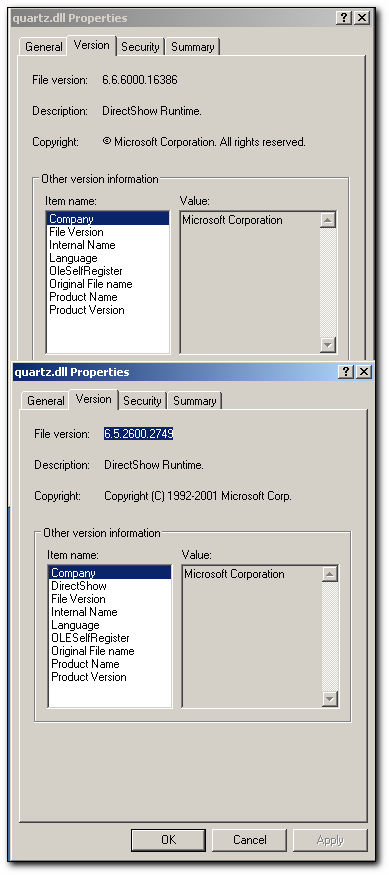
What is the version of the quartz.dll located in your system32 folder?:
 SVCD2DVD v2.5, AVI/MPEG/HDTV/AviSynth/h264->DVD, PAL->NTSC conversion.
VOB2MPG PRO, Extract mpegs from your DVDs - with you in control! -
I have Version 6.6.6000.16386
I am running Vista Home Premium 32 Bit version 6.0 Build 6000
Thanks for the Help...Let me know....got all my other Apps to work..... -
Didn't the Vista install problem really start when Vista got installed?
-
Alan69
You lost me.. are you replying to my post of SVCD2DVD program Error running in Vista
or my problem with registration(Which I didn't Post)
ThrashMaster -
I believe Alan69 was making a joke...
Dwight
"A positive attitude may not solve all your problems, but it will annoy enough people to make it worth the effort."
- Herm Albright
www.martialconcepts.com -
Sorry I didn't catch it..my head is just to full....Have finally gotten everything to work in Vista Home Prem, alot for just 5 days and never seen Vista before....the Networking for workgroups has been a bear...I blame it on NIS, Norton has always given me problems....Once I got rid of it no more Problems...Just this last one with SVCD2DVD...
-
Got it Fixed........
Doesn't like to be installed in any directory on any drive called Program Files period.....first time installed on d:\Program Files\SVCD2DVD, errors....removed & re-installed to c:\Program Files\SVCD2DVD.....would not Register....third time removed and Installed to c:\SVCD2DVD and now works fine.....
Thanks For all the Help!!!!!!!!! -
Hi i have triued running it as adminstor and into a new directory still no good it still wont let me register it any help would b great thanks
-
Drop me and email and we can try it manually...
SVCD2DVD v2.5, AVI/MPEG/HDTV/AviSynth/h264->DVD, PAL->NTSC conversion.
VOB2MPG PRO, Extract mpegs from your DVDs - with you in control! -
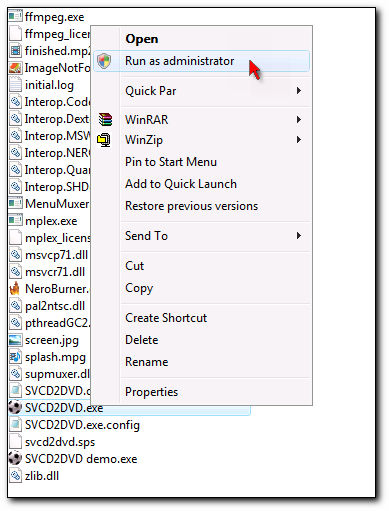
Just to clarify... To "Run as Administrator", do the following:Originally Posted by ChrissyBoy
Either locate the SVCD2DVD.exe file (in the folder where you installed the program and "Right Click"->"Run as Administrator":
OR (Recommended as this will needed to be done just the once):
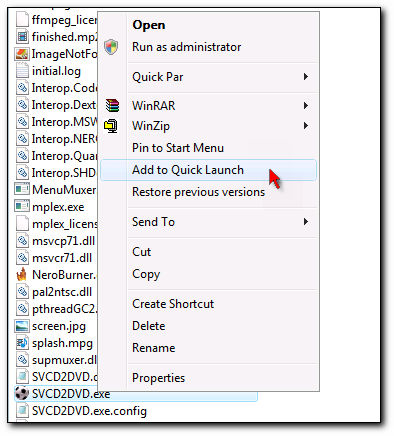
Create a shortcut or add to the Quick launch bar:
"Right Click" on the exe:
or
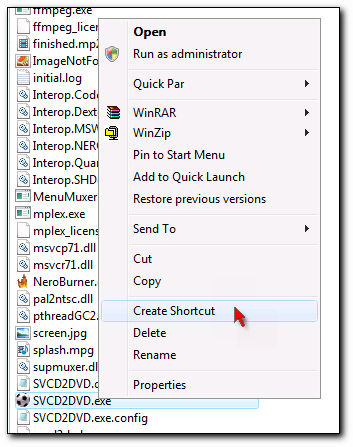
Then locate the shortcut or quick launch icon and "Right click" on that:

Choose the "Advanced" properties of the shortcut:
And then choose "Run as Administrator":
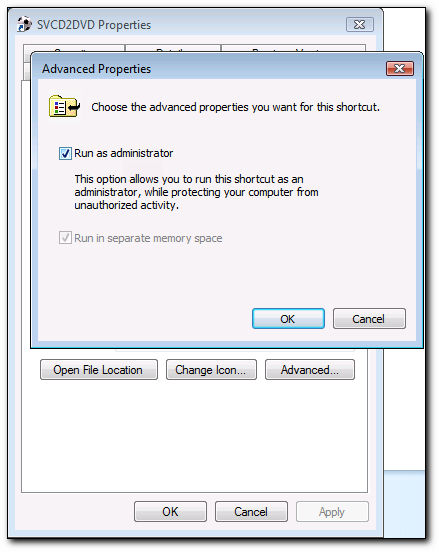
Click "OK" to all the dialog boxes and you should be good to go! Use the shortcut to run the program and so you will be always be running as administrator.SVCD2DVD v2.5, AVI/MPEG/HDTV/AviSynth/h264->DVD, PAL->NTSC conversion.
VOB2MPG PRO, Extract mpegs from your DVDs - with you in control! -
Version: SVCD2DVD 2.5
Build: 2.5.3600.0
Type: System.UnauthorizedAccessException
Source: mscorlib
Message: Access to the path 'C:\Users\Private\Desktop\Newsgroup\10,000_BC_(200 8)\bald-bc\SVCD2DVD_OUTPUT\VIDEO_TS\VTS_01_2.VOB' is denied.
InnerException:
StackTrace: at System.IO.__Error.WinIOError(Int32 errorCode, String maybeFullPath)
at System.IO.File.SetAttributes(String path, FileAttributes fileAttributes)
at x3284ccece41ee22b.xe679539bc4bbd8b5.xfeff58ae51b05 fd0(String xd168ac2ed64c4662)
at x3284ccece41ee22b.xe679539bc4bbd8b5.x865d1dce05e7a 87c(String xc7faa4629ea73ace, Boolean x1ebdb8fb1e9908a0)
at x3284ccece41ee22b.xd3764d4f1e921081.x12cbe7a4e46ac 9ae()
at System.Threading.ThreadHelper.ThreadStart_Context( Object state)
at System.Threading.ExecutionContext.Run(ExecutionCon text executionContext, ContextCallback callback, Object state)
at System.Threading.ThreadHelper.ThreadStart()
Hi
I've followed the instructions to the full but the programme gets to about 60% then closes down on me
Please can somebody help/advise
Thanks -
Post your log file.
Dwight
"A positive attitude may not solve all your problems, but it will annoy enough people to make it worth the effort."
- Herm Albright
www.martialconcepts.com -
Hello There,
Very nice program eventhough restricted to Administrators, but I can live with that (if not my wife lol!). Thanks for a great effort Chrissyboy.
I have been using it for almost half a year now and suddenly it stopped. It just shows the splash screen and "boink" just disappears.
Can this behaviour be anything to do with Vista SP1?
I tried a repair of the install to no avail. Any help appreciated.
Thanks
Pax -
Look here and let us know how you get on:
https://forum.videohelp.com/topic346055.html?highlight=splashDwight
"A positive attitude may not solve all your problems, but it will annoy enough people to make it worth the effort."
- Herm Albright
www.martialconcepts.com -
can you please help, tried everything now to get my svcd2dvd working on windows 7, I had vista installed and everything was fine, I then purchased a copy of windows 7 and upgraded my system, it still worked fine after upgrading until yesterday, I did a system restore and now whatever I do I cannot get it working again, any help would be appreciated.

-
Did you try a reinstall of SVCD2DVD?
Dwight
"A positive attitude may not solve all your problems, but it will annoy enough people to make it worth the effort."
- Herm Albright
www.martialconcepts.com
 Quote
Quote
 Visit Homepage


Similar Threads
-
Can I install Win Vista HP with installation CD
By pchan in forum ComputerReplies: 21Last Post: 9th May 2011, 09:37 -
Cannot install lame mp3 on vista x64
By jarko in forum AudioReplies: 14Last Post: 28th Apr 2010, 03:12 -
AC3 ACM Will Not Install with Vista 64
By Mitchum22 in forum AudioReplies: 4Last Post: 19th Aug 2009, 09:15 -
Vista install glitch and dvr-ms thanks
By todds1 in forum SVCD2DVD & VOB2MPGReplies: 0Last Post: 29th Nov 2007, 12:03 -
How to install Vista Ultimate 64 with raid5
By mysts in forum ComputerReplies: 3Last Post: 4th Aug 2007, 20:49