


 View Profile
 View Forum Posts
 Private Message


So , you have a clip imported into ulead video studio , and it has some garbage on top or bottom ... can be on any side .
Well , no matter what side it is on , I will show you how to clean up so as to remove this garbage from the clip .
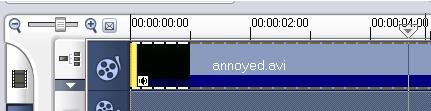
1: We start with the clip already dragged to the time line
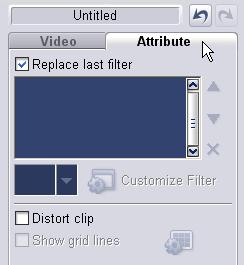
2: Now up left ... go here , and click attibute's .
3: Notice over to the right , the filter's have shown up ... look for
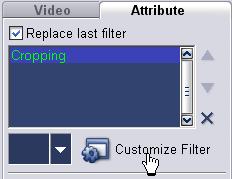
Drag this onto your clip on the time line ...
You now have this in the attibute's ... Click "customize filter"
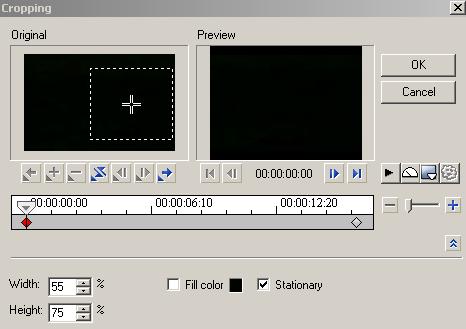
6: You now have a new box appear (dont worry about that clip option , that's just me) ... dont use it .
This thing is a pain is the a*** ... vdub dose this stuff much simpler ... but we will keep going .
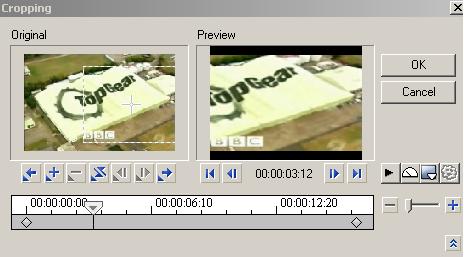
I call it " what's in the dotted box , is what you get ... nothing else"
--------------------------
Notice the preview window's ...
Move mouse into "original" ... over the plus , the cursor will change .
You can now move the dotted box about , into a better position .
For now , move the box to center .
See those width and height box's ... set these to required value's now .
Move the box if you need too as required till you are happy with it's position
------------------------
7: Uncheck "fill"
8: Check "stationary"
9: Click ok .
10: Mess with other program option's or head straight to file encode .
The only hassle is ulead tend's to drag it's butt when using these function's ... good old vdub is wham , bam , thank you ... job done ...
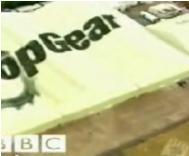
That's how to remove garbage from clip's ... here's a snap of my project ..
As you can see ... it's top gear , from sbs ... no , those black bar's do not get included in the final output , what was in the box dose ...
Here's a snap from koolplaya .... from one of my previous test run's .
Enjoy .
+ Reply to Thread
Results 1 to 5 of 5
-
-
I am having a real problem using this filter. OK, I selected the filter that crops the top and bottom but leaves the sides as is. I then increased the height to the height I wanted. But, here is what I can't control: as the video plays the cropped area gets smaller and smaller as the video progresses.
How do you stop that from occuring? I want the cropped area that I made to stay constant. I have to use Fill Color so that a colored band shows at the top and bottom. Exactly what does the Stationary option do? I have selected it and deselected it but I don't see where it make any difference to anything. -
From a couple of test's ... dont move those line's around the video in the main window of the program ... they cause the problem you are experiencing ... it drove me nutt's because all I wanted to do is contained in this guide ... this filter , you pick what you want , and anything outside the box is cropped ... gone ... out of here .
The way I used the filter , crops the crap off ... and output was to dvd .
When setting the output , you have the option to make change's to the scale ... I used mpeg2 at 352x288 , and created a mini-dvd on cd for a freind .
-------------------------------
Set the filter , dont mess with those line's in the main window , make changes to encoder output .
Doing the way you have it dose some weird motion crap , that's almost uncontrolable ... well I didnt bother to find out why it dose that ... I dont get paid by ulead . -
I only have version 6 so it might be somewhat different, but checking the "Stationary" checkbox means that the center of the crop field will remain in the same position through the span of the filter, but it does not mean the size or shape of the filter will remain constant. To maintain a constant crop set the size and position you want and click stationary, then move to the end of the filtered clip and reset the size to match the start.
"Shut up Wesley!" -- Captain Jean-Luc Picard
Buy My Books -
Haha same problem you have to select both ends of the Video!Originally Posted by Bjs
How?
The two little Diamond Box on both sides in the Lt. & the rt Lower corners!
1. each have their own setting one for the beginning (See Pic RED one)
2. one for the end of the video (& then select the Clear one! , & make the settings the same as the red one)
you must have the same setting on both end & WOW & than you can move the box around to crop what ever you want
& it will be the same on both ends! & a Even Video!
I hope this hepls

 Quote
Quote
Similar Threads
-
help with Ulead videoStudio?
By wamit in forum Capturing and VCRReplies: 4Last Post: 24th Apr 2009, 08:27 -
Something faster than ULEAD Videostudio SE DVD?
By snafubaby in forum Authoring (DVD)Replies: 3Last Post: 2nd Mar 2009, 00:11 -
ULEAD VideoStudio trim
By dcmoser1952 in forum EditingReplies: 3Last Post: 24th Feb 2009, 14:43 -
Ulead VideoStudio 11 on Vista
By run1492 in forum Authoring (DVD)Replies: 2Last Post: 10th Jul 2007, 17:21 -
Ulead Videostudio Transitions - How to Add?
By markannab in forum EditingReplies: 1Last Post: 28th May 2007, 12:54