


 View Profile
 View Forum Posts
 Private Message


This guide will illustrate how to convert an AVI file to DVD with switchable subtitles and a professional looking menu using the freely available AVI2DVD and its DVD menu creator.
You will need:
the movie, in AVI format (usually about 700 MB or so)
the subtitle of the movie, usually in SRT format
AVI2DVD (available here on the website)
Irfanview (to convert the pictures)
a paint program (to add text and other effects to background), such as PAINT.NET (free)
a couple hours to spend (most of which is unattended)
about 10 GB of space
and a lot of patience!
Before you start, please load the movie and subtitle into your favorite player and test them to make sure they synchronize properly. If they don't, use something like Subtitle Workshop to fix them, but that's subject for another guide.
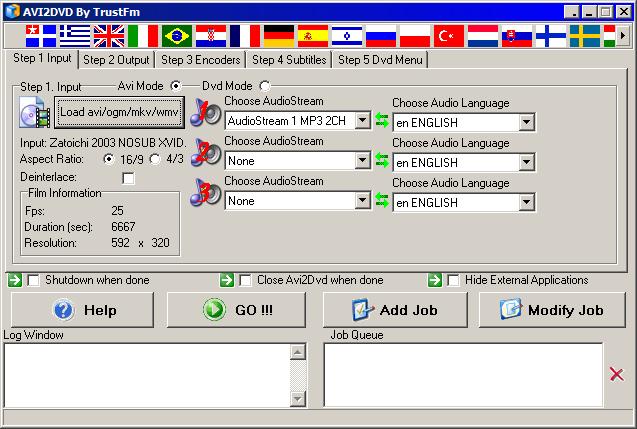
Anyway, start up AVI2DVD, and you're in the initial screen "Step 1: Input"
Load the AVI file you want, go onto "step 2: Output"
In screen 2: output, you can leave everything as "default". Change the output ISO filename if you want to, or if you don't need an ISO at all, uncheck the choice "make Iso". If you have a PAL video source, 25 fps, be sure to select PAL to NTSC conversion.
I usually leave the chapter settings alone, with default of every 5 minutes. It's enough so people can skip, and it doesn't take any time on your part. In any case a chapter menu is beyond the scope of this guide.
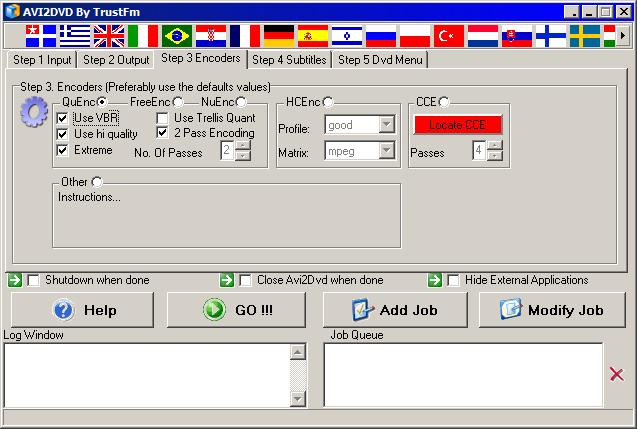
Go onto Step 3: Encoders
I usually leave everything alone here as well. QuEnc is free MPEG2 encoder. The more choices you select, the slower encoding becomes. I usually check everything except Trellis, and Extreme quality. Those 2 can stay off. I'd suggest you encode a short piece, maybe 15 seconds to a minute, and check the output quality begfore you decide, or just leave it as default.
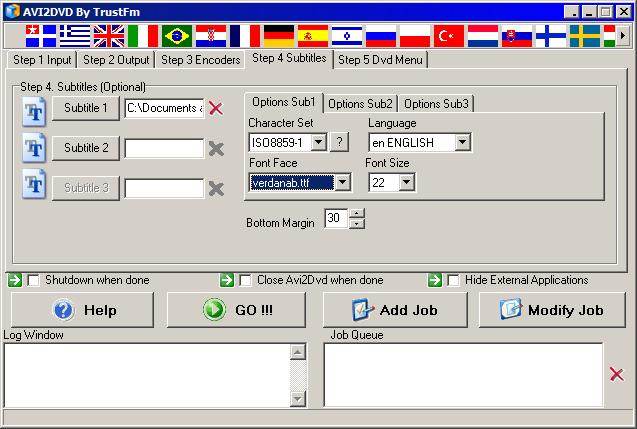
Go onto Step 4: Subtitles
Click on the button to load the matching subtitle to the first (and likely, only) soundtrack. Leave all other settings alone. You may want to consider making the fonts slightly smaller than the original default, but that's up to you. I use the settings here.
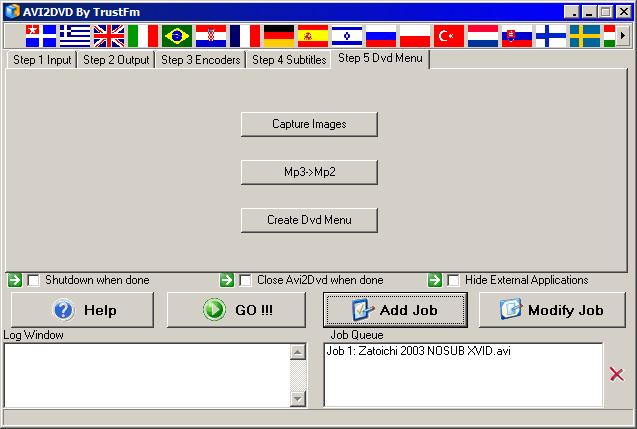
Now add the job and watch it appear below. Do NOT click on "Go!' yet. Click on Step 5: DVD Menu
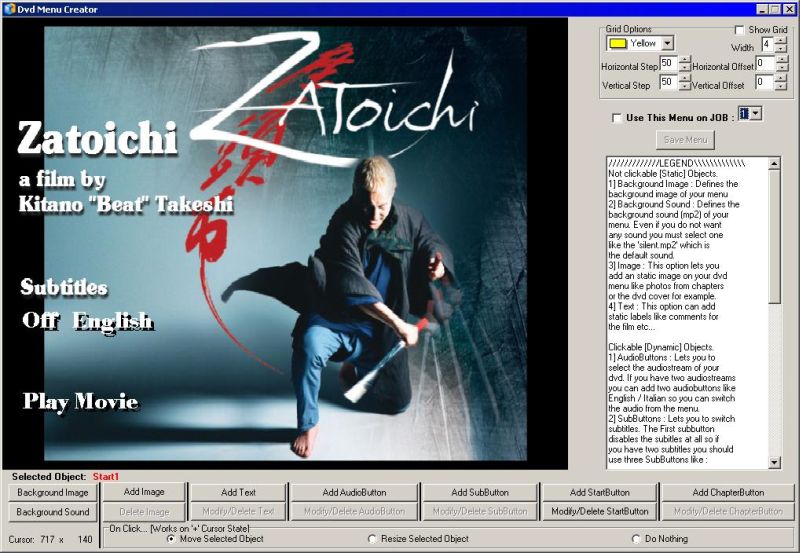
A very professional looking menu can be created with a nice picture, a line of text, and some text buttons. You don't need fancy music or looping video to impress.
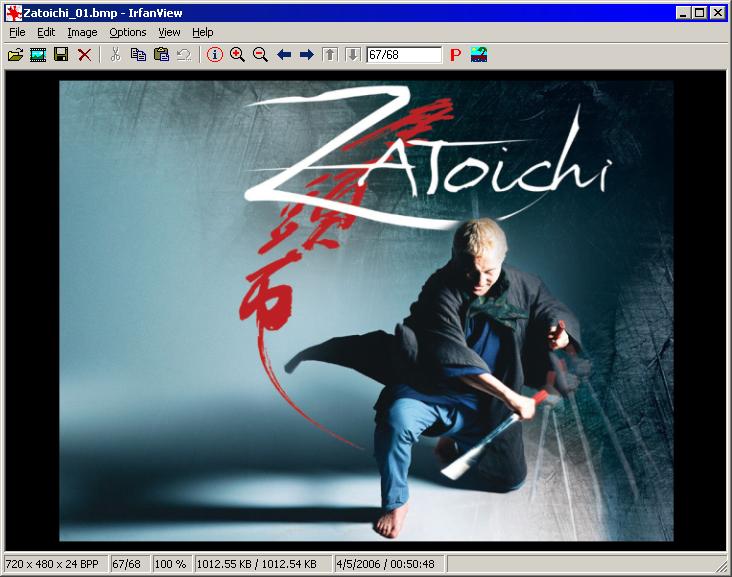
Easiest way to find the picture for your background is via the Internet. Google's image search is an excellent way to start. I am going to demonstrate by using a Japanese movie called Zatoichi (2003). I found this wallpaper for Zatoichi on the net... It has enough blank space for the menus, excellent.
NOTE: If you don't like the pictures you find, or rather not to, you can use the built-in DVD frame capture. Click on Capture Images button on step 5, and pick some frames out of the movie itself as your main menu.
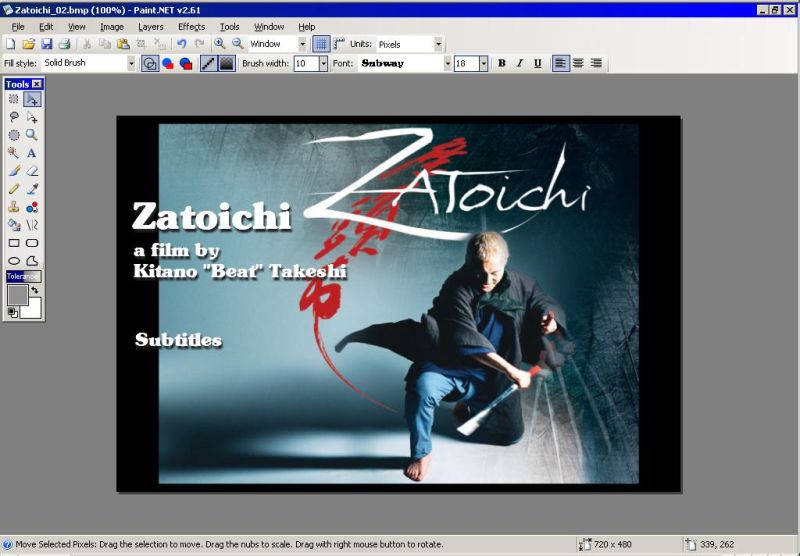
Open the picture into Irfanview, and resize it to 720 x 480 for the background. I am on NTSC system, so I use that resolution. If you have PAL, you'll have to use some other resolution appropriate for your system. Save it with a different name as a BMP file, and load it into your paint program. The menu creator only load BMP files. Add the title and other texts in the Paint Program as you see fit.
And leave some TINY marker for where you want the controls to go back in the menu creator. You would need three buttons: subtitle on, subtitle off, and play movie. It's recommended that you do all the text and picture manipulation here as the interface for adding the text buttons is EXTREMELY convoluted in AVI2DVD's menu creator.
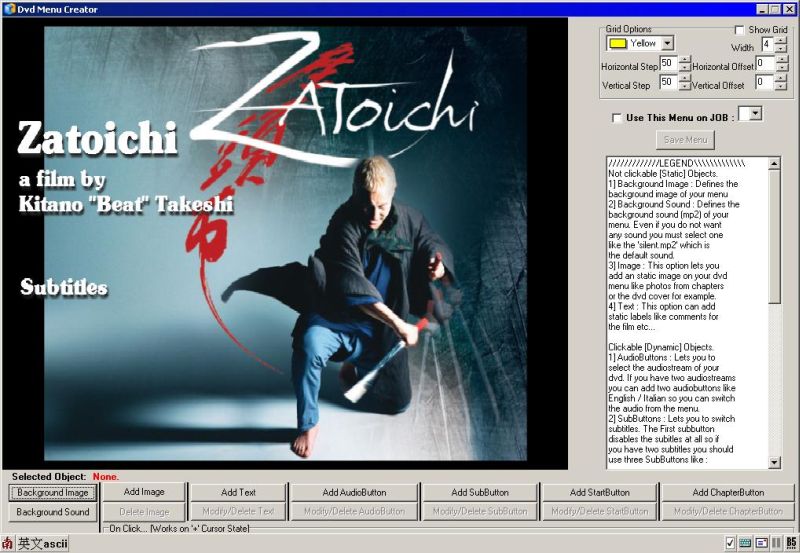
Once you are satisfied, save the picture, and load it into the menu creator.
Now let's add the buttons, by using TEXT BUTTON below, click and drag, enter text.
If you need to reposition the item, make sure you have "move mode" selected at the bottom. Else you'll end up replacing the item. And you must draw the box big enough, but you don't see the box. That's what I mean by convoluted.Any way, you just need 2 words: English and Off. Click on Add SubButton, and the first one will be "Off", then "English". Change the settings so they sort of match what's on already used in the background, or at least get reasonably close.
Then there's one more button... PLAY MOVIE. Add that as well.
Make sure you assign the menu to the job by using that selector to the right. Check the checkmark, select the job number (usually, only 1), and hit the SAVE MENU button.
Hit GO, and let it finish.
Test the entire folder first with something like PowerDVD, which will play off the HD in "DVD on HDD mode".
Once you are satisfied, then you can burn the image to a DVD, using whatever tool you choose, such as Nero or DVDDecryptor. Enjoy your DVD!
+ Reply to Thread
Results 1 to 30 of 96
-
-
Hi...
I followed all the instructions above but when I about press GO!!!..It asked me to choose an audio stream...so I went back to Step 1 but there is nothing in the audiostream to choose from...
Can you please help me out...
Thanks in advance.. -
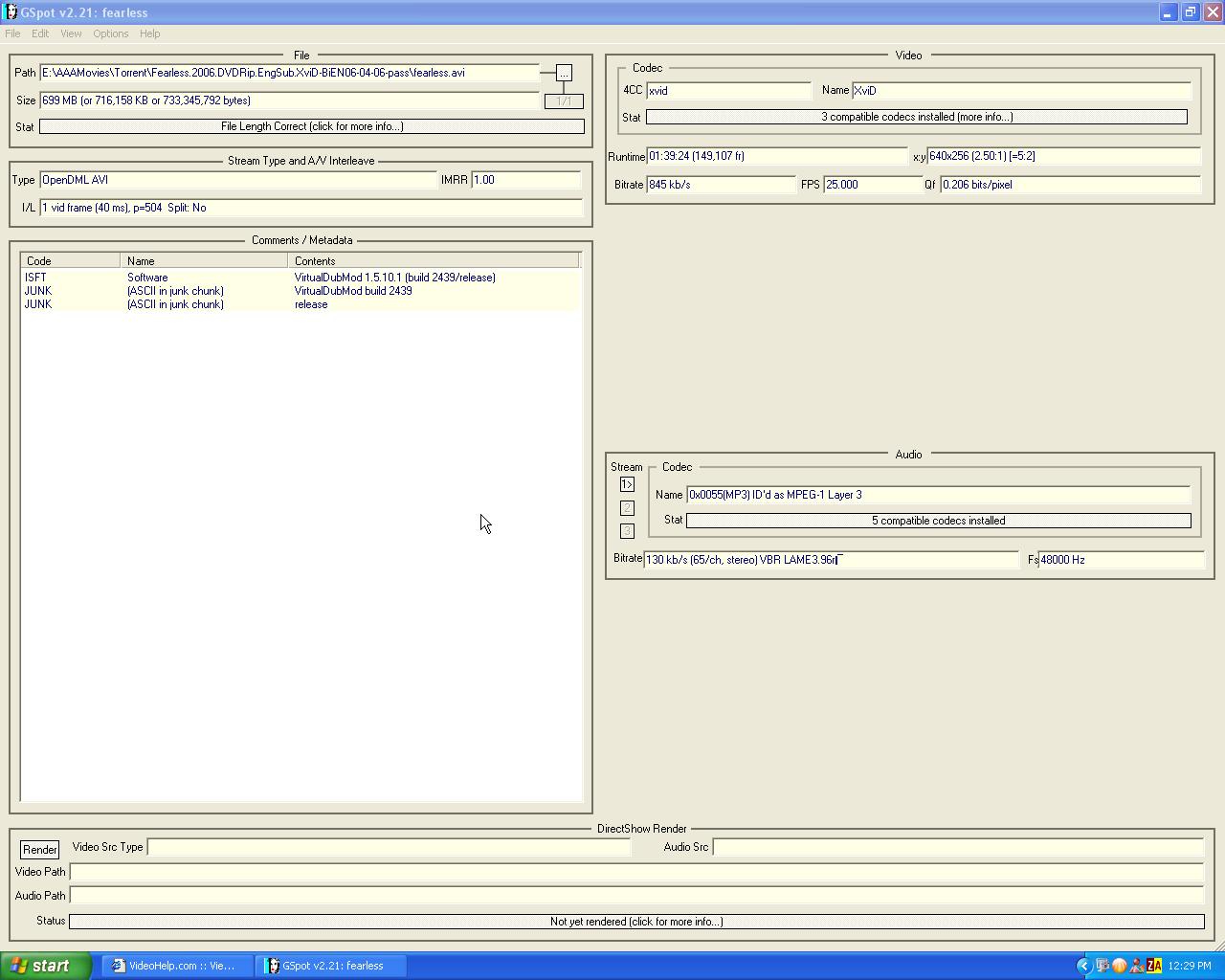
Weird. What does GSpot say about your file?Originally Posted by ironchef
-
Hi Kschang...
Thank for the fast reply....I am very new to some of these programs...
Which information you want to know about mi file when open with GSpot....sorry I don't how to capture the screenshot..
Stream Type and A/V Interleave
Type:OpenDML AVI IMRR:1.00
I/L:1 vid frame (40ms), p=504 Split: No
Not sure is that what you after...
Thanks -
Hi.
I have the same problem as ironchef. There is no audiostream option given. -
I want to know about the audio stream in your AVI file.
Use something like Gadwin Printscreen (free tool) to take the shot, then read the instructions at the bottom to upload/post the shot. You can crop out the name of the file and such. -
Here the capture...Hope it work...
Thanks
-
You have a VBR (variable bit-rate) MP3 as your audio track. Very nasty stuff. While it COULD increase the quality and reduce file size, the headache it introduces far outweighs the benefits in produces.
What you need to do is to demux the audio from the AVI, convert it back into CBR (constant bit-rate) MP3, then mux it back into the AVI so you can use it with AVI2DVD.
Follow this topic for a bit of help:
https://forum.videohelp.com/viewtopic.php?t=296981 -
Will this decrease the quality of the movie..??
I also use The Filmmachine and it work well...quality is good....but it don't have the menu option....
Thanks -
I doubt you'll notice the quality difference in audio. I certainly don't.
-
How do you demux and mux audio from and to a avi file?
I'm having a hell of a trouble getting this to work. I tried using Video dub Mod but I could'nt get the audio stream to work after that as well and I don't know how to combine the video and audio files together in a single file. -
That's actually a different topic altogether. In the future please ask that sort of question in the newbie forum. For now, here's your answer. In VDubMod, open your AVI, open the streams menu, and you should see the "save WAV" which will take out the audio for you and save it as a large WAV file.
Process the WAV however you want, compress it to MP3 or MP2 even. When ready, turn OFF the existing audio track by double-click it. It should turn "cross-hatched". Then add your new audio track by hitting the ADD button. Pick processing mode as "stream copy". And Save the AVI, and let it start processing. VDubMod will then combine the audio with the video for you, replacing the original soundtrack. -
-
That means you didn't set the audio compression. Set it to MP3 compression, pick a bitrate out of that long list, do full processing, and try generating another AVI file.
-
hi i have a question. i want to install two subtitle files--should they be the same folder---have different names? i am not sure if this is even possible.
-
It should be quite possible. I just never had to do it yet. Just add ANOTHER subtitle button. AVI2DVD allows up to 3 different ones.
-
I took your advice, and downloaded Avi2dvd to convert a video that I downloaded from my VCR to my computer (yes, I know that VCR's are becoming extinct, but you can't find this movie on DVD!). When I opened the program, and selected my .avi file, it said that I had to remove symbols (such as underscores) from the input file name, so I did. So I went back into Avi2dvd and selected the newly renamed file. After a few seconds, the program comes up with an error that says something along the lines of "Floating division point by zero". Now, I'm usually able to figure technology out with just fooling around with it, but as soon as this error comes up, the program freezes, and I have to exit and open the application back up. What in the world do I have to do to fix this problem?
Thanks!
screenshot.jpg -
Hmmm... I don't know. You were able to play this AVI okay, I guess? No errors at all? This program is somehow VERY picky about punctuation marks and such. I simply took them ALL out and left the .AVI
EDIT: I noticed in your screenshot that the "resolution" was kinda messed up. Did GSpot say your AVI was okay? -
Ok, I figured out with Gspot that I did not have the correct codec installed to play the video... I should have figured that out when Windows Media Player kept playing it as an song instead of video. Thanks for the help, and I'll let you know how it goes!
-
Hi all:
I managed to make a DVD with this wonderfull program.
Now I need an information.
I have a movie with 2 AVI files.
Is it possible to create only one DVD file with these 2 AVI files without any interruption on the movie ??
Also pls note that I have to add Subs to the movie that are also splied into 2 SRT files.
pls explain if it is possible.
tks in advance and sorry if this was explained in this forum already.
hilario. -
from the way I understand, you just rename them to [title]1.avi and [title]2.avi where [title] is your actual title. Basically it must be consecutive. Just add the first file, and the program knows to seek out the 2nd file and so on. However, I'm not 100% sure on that. Maybe you need to add ALL of them.

-
Originally Posted by kschang
Ok i found.
Not exactely like that: we have to rename like this: title cd1.avi and title cd2.avi
The program will join both files.Same for the subtitles.
Tks.hilario.
Now I have a different problem.
I have a movie in 2 avi files.The program accepts to convert both in separate.!!
But when I want to put them together , using above System CD1, CD2, it will convert only first half of the movie.This is very strange as I alreday made a convertion with anotehr 2 files movie, and it worked!!.
I made a DIRECT STREAM COPY with Virtualdub , but ... same result...
Any ideas ???
By the way if I get 2 VOB files of that movie (using AVI2DVD ) how can I join the 2 parts ???
This could be a solution.
hilario
EDIT: problem solved= used AVI-MUX and it worked.There was a problem on one of the files.
-
hi i have problem when i reached at the end 5 step and hit go button message comes interface not soppert plz tell me what is this
-
Interface not supported? That sounds like a bad DLL or wrong codec being used. Which encoder did you use and what does the log say after that?
-
Greetings,
Thanks for this nice guide, it has helped me a lot. I was wondering, I have 4 short movies I wanted to do a DVD with, can it be done with this nice app? I don't want to join them, I want to have them as separate movies inside the same DVD...
Thanks in advance! -
Great program, but the sound is out of sync. How can I fix this?
-
That'd be beyond the authoring capability of this program, I think. Try converting them individually to MPEG2, then author them with GUIforDVDAuthor or DVDStyler.Originally Posted by gutabo
-
In general, audio desync is due to a bad audio conversion. Is it a constant offsync (always X second(s) behind) or is it a gradually increasing missync (gets worse and worse)?Originally Posted by FBI Agent
The former is easy to fix. The latter... Is either bad conversion or bad frame rate, and is a bit more complicated. How about show GSpot output of your source file, and what format did you convert it into using AVI2DVD? (PAL or NTSC?) -
Hi,Great Guide and a big help for a n00b such as myself,thanks a lot.
I followed the guide and managed to make my 1st DVD,but due to the subtitle being all wrong,I wanted to re-do the DVD all over,but now everytime I try to do so I end up with the same error,After Muxing the subtitles,it seems the program is unable to save the *.mpg file,and I always end up with a "0 bytes" files,causing the program to stop.
this is from the AVI2DVD program log :
Thanks in advanceCode:[11:51:27 PM] AVI2DVD Started ! [11:51:30 PM] Type mode : Avi Input [11:51:30 PM] Output : Dvd [11:51:30 PM] Encoder Selected : CCE [11:51:30 PM] Join Subtitle No.2 ... [11:51:30 PM] Start demuxing the AudioStream No.1 ... [11:52:27 PM] Demuxing of the selected audio finished successfully ! [D:\Avi2dvd_temp\Extracted_Audio.mp3 81287616 Bytes] [11:52:27 PM] Starts Audio correction ... [11:52:40 PM] Audio Fixed successfully ! [D:\Avi2dvd_temp\Fixed_Audio01.mp3 81287744 Bytes] [11:52:40 PM] Starts Mp3->Ac3 convertion ... [12:00:52 AM] Audio converted in Ac3 successfully ! [D:\Avi2dvd_temp\AudioStream 1 MP3 2CH.ac3 254435328 Bytes] [12:00:52 AM] Start creating avisynth script ... [12:00:52 AM] Avisynth script created successfully ! [D:\Avi2dvd_temp\Avisynth_Script_File.avs 141 Bytes] [12:00:55 AM] Bitrate used : 6369 Kbpps [12:00:55 AM] Start video encoding ... [3:46:02 AM] Video encoded successfully ! [D:\Avi2dvd_temp\Encoded_Video.m2v 4212196388 Bytes] [3:46:02 AM] Muxing Video+Audio(s) ... [3:55:10 AM] M2v muxed successfully ! [D:\Avi2dvd_temp\Encoded_Video_Muxed.mpg 4294963201 Bytes] [3:55:10 AM] Two subtitles found [3:55:10 AM] Spumux script generation ... [3:55:11 AM] Spumux script generated successfully ! [3:55:11 AM] Muxing 2 subtitles... [3:55:15 AM] Subitles muxed successfully ! [D:\Avi2dvd_temp\Encoded_Video_Muxed_Subbed.mpg 0 Bytes] [3:55:15 AM] Job NOT Done. There are warnings ... Find at the log file the 0 byte generated file to focus where exactly the problem appears
-
I've found out what my problem is,and in case anyone is interested (I doubt it :P) :
I've been trying to add an Arabic Subtitle,so I changed the "character Set" to *ISO8859-6* -Picture 4 on the original Guide - since that's the encoding for Arabic,I got that by clicking on the *?* next to the "character Set" Drop list.
For some reason,when this application,DvdAuthor Mikisofs was trying to create the *Encoded_Video_Muxed_Subbed.mpg* file,that's where the Program crashed and wasn't able to continue.
I still haven't found a direct solution to this,other than making the DVD,then following another Guide to replace the faulty Subtitle with a working one without losing the Menu.

 Quote
QuoteSimilar Threads
-
convert avi with subtitle files (.sub & .idx) into .m4v with soft subs?
By The Nemesis in forum Video ConversionReplies: 1Last Post: 6th Mar 2011, 20:40 -
avi2dvd menu is up only a few seconds.
By bman321 in forum Video ConversionReplies: 1Last Post: 22nd Jun 2009, 21:45 -
Avi2dvd menu problems
By bman321 in forum Newbie / General discussionsReplies: 1Last Post: 22nd Jun 2009, 19:18 -
Make menu for a movie dvd that have subtitle and have not any Menu!
By p_samimi in forum Authoring (DVD)Replies: 1Last Post: 13th Feb 2009, 14:29 -
Trying to convert AVI to DVD using AVI2DVD
By justmehere in forum Video ConversionReplies: 2Last Post: 22nd Jan 2009, 09:28