


 View Profile
 View Forum Posts
 Private Message


SPLIT A LARGE VOB FILE INTO 1GB CHUNKS AND AUTHOR
OK. Here's the situation ...
You have one big VOB file (with or without IFOs & BUPs) but you require it to be split into 1GB chunks for DVD compliance so you can burn it with your favorite burning software. You don't want any loss of quality, and you want to do it for free. Well, read on ...
Please Note:
The resultant DVD will not have any menus, but can have chapter points added, so that the Next >> and << Previous buttons on your DVD remote or software player can still skip through the chapters. If you want menus, I suggest you bail out of this guide right now and go get yourself TMPGEnc DVD Author or DVD-lab
Tools required:
VOBEdit
IFOEdit
(both free)
In order to accomplish this, we need a two-stage process:
Step 1 - Demux using VOBEdit
Step 2 - Author using IFOEdit
Step 1 - Demux using VOBEdit
Above is my source file (VTS_01_1.VOB). It might be wise to rename your VOB file to VTS_01_1.VOB if it isn't called that already, because I believe that VOBEdit requires filenames to be in this format in order to demux properly
Open VOBEdit.
1. Press the Open button and load the VTS_01_1.VOB file.
2. Press the Demux button.
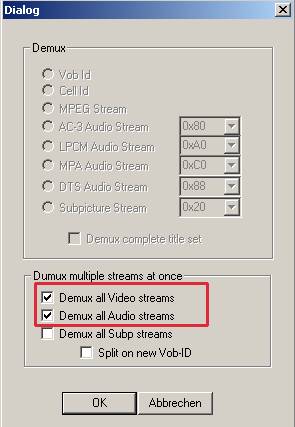
Tick the two boxes as illustrated to demux all video and audio streams.
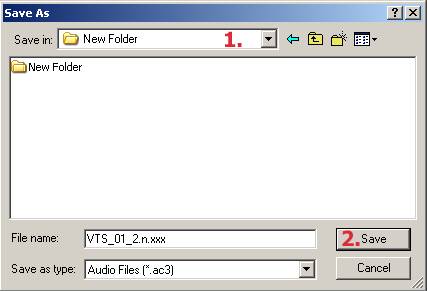
1. Select the folder that you wish to save the demuxed files to.
2. Click the Save button (leave the filename as is).
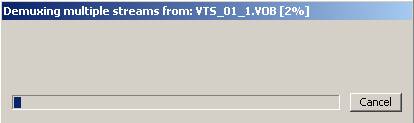
This progress window is displayed while VOBEdit does its thing.
Tip:
VOBedit (and IFOEdit) will work much faster if you move its progress window so that just the titlebar is showing - see above.
The progress bar disappears when VOBEdit has completed the demux.
Above is the end result. Here you can see that my VOB file had two audio streams, hence two audio files, and it created one big M2V file.
Now the next step is to author that M2V and your audio file (or choose one, if you have a choice, like I did) in IFOEdit.
Step 2 - Author using IFOEdit
Open IFOEdit.
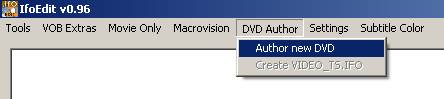
Go to DVD Author (one of the menu choices up the top), then go to Author New DVD.
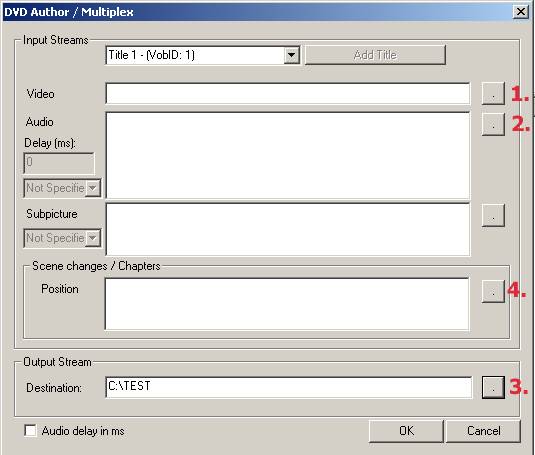
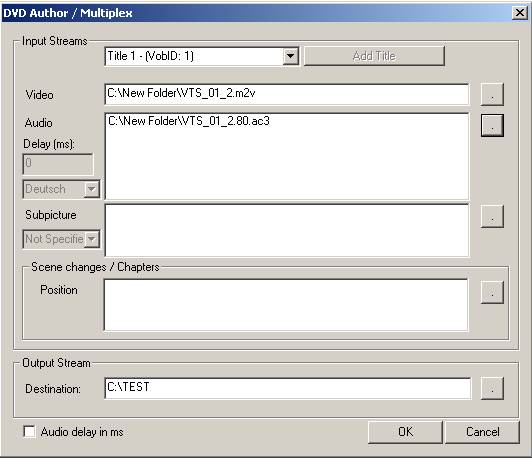
1. Browse to your M2V file.
2. Browse to your audio file.
3. Browse to where you want the new files saved to.
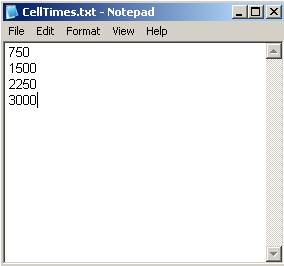
4. (optional) specify a file called CellTimes.txt to specify chapters. CellTimes.txt is just a standard Windows Notepad text file, and it must contain the frame numbers where you wish to add chapters.
For example:
Simply multiply the timecode of your position for a chapter point in seconds by the applicable frame rate (PAL is 25fps, NTSC is 23.976fps or 29.976fps) to get the frame number. In the example above, I'm using PAL so frame 750 corresponds with the 30 second mark (30 x 25 = 750), 1500 the 1 minute mark, ... and so on. By default, IFOEdit will create a chapter point at frame 0 (the start) so there's no need to include this in your CellTimes.txt file.
You should now have something that looks like the above. Click the OK button to start authoring.
This progress window is displayed while IFOEdit does its thing.
The tip from earlier applies here, too!
This progress window is displayed while IFOEdit changes the VOB navigation packs.
Guess what! The tip from earlier applies here, too!
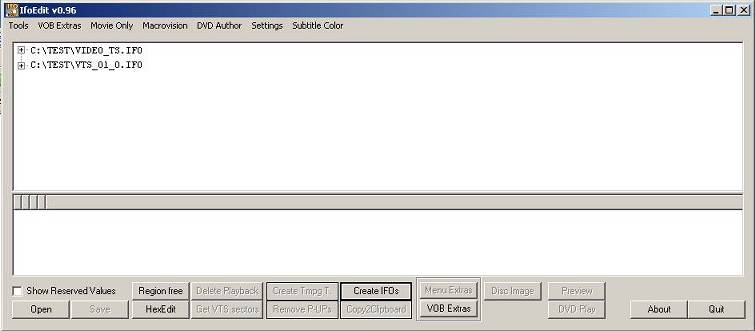
When you get this, and the VOB navigation packs progress bar disappears, IFOEdit has completed its tasks.
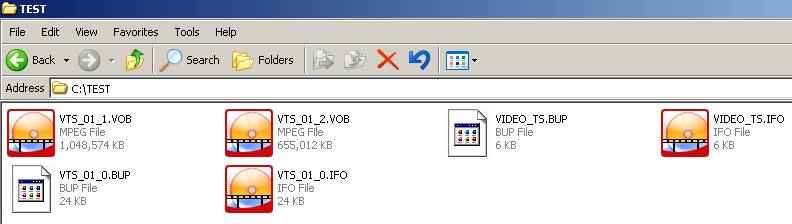
Above is the end result. Here you can see that we now have the VOBs split into 1GB chunks, and IFOEdit has even created the IFOs and BUPs for us as well.
Now all you need to do is burn - my burning guide might come in handy if you have Nero Express
... and you are done!
+ Reply to Thread
Results 1 to 30 of 40
-
If in doubt, Google it.
-
Hi,
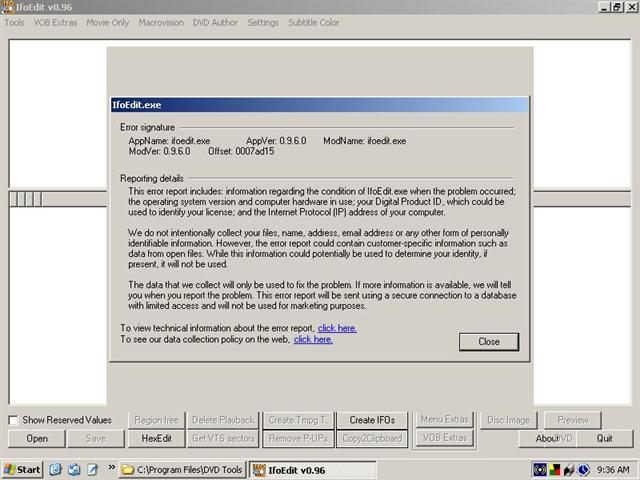
Have tried your method and get a repeatable error when I try to author with IfoEdit - as soon as I start the remux process, I get an error message saying that IfoEdit has committed an error and must close. I have tried this with 2 different versions of the software and on 2 different PCs.
Any ideas? -
Sounds like your source files.
Can you post a screenshot of the error maybe ?If in doubt, Google it. -
-
It's obvious I don't understand how to post a picture. Don't know what "Type
 means" (and my filename has a space in it)
-
Thanks Jim,
Try two
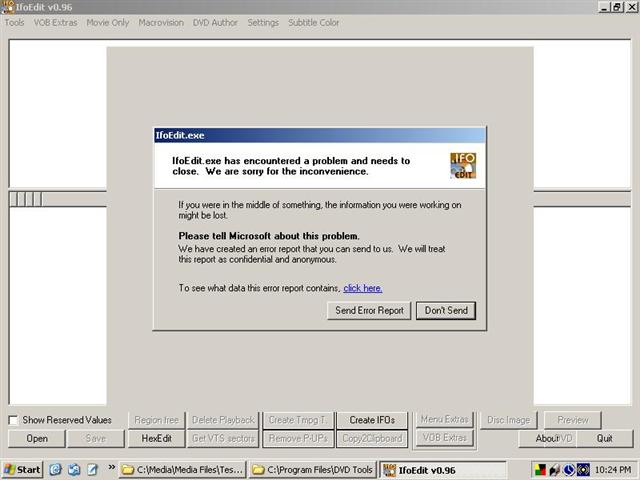
-
Second error
-
Why are you using this guide if you have already got a VIDEO_TS folder ready to burn ?Originally Posted by Cordelia
The whole idea of this guide is to take one large VOB (normally achieved by ripping straight from DVD with File-Splitting turned off), and then providing a method to author it.
... or did you just put in into DivXToDVD to test if it was the source file ?
I assume demuxing worked OK - what files did you get ?
At what point did this error come up ?If in doubt, Google it. -
I am downloading Public Domain movies from www.archive.org/details/feature_films as mpeg2. I want to put them on DVD. Their forum suggested using DivXtoDVD or Ifoedit to make VIDEO_TS folders.
DivXtoDVD works on some movies (The Last Time I saw Paris) and sometimes not (Charade). It makes a VIDEO_TS folder.
Their forum said to change .mpeg to .vob and then running ifoedit to make the folder. This only works for files less than 1GB. That's why I want to split a big .vob file.
When I demuxed the mpeg/vob file I got an .mpa file and an .m2v file. The error occured after I had started ifoedit and filled in the file names and clicked OK. -
OK. So at times you're getting VOBs that are > 1GB, yes ?
... or are you getting MPEG files, and changing their extension to .VOB ?If in doubt, Google it. -
I'm downloading mpeg2 files and changing extension from mpeg to vob. Most files are bigger than 3GB.
-
OK, that might be the problem then. You might try demuxing the MPEG file directly with TMPGEnc Plus > MPEG Tools > Simple Demultiplex, or even using rejig, going into File mode, then loading your MPEG file:
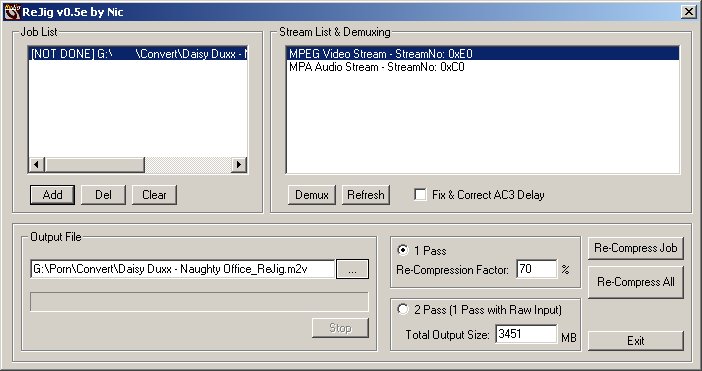
Then all you need to do once you've added your MPEG file is click on the Video stream in the right hand side window, click the demux button, choose a destination and filename for the M2V file, and hit save. Repeat, this time clicking on the audio stream in the right hand side window.
Then try this guide again from the point where it says "Step 2 - Author using IFOEdit" down, and see how you go.
As a last resort, maybe try downloading IFOEdit again ?If in doubt, Google it. -
-
The good news:
1. REjig demuxed the mpeg file.
2. IfoEdit made me a VIDEO_TS folder.
The bad news:
1. Imgtool Classic 0.91.5 bombed.
2. I'll paste Imgtool log here.
/cygdrive/c/Program Files/Image Tool/Classic_0.91.5/mkisofs: IFO is not of correct size aborting.
/cygdrive/c/Program Files/Image Tool/Classic_0.91.5/mkisofs: Unable to parse DVD-Video structures.
/cygdrive/c/Program Files/Image Tool/Classic_0.91.5/mkisofs: Unable to make a DVD-Video image.
It looked OK to me. Can you offer any further suggestions please? -
This morning i used Folder2ISO to make an image from the output of IfoEdit and it worked. Don't understand why ImgTool wouldn't work and this app would. Burned successfully with DVDDecrypter.
So now I have two methods of getting from a mpeg2 file to DVD disc. Thank you for all your time and help.
Cordelia -
I want to do just the opposite of what you showed here. I want to join a set of 9 VOB files into one file. I named them VTS_01_1.VOB thru VTS_01_9.VOB. I clicked the Open button and added each VOB file to the LBA. I then clicked on the edit button on the top left hand corner of the screen and then clicked on Join Clips. When nothing happened, I clicked on Join CellVob Files, and nothing happened.
What do I need to do to join 9 VOB files using VOBEdit
-
If you want to join in VOBEdit, The files need to be named VTS_01_001.VOB through to VTS_01_009.VOB (the leading 0's are the key here) - dunno why, just the convention it uses. This won't create one big file though, it will still split at 1GB chunks AFAIK.
I'm pretty sure there's a tool called VOBMerge or something similar that may be useful.If in doubt, Google it. -
Ok, I have a problem with splitting a large VOB file.
My problem comes into play when: VOBEdit has completed the demux.
I followed the steps right up till there.
Where it states that I should see my VOB file having audio streams and one big M2V file, my case was that VOBedit didn't make any audio streams / files. VOBedit only created one big M2V file.
What can I do to fix this situation?
All I want to accomplish is solving this issue on Nero Burning ROM:
The file "VTS_01_1.VOB" is larger than 2 GB and therefore cannot be stored in an ISO file system. Please use the UDF file system to write such large files. This can be done by selecting another compilation type.
Thanking anyone in advance! -
Did you tick the box that says "Demux all Audio streams" ?
(3rd graphic from top)If in doubt, Google it. -
ya i ticked that and video streams too...not sure why it didn't work.
But I resolved my problem by splitting the output file right in the beginning when I covert from avi/mpg to DVD on WinAVI Video Converter. -
Great Guide thanks so much for the help!!!!!!!!!!!!!!!
-
Is there a way to keep the chapter points from the original VOB after demuxing and authoring instead of making up new ones manually?
-
I'm not sure you can change the chapters if you've already authored it, but I could be wrong. Others' may have better solutions, but this is what comes to mind for me.Originally Posted by seven_deuce offsuit
1. Use ChapterXtractor to locate the chapters and reauthor again.
OR
2. Use PgcDemux to demux streams. Check "Create Celltimes.txt" (it will give chapters in terms of HH:MM:SS:MS)
Then use DVDAuthorgui to author the DVD. *Note - chapters will need to be entered as such (HH:MM:SS.MS) <= period between SS & MS instead of a colon.-The Mang -
I don't think I'll be able to use ChapterXtractor without the original IFO though.
-
I haven't realized until finally burning the DVD that I'm getting a problem with one of the VTS files Ifoedit creates. I authored a VOB and it created 6 VTS files (VTS_01, VTS_02, and so forth) and every one of them worked fine except the third one. I tried viewing the third VTS file on a media player and it would freeze in the middle of a scene and stay like that throughout the whole thing. I don't see what I'm doing wrong here as I've followed every step in this guide. The only thing I did different was demux the subtitles in VOBedit and added them in in Ifoedit. I know it's not my source VOB.
-
Dude!
Awesome guide, easy to follow and worked like a champ!
Major kudos!

-
Last edited by Chug a Bug; 9th May 2010 at 08:34.
-
Great work, Sherlock ... it WAS posted in 2005, after allOriginally Posted by Chug a Bug


VOBEdit and IfoEdit had (and still have) their place in most peoples' toolkits and were well ahead of their time for what they did considering they were free. It doesn't surprise me that other tools have tried to emulate them.
BTW there's also the IfoEdit and VobEdit trick of moving the progress bar off-screen so that all you can see is the title bar - makes them go wayyy faster.Last edited by jimmalenko; 9th May 2010 at 15:19. Reason: smiley didn't work!
If in doubt, Google it.






 Quote
Quote


Similar Threads
-
How to convert the 1gb VOB file to 80Mb AVI file ?
By zohaibshaikh in forum Newbie / General discussionsReplies: 3Last Post: 17th Oct 2010, 06:41 -
Vdub script / tool etc - split large file into 10 min segments? (auto)
By Jynks in forum Newbie / General discussionsReplies: 0Last Post: 17th Apr 2010, 06:19 -
large file split for multiple displays and convert ... what tool 2 use?
By rodpacker1 in forum Video ConversionReplies: 3Last Post: 13th Oct 2007, 03:03 -
automatically cutting a large wav file into x minute chunks?
By graysky in forum AudioReplies: 5Last Post: 22nd Sep 2007, 22:12 -
"chunks" cannot get my .VOB file to split into .DV chunks
By system9 in forum ffmpegX general discussionReplies: 2Last Post: 12th May 2007, 17:53