


 View Profile
 View Forum Posts
 Private Message


I was just screwing around the other day with Gabest RealMedia Source / Splitter filter when i realized an easy way to open RealMedia files in VirtualDubMod.It seems to work now. Updated (with help) - 10oct05
I have (1)AviSynth 2.56 installed as well as the RealMedia Splitter filter that came with RealAlternative.
(1)edit - see below (Wilbert)
I made the template;
-----------------------
#ASYNTHER RealMedia 30fps
[DirectShowSource("%f",30)]
-----------------------
and saved as "RealMedia_30fps.avst" and placed it in the VDubMod / Template folder. (as an experiment)
Works like a charm, provided you get the framerate right!
Install AviSynth, and unpack VirtualDubMod to the directory of your choice.Whats needed:
1. AviSynth 2.56
2. RealAlternative or the combination of RealPlayer and Gabest RealMedia Splitter
3. VirtualDubMod
4. AviCodec, or any application that can view the video properties of a *.RAM file
5. Notepad
Install RealAlternative, or if you have RealPlayer you'll need the RealMedia Source/Splitter DShow filter by Gabest (of Media Player Classic fame). The filter is available from SourceForge.net, without an installer, but InMatrix has an installer version of the same filter.
To my knowledge, there is only one file for both Win98-Me (non-Unicode), and Win2k-XP (Unicode), but InMatrix has two different installers????
This conversion relies on a built in function of VirtualDubMod, AviSynther. It's basically an AviSynth script generator, and works by using simple templates that make use of very basic AviSynth functions.
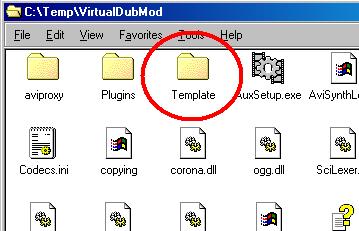
Inside the VirtualDubMod directory is a folder named "templates".
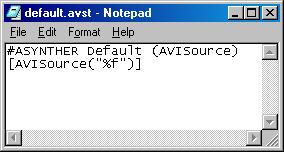
You can open them with notepad to view the contents;
(1)To create a new template simply open NotePad and past the text (without the dashes);
--------------
#ASYNTHER DirectShow_NTSC
[DirectShowSource("%f", fps=29.97, convertfps=true)]
--------------
or
--------------
#ASYNTHER DirectShow_FILM
[DirectShowSource("%f", fps=23.976, convertfps=true)]
--------------
or
--------------
#ASYNTHER DirectShow_PAL
[DirectShowSource("%f", fps=25, convertfps=true)]
--------------
and save to the VirtualDubMod / template directory (Assuming your source is NTSC. To be sure, use an application like AviCodec that determine the video properties) and give it a file extension of *.AVST.
I chose "DirectShow_NTSC.avst" so i could accomidate more than one framrate ("DirectShow_FILM.avst", or "DirectShow_PAL.avst").
(1)edit - see below (Wilbert)
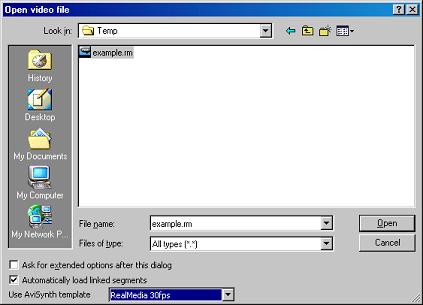
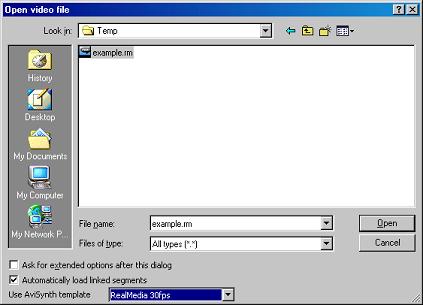
To open a RealMedia file in VirtualDubMod, set "Files of type" to "All files", and browse to your source file. In the lower menu "Use AviSynth Template", choose your newly created template.
*DirectShow usually has no problem displaying RealMedia through Windows Media Player (or MPC), but AviSynth requires that the framerate be included before it will frameserve *.RAM.
Encode!
---------observations----------
Slower machines may produce bad audio synch after encoding, but decoding the audio and then reloading the *.WAV file should avoid the issue
Occasionally i load *.RAM files into TMPGEnc using RealAlternative, and choosing "Open / All Files", but sometimes the audio doesn't come through. Using VirtualDubMod, i'm able to decode to *.wav.
I've since made a few templates to cover the common framerates (12, 23.976, 25, and 29.97).
Opening the generated AviSynth script in TMPGEnc sometimes produces bad audio synch. Using the *.wav file extracted with VirtualDubMod solves this problem.
And again, Matroska files with RealMedia streams seem to open just fine using the same template.
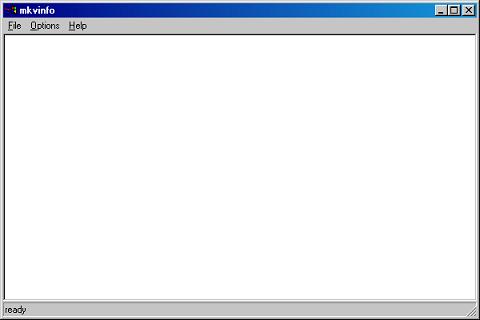
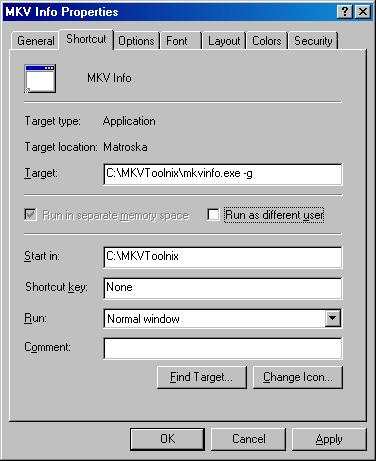
In the package MKVToolnix is a command line tool "mkvinfo.exe" that HAS a hidden GUI built in. To access the GUI use a "-g" at the command line or make a shortcut with;
to produce;
+ Reply to Thread
Results 1 to 30 of 45
-
-
It seems to work with MKV's with RealVideo as well!
-
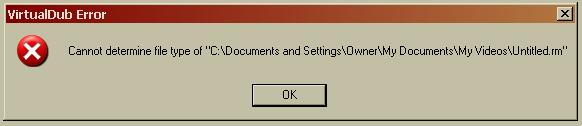
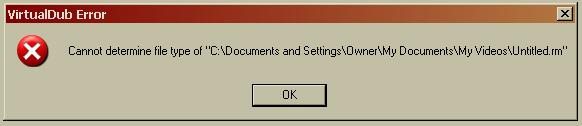
I followed your guide, and got this error:
 Hello.
 -
Hmmm, i wonder whats different?
Does the generated AviSynth script play through DShow?
Well, i thought it might have something to do with difference in *.rm files so i downloaded a few off the web..............Mine still works fine, i don't know what to tell you.
Try this one; http://www.bunkus.org/videotools/mkvtoolnix/samples/real/VC-RV40/Blade2_640_1Mbps.rm
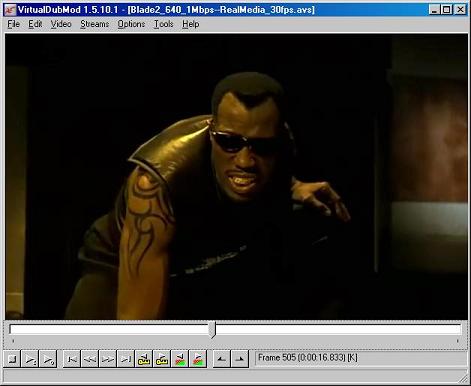
Here's what i see;
-
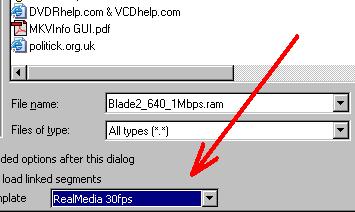
I see the problem, if VirtualDub didn't like anything, it wouldn't like a file with a *AVS file extension. Your pic shows VirtualDubMod has identified a *.RM file extension.Originally Posted by Tommyknocker
You couldn't have loaded the template (see bottom menu in blue)
-
AviSynth gives me an "Unspecified error".
Hello. -
and you have Real Alternative installed? (with Source / Splitter filter)
-
No, I didn't. Thanks.
Hello. -
Hi, Thanks for the guide, I cannot get the audio to work though...

And I do not see how to get it out other than recording it with aa-recorder and join it (which is hard to sync), as properties says there is no audio in my clips... -
This is my first guide and some of the instructions may not be as clear as i intended.
As i said in the "observations" section of the guide, audio sometimes does not work correctly unless you extract the *.WAV file first and then load it as your audio source. (it looks like i only said it for TMPGEnc, sorry)
If the audio will play through your media player then try this;
1. Reopen the file by browsing for the *.AVS file.
2. Under the Streams Menu, see if the audio appears.
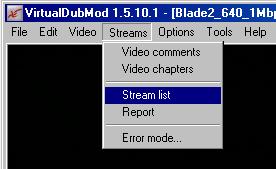
If the audio appears then;
3. "Save WAV"
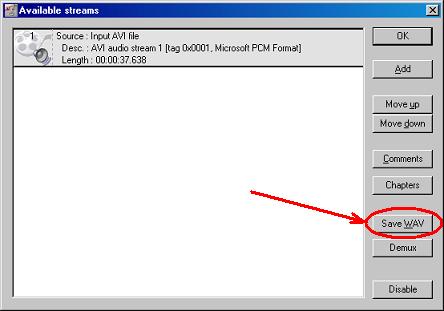
4. When the "Save WAV" is finished, reload the WAV file as audio source.
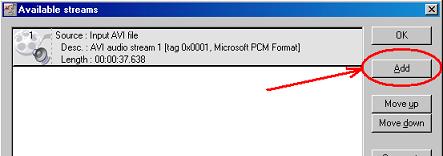
5. Now highlight the original audio (Gray), and select "Disable".
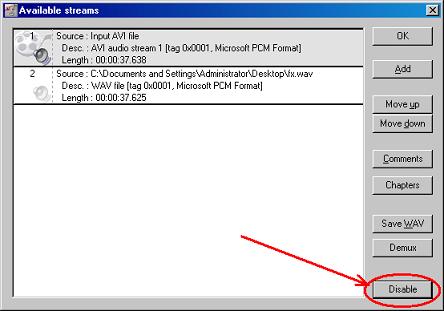
6. Click "OK", and try your project again.
I havn't figured out yet why this is happening but hopefully this workaround will take care of the problem. -
Thank you for your help, but the problem is that the audio does not appear in Virtualdubmod properties at all!
When checked with AVICodec, that program sees the is audio.
I think your way of converting has potential, so I'll try to sort things out too! -
Does not work with rm files encoded with older versions . Use Real7ime convertor for those.
-
Oh, it's not foolproof!
Has the same limitations as RealAlternative. (even if you have the RealPlayer / RealMedia DShow Splitter combo)
RV10 won't play through RealAlternative (for me)
RV20 - works (for me)
RV30 - works (for me)
RV40 - works (for me)
Matroska format (MKV) - must use only 1 video, and 1 audio stream (remux to new file).
TMPGEnc seems to have fewer problems with audio synch, but you must load the audio stream separately (VDubMod - extract *.WAV). Yes, you can export AVI's from TMPGEnc!
Even if this guide goes nowhere, i hope the info will lead this community to a better solution. -
I'm using Realalternative 1.23 and TMPG plus 2.52. I convert to mpeg 2. Same, no audio. I can't load the audio stream separately because I don't know how to demux real media file. How to solve the audio problem?
Thanks -
When i encode MPEG's from RealMedia i do almost the same thing, but i use the method above (VirtualDubMod / AviSynth / RealAlternative) to extract the audio to WAV. I've never had a synch problem this way.
This method doesn't demux, it decodes. Even if you can demux the stream you still have to decode it.
I don't get audio from RealMedia using TMPGEnc either, but TMPGEnc handles the video much better than AviSynth.
Sometimes with AviSynth, even if the correct framerate is specified, the video runs too fast. This has the effect of adding blank frames to the video.
GraphEdit seems like the obvious solution but some people are intimidated by it. -
-
It's the only reason i'm looking into a different method.Originally Posted by Videomania
-
load avisynth file
under frame rate
Source rate adjustment
tick
Change so video and audio durations match
or else- adjust the fps in the avisynth file so that the video and audio durations are shown equal in File Information -
When the problem occurs, "Video Plays to fast", AviSynth fills the end of the file with black frames to make the Audio and Video durations match.
For some reason, changing the framrate in AviSynth has no effect. Remember its using the Directshow filter "RealMediaSplitter.ax", which is both RealMedia Source, and RealMedia Splitter.
I don't believe this filter is correctly passing the framrate through AviSynth. -
I found your guide to be easy for short clips that I could then transfer to TMPGEnc and so far its worked on a majority of files that havent worked through other software like Boilsoft's RM Converter.
Some files are proving to be a little troublesome but I'm not gonna bother about that too much at the moment.
BTW, if anyone has a problem with audio/video synch issues then just look closely at a point in the file where someone says something and a scene cut occurs.
I tried this on a TV network ident and I judged it spot on where with other methods it had proved to be a major headache. -
can any1 solve the audio/video synch problem? the above methods seems can't solve the audio/video synch issues.... if the problem solved, this will be the great for RM, RMVB to avi...

-
AviSynth v2.56rc1:
DirectShowSource("file.rmvb", fps=xxx, convertfps=true)
that preserves sync. -
where should I write in this "DirectShowSource("file.rmvb", fps=xxx, convertfps=true)" line? in what file? how? ThanksOriginally Posted by Wilbert
-
I put it in the template file as gastorgrab suggested in the first post. Upon opening an RMVB file in VirtualDubMod AVISynth complained that "DirectShowSource does not have a named arguement "convertfps".
-
Do u mean that just replace "[DirectShowSource("%f",29.97)]" with this line "DirectShowSource("file.rmvb", fps=xxx, convertfps=true) "?
Thanks -
Yes, but I left in the "%f" so you can use the template to open whatever file is selected from the Open File dialog. And of course the fps=xxx argument was changed to reflect the correct speed. I made two different templates one with fps=29.97, the other with fps=23.976:Originally Posted by supergoku
-------------------------
#ASYNTHER RMVB 23.976fps
DirectShowSource("%f", fps=23.976, convertfps=true)
-------------------------
#ASYNTHER RMVB 29.97fps
DirectShowSource("%f", fps=29.97, convertfps=true)
-------------------------
But neither works because AVISynth rejects the convertfps=true argument. If I remove that argument the templates work but the resulting AVI file has audio sync errors. -
Maybe you can try with changefps=true.
-
No, it's convertfps=true, and you need the latest AviSynth v2.56.
-
I was using 2.5.5. After updating to 2.5.6 it is working. And indeed the problems with audio sync are gone! Thanks Wilbert.Originally Posted by Wilbert
-
the audio sync problem are solved! THanks
What is the best codec for video compression to avi(fast and good quality)? alparysoft? huffyuv? xvid? or other? any suggestion? Thanks
 Quote
Quote


Similar Threads
-
Handling 4:3 PC video on 16:9 TV
By ptrk.mj in forum Newbie / General discussionsReplies: 14Last Post: 20th Dec 2010, 13:30 -
Handling home made HD recordings
By ngc7088 in forum Camcorders (DV/HDV/AVCHD/HD)Replies: 4Last Post: 11th Mar 2010, 17:03 -
More Video Source Handling Questions..
By alcOre in forum Newbie / General discussionsReplies: 21Last Post: 11th Mar 2009, 03:00 -
Best error handling
By demonwarrior in forum DVD & Blu-ray WritersReplies: 5Last Post: 11th Sep 2007, 03:16 -
TDA3..Audio Handling
By barneystorm in forum Authoring (DVD)Replies: 1Last Post: 19th Jun 2007, 21:01