


 View Profile
 View Forum Posts


This Guide gives a quick overview of the 'Patch' method, used to make a PAL disc appear as if it was NTSC or an NTSC disk appear as PAL. This method requires no re-encoding, and takes only a few seconds.
NOTE: This method may not be supported by your player.
( Your mileage may vary )
If this method does not work in your player, then it simply means "It does not work in your player". Please don't PM me asking for a fix. I didn't invent this method, and I claim no responsiblity if it does't work
That said....On to the guide 8)
Tools required:
IFOEdit
Assumptions:
This method requires that you have all of the necessary IFO, BUP, and VOB files stored on your PC. Although you can create new IFO files with IFOEdit, this guide is not intended to cover that option. It assumes you have a working DVD image stored on your PC.
You can find IFOEdit in the Tools section.
Launch IFOEdit, and select the OPEN button located in the lower left hand corner of the GUI
When prompted, browse to our stored DVD image (usually located in the VIDEO_TS folder), and select the primary IFO file (this file will always be called VIDEO_TS.IFO )
Once you open the main IFO file, you'll see a large amount of information displayed.
Ensure the IFO is selected in the upper pane. It should be the first item listed in that pane:
If it is selected in the upper pane, the lower pane of the IFOEdit window, in the DESCRIPTION column, will display information specific to what is select in the upper pane.
(IMPORTANT: You will not need to select anything other than the first entry in the TOP pane. Further along in this guide, you will be instructed to scan for all entries in the IFO. This applies only the the LOWER pane, not the UPPER pane. It is not necessary to scan through any other items in the Upper Pane).
Scroll through the list, and look for any reference to an aspect ratio (16:9, or 4:3)
(see circled in red below)
Double click that description text. This should open up a properties dialogbox, which allows you to specify settings for that individual IFO element.
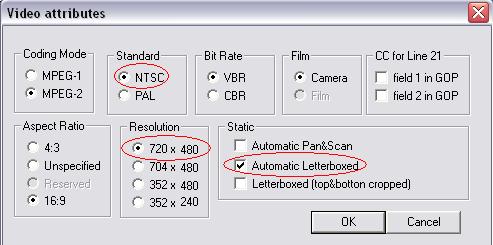
Note the items circled in red above. To 'patch' a DVD so it appears to be an NTSC or PAL disc, you
change the following:
Standard: NTSC or PAL (select either depending on which you want to convert to)
Resolution: Set this to the closest compatible format (i.e. 720x480 for a 720x576 PAL->NTSC disc or 720x576 for an NTSC->PAL disc for example)
Static: Set this to Automatic Letterboxed
Click OK
(Note: The information displayed in the Description column will NOT update until you re-open the IFO)
Repeat this process, scanning through the entire lower pane for ALL references to an aspect ratio.
When you are sure you have modified all lines containing a reference to an aspect ratio, click the REGION FREE button to remove any region restrictions (if any)
Finally, click the SAVE button. You should be prompted to also save the BUP file as well. Answer YES.
Next, click the OPEN button again, and browse back to your DVD file folder. If the folder contains any other IFO files (exluding the one you have already opened), repeat this entire process for each IFO you find there. You should find at least 1 more IFO file at a minimum. Depending on your DVD, you could have several.
Once you have modified all IFO files, you may find it usefull to close IFOEdit, and relaunch it. Open each IFO to verify that all references have been updated.
Burn as usual.
+ Reply to Thread
Results 1 to 30 of 272
-
Impossible to see the future is. The Dark Side clouds everything...
-
i would STRONGLY suggest that if you do the above method to use some re-writeable disc. A good majority of machines will not play the above method correctly at all.
-
I wouldn't say a multitude, but a smaller number may not play correctly.
I believe I noted that at the top.
I agree though, that when trying any new method, you should always use -RW media when possible to verify your output works in your player.Impossible to see the future is. The Dark Side clouds everything... -
I've been alway used this method and it worked perfectly !!!
-
i have tried this method a year or two ago with quite a number of various machines (sony, pioneer, panasonic, apex, ps2, etc) and none of them were able to play it back smoothly. But hey if it works for you stick with it. In my own personal view, the only true conversion is through the horribly long task of encoding
-
Must be the players you purchased. I have successfully played these on two different models of Sony, and a Panasonic. 8)
Impossible to see the future is. The Dark Side clouds everything... -
one was the panasonic dmr-hs2 dvd recorder deck, and of the sony's, they were models in a few stores iwent to. I personally do not own any sony dvd players (unless you really want to ocunt hte ps2)
-
Video Restorer

- Jun 2003
- dFAQ.us/lordsmurf


I've tried this method and similar ones on 7 distinct players. They all rejected the discs. I've never seen it work.
 Want my help? Ask here! (not via PM!)
FAQs: Best Blank Discs • Best TBCs • Best VCRs for capture • Restore VHS -
And I though I was hard on a lot of players.
Impossible to see the future is. The Dark Side clouds everything... -
For me I like DVDshrink I know it does not encode pal to NTSC but it will shrink a DVD-9 to DVD-R and make it region free. Most DVD player's will change PAL to NTSC. But forget about sony they only change VCD pal to NTSC. Pioneer JVC APEX all do a good job
-
I currently own two different Sony's. One of their first dvd players (it's still hanging in there..no dts, svcd, etc, but a good box), and a current model. Both play the patched dvd's without issue.
Definately should be tested with RW if possible. Seems very spotty, even within the same brand.Impossible to see the future is. The Dark Side clouds everything... -
I got DJRumpy's method to work with my Sony!! Thanks DJRumpy!!
~ John
-
And what about the TV?, it dowsn't matter if it is PAL or NTSC?
Eddie...could you please tell me which is your Sony?
I vave a NS315 ... has anyone of you tried this in one?
ThxIs it just my case ... or all wifes hate computers? -
It looks like your player supports both -R and +R. You should just give it a try. What have you got to lose?
Impossible to see the future is. The Dark Side clouds everything... -
The way this trick works is by tricking the DVD player into decoding it as if it were NTSC. The DVD player is sending an NTSC signal to your NTSC tv, (if it plays it at all) the question is just how well the DVD player is able to adapt to the odd source.Originally Posted by LioCraft
-
OK,
But is very confusing to me...because there are diferences in resolution and FPS....wired.Is it just my case ... or all wifes hate computers? -
I just tried this trick on a pal image and it does work on my Sony DVP-NS725P, the framerate has a slight stutter to it (mostly noticable during camera pans) but very watchable.
-
The video portion of the conversion worked, for the most part, on my Pioneer DV-525. The video has been converted, although it skips and blots a bit, but the audio cuts in & out every second or so. Very annoying, and not watchable.Originally Posted by mathesar
-
This trick worked on my Sony DVPNS500V SACD/DVD player. A slight stutter to the motion as one person said. My Pioneer DVL-919 DVD/LD combo player played the disc, but it was unwatchable. Distorted image. However the DVL-919 will play PAL dvd's but won't convert them to NTSC.
Steve -
hi, i have a question... if i change the things in "video attribut" as you showed but i let it be an mpeg 1 instead of mpeg 2. does it matter then? thanx: Nadro
-
It shouldn't. Just leave the MPEG setting to match your MPEG type. Mine is only an example.
Impossible to see the future is. The Dark Side clouds everything... -
Wrong.Some players will.Most DVD player's will change PAL to NTSC
-
Can someone link me to the reencoding method guide?
Ive tried Vobedit to demux, it demultiplexes the first VOB fine but then wont read the next one... maybe a different tool?Never meddle in the affairs of dragons,
for you are crunchy and taste good with ketchup. -
petcanuck, you should search in the GUIDES section, rather than posting your question in here.
https://www.videohelp.com/guidesImpossible to see the future is. The Dark Side clouds everything... -
Any luck with a Sony NS425P?
interesting.. no RW's but some spare -R's will try one that I have been having tons of probs with (says can't play due to area restrictions.) The DVD isn't region coded either. -
I haven't tried on that one. Unfortunately the older Sony's don't support any of the RW format's. On the brighter side, DVD media is much cheaper than it used to be. If it doesn't work, it always gives you an excuse to upgrde
Impossible to see the future is. The Dark Side clouds everything... -
Just tried this and it works fine on both of my stand-alone DVD players (see my specs) but the only little thing is that the picture is a little jerky, just barely, but it is noticeable. Any fix for this??
"I'm a reasonable man, get off my case..." -
In short....No.
Impossible to see the future is. The Dark Side clouds everything... -
You know I tried the SAME disk on a DIFFERENT TV set with the SAME DVD player and it was a little jerky as well. Oddly enough, it played smoothly on the SAME TV with a DIFFERENT DVD player... (The player being a Cyberhome model.)
Outcome:
It's the DVD player that causes jerky playback!"I'm a reasonable man, get off my case..." -
The tv shouldn't matter. The player is the key, and the one doing the decoding.
Impossible to see the future is. The Dark Side clouds everything...


 Quote
Quote Visit Homepage


Similar Threads
-
Simple click and go method to convert PAL to NTSC
By THRobinson in forum Video ConversionReplies: 15Last Post: 26th Feb 2011, 00:16 -
Best Method Convert PAL VOBs to NTSC
By ehmjay in forum MacReplies: 13Last Post: 28th Jul 2009, 15:54 -
PAL DVD to NTSC Conversion (read as much as I could)
By DW in forum Video ConversionReplies: 3Last Post: 27th May 2008, 02:42 -
PAL to NTSC DVD [Full Disc] Conversion (hybrid method, very easy)
By LadyLiete in forum User guidesReplies: 28Last Post: 5th Nov 2007, 20:35 -
Automatic selection PAL NTSC & command line switch method
By joecon in forum Capturing and VCRReplies: 0Last Post: 13th Sep 2007, 07:13