


 View Profile
 View Forum Posts
 Private Message
 Visit Homepage


Hello all, I have just released a brand new guide on how to add subtitles to a DVD.
So here it is:
************************************************** ***************
Watch now the MOVIE TUTORIAL on How to Add Subtitles to a DVD using DVD-lab PRO !
************************************************** ***************
DVD Subtitle Guide using DVD-lab PRO
***3 Steps Guide***
This guide brings new things, like support for SRT and SUB subtitles or SSA, SON and SST.
And more easy on use by the beginers on DVD Authoring world.
I must to thank all the users on my forum for supporting me and understanding me.
Please join my forum for more support and if you need help, ofcourse ;-)
Software used:
1. DVD Decrypter - (for demuxing video, audio, subtitles and chapters form the DVD)
2. DVD-lab PRO - (for multiplexing video, audio and subtitles)
3. Ifo Update - (for updating the original IFO fles, let them know about the new info in the VOB files)
Create 3 folders on a partition with more then 20 Gb of free space. NTFS partition is needed for DVD movies over 4 Gb.
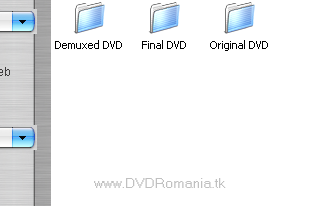
STEP 1 - DVD Decrypter
a). Insert in the DVD-ROM the disc on which you want to add a subtitle. If you have an DVD Image on the HardDrive mount it first with Daemon Tools. Open DVD Decrypter, go to Tools menu and then press "Settings" and after that press "IFO Mode" tab and set the parameters like in the image below.
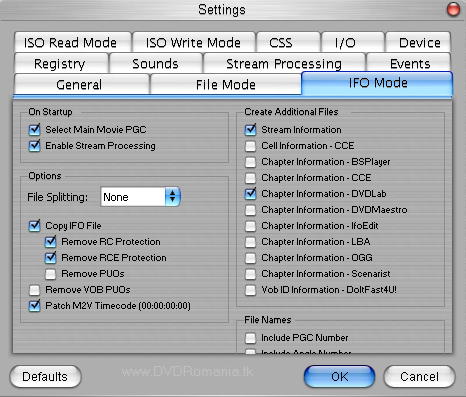
After you have set everything as in the image above, press OK and go to "Mode" menu and select "IFO I".In this moment the software will automatically choose the main film in order to demux it.
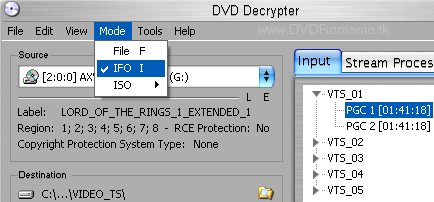
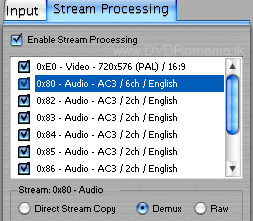
b). In the right side, press "Stream Processing " tab and check "Enable Stream Processing" and at the bottom of the window select "Demux" like in the image below.
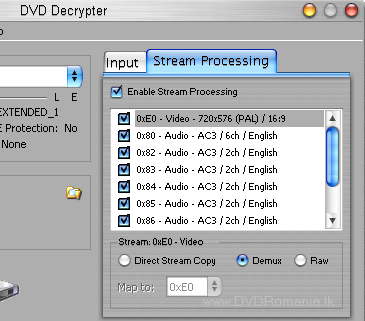
Now select all the lines in the Stream Processing window, one by one, (ONLY THE ONES YOU WANT OR NEED) and select for each one the Demux option.
c). Select the files destination, in our case "Demuxed DVD" . Press the button

and the program will start its work. After it finishes, close DVD Decrypter.
STEP 2 - Multiplexing video, audio and subtitles with DVD-lab PRO.
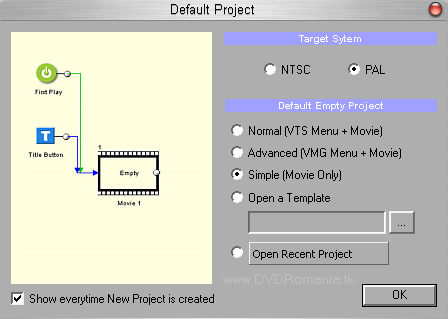
a). Open DVD-lab PRO and on the window that appears select like in the image below, the option "Simple (Movie Only)". Don't forget to chose the NTSC or PAL option as is your original DVD movie and hit OK.
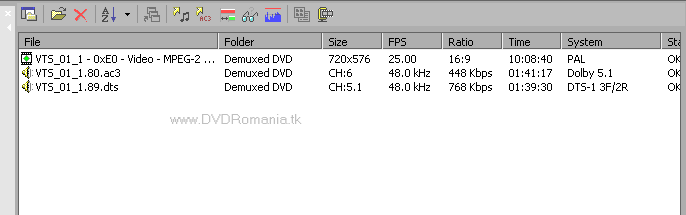
b). In the lower left part of the screen, in the big white section, right click and chose "Import..." and import one by one, your VIDEO file and AUDIO file(s).
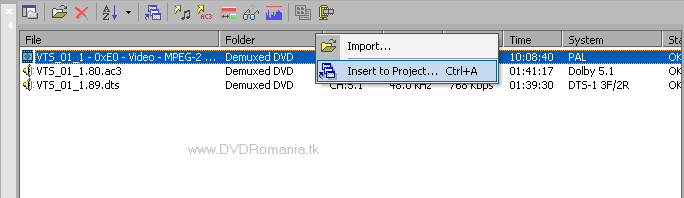
c.) Right click one by one the each line in the big white section where you just imported the video and audio files, and chose "Insert to Project...".
The Video and Audio will be automaticaly inserted on the MOVIE 1 window (right upper part of the screen).
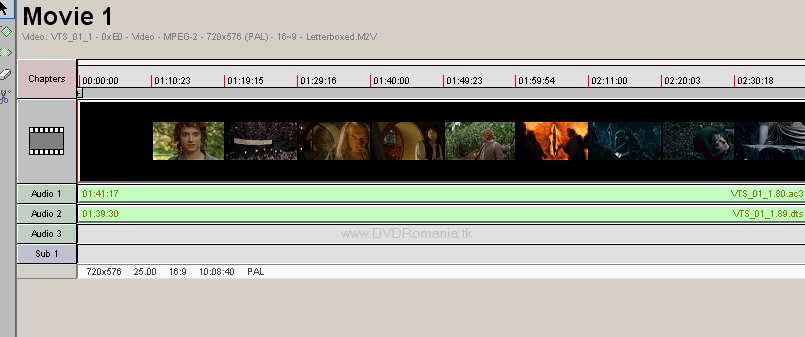
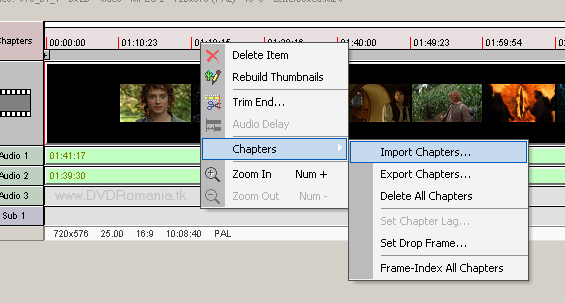
d). Right click on the Chapters section (right above the Video section) in the MOVIE 1 zone and go to Chapters->Import Chapters...
A windows will appear, just hit "Proceed" button and the chapters will be imported automaticaly to the movie. (Hit OK to all the windows that appear).
e). Double click the Sub 1 line and a new window will appear.
First you must chose the subtitle language...
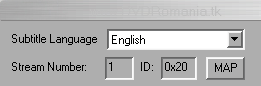
Second you must click on the Import button and open the subtitle file (you have 5 formats to chose from: SUB, SRT, SSA, SON, SST).
Optional:
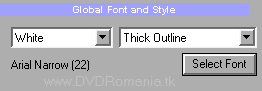
1. You can chose the font color (White or Yellow).
2. You can chose the font face. (I suggest using a Arial font face).
3. You can chose the font size. (I suggest using a 22 size font).
4. You can chose the font style. (I suggest using Thick Outline style).
If you have an NTSC disc I suggest to check the "From DF source" option for perfect syncronization. (You can do some test yourself and see if you have perfect syncronization).
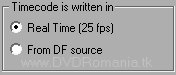
You can view the changes in the Preview window !
After your are done hit the "Generate Subtitle Stream" button and wait for the process to finish...it will automaticaly return to the main window after it's done.
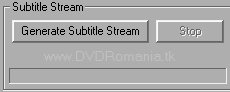
Now you can see your subtitle line added automaticaly.
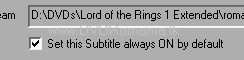
If you want a subtitle to appear automaticaly on the movie when you start the movie, just select the "Set this Subtitle always ON by default" option.
f). Go to "Project" -> Compile DVD...
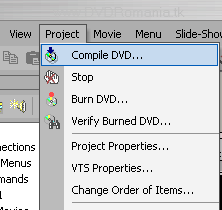
In the window that will appear chose the path to the Final DVD folder and hit Start.
Wait untill the whole process finishes. About 15-20 minutes on a AMD 2.0 Ghz machine with 512 DDR.
STEP 3 - Update the original IFO files.
a). Copy from the DVD-ROM in "Original DVD" folder all the files of the disc with DVD Decrypter in File Mode.
--------------------------------------------
WARNING ! - Before moving the *.vob files over the original ones rename them (e g: let's suppose that on the original disc the movie is situated in the VTS_03_1.VOB, VTS_03_2.VOB, VTS_03_3.VOB etc... files . You will have to rename the VOB files from the "Final DVD" folder to their original names.)
--------------------------------------------
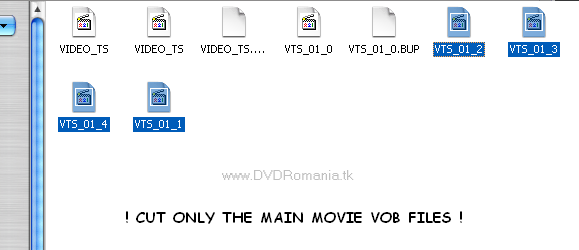
b). Select the main movie *.VOB files from the "Final DVD" folder (ex " VTS_01_1.VOB, VTS_01_2.V OB, VTS_01_3.VOB, VTS_01_4.VOB etc) that contain the movie, !ONLY AFTER YOU HAVE CORRECTLY RENAMED THEM!, and move them (Cut and Paste) in the "Original DVD" folder overwriting the old ones .
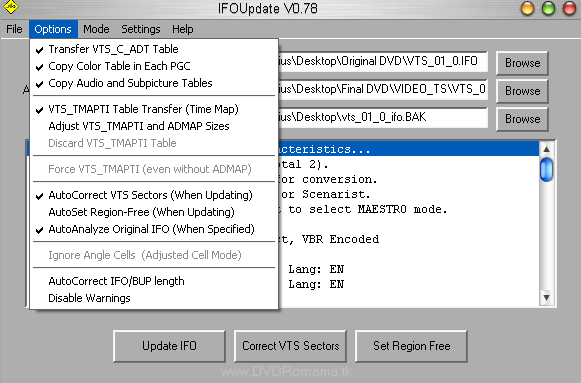
c). Open IfoUpdate and go to "Options" menu and select as in the image below.
d). Now you will have to insert the IFO files.
- On "Original IFO Path" choose the corresponding IFO file from "Original DVD" folder (eg:if the movie is situated in the VTS_03_1.VOB, VTS_03_2.VOB, VTS_03_3.VOB etc files, you will have to open VTS_03_0.IFO in IfoUpdate)
- On "Authored IFO Path" choose from "Final DVD" folder VTS_01_0.IFO file.
- On "Backup IFO Path" choose where to save a backup of the original file just in case you make a mistake. Press "Update IFO" and 2 windows will appear and click OK.
Now the new DVD with your prefered subtitle is ready for burning on a DVD±R/DVD±RW.
Guide made by TheMatrix
+ Reply to Thread
Results 1 to 30 of 654
-
Follow the white rabbit
-
Please test the guide and post here if you have problems, or you get stuck somewhere. I will try to help you.

(02/04/04) - Today I replaced all the images, with new ones in english for better results ! Enjoy.Follow the white rabbit -
-
Follow the white rabbit
-
Does this guide prevent original menu structure?
-
Can some tell me how you get the subtitles into subtitle workshop in the first place? I've looked around in the guides and this is not explained. What have I missed? Where do the subtitles come from?
Thanks-a-lot -
For kinza2000 : YES ! If you follow this guide, the result will be exactly like the Original DVD that you want to add the extra subtitle (only the has an extra subtitle
).
------------------------------
For tarpot : Look for a guide ...on How to modify the subtitles with Subtitle Workshop. You will find subtitles on specific sites like (www.divxsubtitles.net, www.subtitles.cz).
Mabey I will make a guide about how to modify and adjust subtitles with Subtitle Workshop ....but I think that there are some guides on the internet regarding that.
Follow the white rabbit -
Hi.
I´m trying to follow this guide, and I have 1 question:
When I strip the full movie , i have 2 files called VTS_01_MENU_1.vob and VTS_02_MENU_1.vob, that i think it´s the MENU File.
Following this guide, all the Original Menus are preserved??
If not, how can i insert new subtitles, but presenving the Original Menus??
Thankx -
glauber_herbert : As I said to kinza2000, following this guide will preserved the original menus, YES ...you will have the original menus on the final result

I repeat : FOLLOWING THIS GUIDE WILL RESULT IN A DVD WITH THE ORIGINAL MENUS, ORIGINAL EXTRAS, ORIGINAL MOVIE, ORIGINAL SUBTITLES and THE NEW SUBTITLE (in your language) YOU WILL ADD TO THE DISC !
About the VTS_01_MENU_1.vob and VTS_02_MENU_1.vob, what did you use to rip the original DVD ? I recomended in the guide DVD Shrink.
Please give me some more details.Follow the white rabbit -
I use to rip the DVD Shrink, in file mode.
But this DVD is a DVD that i downloaded from internet.
There´s some difference?
Thanx in Advance -
Can you give me a screenshot of the original DVD content ? (with all the files)....on e-mail. And I will try to help you...I didn't have that problem on any of the DVD I used.
Follow the white rabbit -
With all due respect... and there is respect...
-
tkamin : This guide was made from 3 weeks ago, but in another language (as I said at the begining of the guide). And tested with succes by many users on other forums, and I wanted to give this guide to the whole world. Because there are many, many, many more guides on the internet about this subject, but none is working perfect.
About the IfoEdit with NTSC error, it's very good if you have no errors with it. In our tests, the result of the multiplex with IfoEdit for NTSC DVD was very bad, the movie is playing like this : 1 second play/1 second freez ...1 second play/1 second freez ...end so on...you can't wach it !
Mabey you finish the guide and post it, but will be no diference, if you use another program for multiplex, if the result is the same (I mean a PERFECT DVD)
Follow the white rabbit -
The guide is good and uses only free software. Personally I prefer Maestro - it's easier and faster. If you have it...
For this guide to be perfect however you need to add how to reauthor the subtitle language selection menu in order to include a selection for the new subtitles /although you can select them by pressing the Subtitles button on the remote/.
Keep the good work going! -
I try following the guide but when I try to play the movie when I press to go in menu it stops.
-
Yes Gregg : that is the final logical step to a perfect DVD ! But, I don't know how to do that
 Mabey I will discover some time in the future, or someone else will make some guide about that
For panoplos and glauber_herbert : I will write you in the email, some technical problems regarding Finding Nemo DVD ! Many haved problems with it.Follow the white rabbit -
TheMatrixx you made a good job. Very good and useful guide!
I tried another guide and your guide is the best! All done succesful!
But I want to ask you something. I have the Out Of Time movie.
The movie (1:45h) is in the VTS_02_0.vob till VTS_02_5.vob .
When I ReAuthor the DVD, the files automaticlly renamed to VTS_01_0.vob till VTS_01_5.vob .
Now when I am trying to play the DVD after I overwrite the new files to the origina RIP that I made with DVD-Shrink, It's not work because the new IFO and the new .vob's files are renamed !
What can I do to prevent this unlike rename ?
Sorry about my English..I will be improve soon..
Thank you for your job and for your GREAT guide!!!
BiGOFiR -
Hi bigofir2, first I made the guide for me, for my movies
, but just like you, I saw many guides about this subject on the Internet and none was good, no menus, no extras...and other errors.
And I wanted to share the guide with the world
About your problem, looks like you are lucky , during tests on the guide I had an NTSC DVD and the movie was at VOB 9...(VTS_09_0.VOB). I didn't modified the guide for this, because there are so few DVD's like this, in most of them the movie starts from VTS_01_0.VOB.
So, in this case you will have to replace in the guide VTS_01_0.VOB with your movie (VTS_02_0.VOB).
Exemple : When you demux, you will open VTS_02_0.VOB, so after demux, when you multiplex you will have VTS_02_0.m2v...and so on...and at STEP 5 section c) when you make Vob Extras (ReAuthor) it
should work fine, start with the last IFO and end with the first. Look at the progress of Vob Extras like in IMAGE 12, and see if the file name at Writing destination VOB is exactly like Reading source VOB file (LOOK AT ALL 5 VOB's !).
Tell more details about the problem. And if you can it will be very good to make some screenshots, when you demux, multiplex, reauthor...and at Vob Extract. Please send them to email. (thematrix @ go.ro).
Thank you for using the guide and tell your friends about it
Follow the white rabbit -
I found some subtitles in the internet. I open the file in Subtitle Workshop and I put the first time the first subtitle shown and the last and adjust the subs. But when I finish the importing and all like the guide the subtitles delay 4 seconds. In the Subtitle Workshop I can see that the subs is in the right time.
Whats wrong? -
The Matrixx, I want to ask you something...
Like I said in this topic, I want to burn the Out Of Time movie.
The movie length is 1 hour and 45 minutes.
The movie is NTSC and when I Demux the movie I got .m2v movie file that his length is 1 hour and 11 minutes. The Demux process was done in VobEdit like in the wounderful guide that you create.
Whats wrong?
This is very big problem because the subtitle synchronized to 1:45 and not to 1:11 !
Please help me..
You are the BEST !
Thank you for all!
BiGOFiR -
Of course after I do all like the guide and I success, I will make screenshot! I don't want to do now because I didn't succed to make the new DVD..

-
Does this tutorial work with a DVD that has NO subtitles yet, and I want to add the first one? If it's possible, how can I do that?
 Best regards,
Joelson. -
My question is about step 5 item a):
"a) We'll cut (move) from the "Final DVD" folder the .vob files that contain the movie (e.g. VTS_1_1.VOB, VTS_1_2.VOB, VTS_1_3.VOB, VTS_1_4.VOB etc) and paste them over the ones in the "Original DVD" folder. Then erase the .ifo and .bup files left in the "Final DVD" folder, so that is remains empty."
The files generated by Ejig in the "Original DVD" folder are:
VIDEO_TS.BUP
VIDEO_TS.IFO
VTS_01_0.BUP
VTS_01_0.IFO
VTS_01_0.VOB
VTS_01_1.VOB
VTS_01_2.VOB
VTS_01_3.VOB
What exactly the files that I need to replace in "dvd original folder"?
Only the .vobs?? Only .vobs and vts_01_0.bub and .ifo? Everything include video_ts.bup and .ifo?AMD Athlon XP +1700 Box on IMT4000
Soyo Dragon+ . 256Mb DDR . ADSL 3Com 812 Office Connect
GeForce 3 Ti200 . Samsung 753Dfx 17"Flat
160Gb + 80Gb Seagate Barracuda - DVRW LG4040b . CDRW LG8532b
______________________________________
Keep Walking -
For bigofir2 : For your first problem, when you multiplex the movie that starts at VTS_02_0.VOB with IfoEdit...I found 2 hours ago a DVD just like yours (Jurassic Park 2), with movie at VTS_02_0.VOB 'till VTS_02_3.VOB...so the answer to your question is this :
------------------------------------------------
THIS IS FOR ALL WHO MAKE THIS GUIDE ! : A BUG in IfoEdit and Rejig when you multiplex a movie that starts at other VOB than VTS_01_0.VOB...like VTS_02_0.VOB or VTS_05_0.VOB...etc...after
multiplex IfoEdit will change the name to VTS_01_0.VOB ! Simply you will rename the files exatly like the original files and continue with the guide ! The result will be OK !
------------------------------------------------
I think this is not realy a bug, I think the author of IfoEdit made it like that, probably when the user renames the files like...video.m2v and audio.ac3...the result of multiplex will be automaticaly VTS_01_0.VOB. But for my guide this is a BUG !
For your second problem with the lenght of the movie, please see if you have more than 12Gb before you multiplex the movie !
-----------------
For joelson : Yes it works ! You will make your subtitle like in the guide (STEP 2) and you will rename it to VTS_01_0.20.VOB if your VOB movie files start from VTS_01_0.VOB. Try this and tell me if it works.Follow the white rabbit -
My problem is similar to the one of the BiGOFiR, but still I have some doubts.
I will try to explain better what it happens:
My film is in the VTS_04_0.vob archives till VTS_04_3.vob.
When rejig mux the archives and saved they in folder "Final DVD" the program automatically rename it for VTS_01_0.vob till VTS_01_3.vob
Can I rename for VTS_04_0.vob till VTS_04_3.vob before copies them for "Original DVD" folder?
This goes to cause some problem later?AMD Athlon XP +1700 Box on IMT4000
Soyo Dragon+ . 256Mb DDR . ADSL 3Com 812 Office Connect
GeForce 3 Ti200 . Samsung 753Dfx 17"Flat
160Gb + 80Gb Seagate Barracuda - DVRW LG4040b . CDRW LG8532b
______________________________________
Keep Walking -
YES KeepWalking ONLY the VOB files of the movie. DO NOT REPLACE the IFO or BUP files.
You said "The files generated by Ejig in the "Original DVD" folder are:" ... look at STEP 4 - Multiplexing the files from STEP 3 .... "After that, you'll choose where you want it to save the final movie ("Final DVD" folder)" and look at the IMAGE 7 also, you will see that you have to put the result of the multiplex in Final DVD folder, and than at STEP 5 section a) you will take the VOB movie files (NOT IFO or BUP) and paste them into Original DVD folder, when ask if you want to replace hit YES !Follow the white rabbit -
YES you can see my post for bigofir2's problem ! It looks like Rejig has the same problem of renaming the files.
RENAME them before you replace it with the ones in the Original DVD folder
Follow the white rabbit -
Originally Posted by TheMatrixx
Ok Matrix, thanks for help in my 2 questions, and GREAT guide!!!
Finally I can do it. Great results and great tutorial. CongratulationsAMD Athlon XP +1700 Box on IMT4000
Soyo Dragon+ . 256Mb DDR . ADSL 3Com 812 Office Connect
GeForce 3 Ti200 . Samsung 753Dfx 17"Flat
160Gb + 80Gb Seagate Barracuda - DVRW LG4040b . CDRW LG8532b
______________________________________
Keep Walking -
Hi The Matrixx !
What's up?
I have 15GB of space.. It's not the reason of my problem..
I don't know why but my final length film is 1:11 and the original RIP is 1:45.
Can you think about another reason for my problem ?
Thank you!
Your'e the BEST!
-
Hi bigofir2, it's all gooood
Sorry I didn't see that your problem is at Demuxing in STEP 3.
Damn isn't that nasty ? I will try to help you...first...look carefully in VobEdit...you will have to Open VTS_02_0.VOB file...second, look at the progress and see if it process all the files (VTS_02_1.VOB, VTS_02_2.VOB, VTS_02_3.VOB, VTS_02_4.VOB and VTS_02_5.VOB).
Let me know what you did.Follow the white rabbit
 Quote
Quote


Similar Threads
-
Tutorials: The Complete Guide to Macintosh Video Conversion
By galactica in forum MacReplies: 40Last Post: 9th Jan 2019, 18:25 -
Add Subtitles to DVD on Mac? guide? help
By spatafore in forum MacReplies: 0Last Post: 17th Mar 2012, 20:06 -
How to Add Deleted Scenes & make it complete version?
By skorpinok in forum Video ConversionReplies: 2Last Post: 1st Jan 2012, 06:29 -
Subtitles not complete
By Antares in forum DVD & Blu-ray PlayersReplies: 5Last Post: 8th May 2011, 10:26 -
SVCD 2 DVD Not Working - Cant Add VTS or Click Convert
By rytech in forum SVCD2DVD & VOB2MPGReplies: 1Last Post: 2nd Feb 2010, 03:55