

+ Reply to Thread

Results 31 to 60 of 66
-
tgpo, my real dad, told me to make a maximum of 5,806 posts on vcdhelp.com in one lifetime. So I have.
-
If you're capping from VHS, just remember three things for lip-sync:
1) Get a TBC.
2) Make sure any audio/video "lock" features for the capture card prescaler/decoder are set properly in the Windows registry, and get a TBC
3) Minimize post-processing on the captured file (this accounts for at least half of the sync issues), and get a TBC

-
The first thing to look at is Configuration of your system and the software you use. I have AMD systems and the problem can be solved by slowing down AGP graphhics. In BIOS, avoid Fast AGP setup, also try different PCI setups to see if goes away. Also, problems seems to be worse with WinDVR than MyDVD or NeoDVD.
My hard drive BitRate measured by Sandra is much much faster than the required 6400KB/seconds.
My problem is sound lagging behind graphics, so I just slowed graphics down in BIOS.
My system:
Soyo KT400 Dragon Platinum Edition, RAID with 5.1 Built-in sound
VisionTek Personal Cinema NVIDIA MX200 64MB AGP.
AMD 2500+/Barton
DDR333 512MB
Hitachi Deskstar 200Gig/ATA100/RAID
Maxtor ATA133/60Gig/RAID
Maxtor ATA100/40Gig/IDE
Win2K Professional (no service pack) -
the things in bold, i dont understand, i have the ftp from the source reate adjudgement, but i dont know what to calculate ...Originally Posted by mgh
i think i allready found where to enter it (double klik on the stretch in advanced filtering)
edit: i think i found it, i use 29.97 (the first value) i divide it by 24.593 (the second value so i get a numer
29.97/24.593 = 1.2186 .......
i double klik the stretch and save as avi (encode)
when i played it, the voices still werent the same, and they where streched alot (like when you are falling asleep)
edit2: i tried reversing it, i divited 24.593/29.97= 0.82058....
now the voices are faaaast (like in the cartoons) -
i have a soyo kt600 platinum board with a 2400+ athlon xp .
I don't have any sync problems at all capturing with my tv tuner.
I have a fast hd, I try and defrag it often. I have 512pc3200 ddr ram, I have a good tuner leadtek winfast 2000xp,I have a great primary and 2nd dary. 160wd 8meg cache 7200rpm as primary and 100gig wd 7200 rpm, even though my moldy gf2gts asus is old. I get excellent results! hehehe
I used windvr to record. Power dvd.. no matter what system it was on and whatever chipset. completly out of sync. sure I could do that avi then to mpeg2. blah..
Windvr works great.
I have a via chipset.. never had a problem.. as long as i stayed with a good mb... ie if i got an abit or msi, i doubt i'd be happy.
It also worked on an epox 8kha3+ -
Well I'm running an ATI AIW Radeon 8500 128mb and I am having trouble with my sync as well. Basically I am capturing from the cable into my comp. I'm using MMC 9.0 and my comp is a P4 3 ghz HT and motherboard an Intel D865 GRH. Well the rest of the specs are in my profile so you can read up there. I'll get to the point.
I have done several test captures and I found that capturing using huffyuv on 640x480 or 512x386 works nicely. I set the audio compression to PCM (native) 48khz and my captured video, I ususally do 1 hour shows comes out on a nice avi file, just a bit big (30gb). I use virtual dub to compress it with the xvid codecs but I always get an encoded file that has audio and video sync issues. I don't know why this is the case but my hunch is dropped frames right? It's weird because the captured video has no problems at all. Can anyone figure this out since I have to do a capture of a program tomorrow (saturday) 8pm-9pm
On a similar note, I have tried messing with the audio compression. I can't do mp3 compression since the MMC 9.0 crashes and I have tried ati mpeg audio compression which is fine at first but for long programs like 1 hour, it gets progressively worse. And this is in the captured video, not the encoded video! SO far I only experienced success with huffyuv with PCM (native) audio but it's just the encode that is getting me. Any tips please? -
i have an ati aiw 8500 dv...and capture at 640x480 with huffyuv using mmc9.0...i plug the analog directly into the video card( i wish i had s-video)i get no dropped frames which is great, i wihs i could say the same when i capture in virtualdub. When i capture with virtualdub i get dropped frames, which i assume is because the audio is trying to keep up with the video and dropped frames occur. I believe this because the volume time adjust goes to +200 within 2 minutes! The audioI recently captured an old gi joe vhs tape and the audio is wacked...the audio sync doesnt seem to be consistent...My system should be worthy of capturing. Do any other ati users have problems with dropped frames using virtualdub but no dropped frames with ati mmc9? I havent treid virtualdub vcr yet. My system isn't over clocked or anything and when i try caping in vdub i close all programs like internet connection virus scan. I can cap in mmc9 with everyhting on including mirc. does anybody have any suggestions or ways to make the audio and video become more sync using virtualdub..
-
From what I have read above, it really doesn't make sense to post rules. I have a KT133 board and only 256 Meg of 133 ram and a 1600 Athlon and I have no problems with sync. I only get sysnc problems if I capture to mpeg2 and then edit. So I just use picvideo or huffy and convert after editing. I would suggest that anyone with sync problems try software and procedure solutins before getting new equipment. Capture programs and codec vary significantly in quality, so try different ones. Also, capture card drivers can make a difference. If you have a BT card you can try the BTwincap drivers.
-
Originally Posted by shdwsclan
dude, amd isnt bad, and a lot of the things u listed dont have anything to do with capturing, maybe u have had problems in the past with such things, most have nothing to do with cap video tho, not saying or putting u down or anything, u need to become informed, but dont put amd down because it smokes intel i have a athlon xp2400 and it works exeleent, the new a64's will smoke any intel on the block with video cap and editing oh and the via chipsets work fine, sis is crap, nforce 2 is the best,
-
I am having sync issues with a particular tape and am not sure if it is source, software, or hardware.
Capture 1 PowerVCR II Delux 3.0
Audio/Video Appear in sync upon playback. PVAStrumento says otherwise and upon demux, audio is released choppy with numerous alerts in log.
Capture 2 Mainconcept 1.4.2
Audio is ahead of video upon playback. PVAStrumento says audio/video are in sync. Upon demux, video is chopped off at end.
First thought was maybe hardware, but capture is fine with PowerVCR (PVAStrumento just doesn't like the file.)
Second thought was maybe the source tape, but again, the capture is fine with PowerVCR.
Third thought was maybe software. I don't know why PVAStrumento likes the MC 1.4.2 captures when they are obviously out of sync and does not like the PVCRII captures that appear in sync.
I used PVAStrument 2.0.30 and 2.1.0.9. The newer version cut the video at the end and the older version messed with the audio. I am not entirely informed on how this piece of software works.
My thoughts: Demux in both PVA 2.0.30 and 2.1.0.9 and find the frame difference between two video streams. Cut difference from front end of full video stream (2.0.30) and Mux with full audio stream (2.1.0.9). This puts the video ahead of the audio stream. Then I can demux it another time using 2.1.0.9 to cut the back end of the video and reestablish sync.
Don't think this will work, but it is fun trying to mess with it anyway. Any suggestions as to why one program would capture in sync and the other not, as well PVAStrumento likes the file that is not in sync but does not like the one that is in sync, would be greatly appreciated. -
I hope someone can clear up in my mind a problem. I have captured [Recorded] a number of TV movies off of cable using Power Cinema Service by CyberLink in several different modes. It allows recording at anywhere from 4000 kbps to 9000 kbps. After capturing the movie kit normally creates two or three mpg files. When I play the mpg file in the Power Cinema Service the movie plays out flawlessly. After using TMPGEnc DVD Authoring top edit out commercials, adding menus etc. and finally converting the mpg's to Vob's for final DVD/R burning, this is where my problem begins. When playing the Vob's files the video and audio are out of Lip sync. Does TMPGEnc Plus solve this problem --- or is there any encoding software that does.
-
Editing mpgs can be problematic, especially adding titles and such. Try to capture in avi, then edit and finally convert to mpg.
-
Yes, I capture in AVI first and edit my Avisynth script in VdubMod which I then feed to Quenc encoder. I used various wdm based progs for capture and mainly use iuvcr now. However, whatever I do, now and again I get out of sync result and for me the problem is how to fix the avi quickly without having to recapture. Here is what I do. It requires knowledge of Avisynth.
Iuvcr rarely drops frames since it uses the audio as reference. Trouble is the resulting video frame rate is not exactly 25.0 (for PAL).
Open basic script in Vdubmod and using Tools>Script Editor and comment out everything except:
--------------------
AVISource("filename.AVI") #which opens file
AssumeFPS(25.0,true) #sets correct frame rate and equalizes audio and #video time length. Resuting audio sample rate is non-standard however
DelayAudio(x) #Normalised at 1.0
TimeStretch(y) #Normailsed at 100.0
ResampleAudio(48000) #Sets correct sampe rate for DVD
-----------------------------------
Leave y = 100.0 then tweak x, then hit F7 and play in VdubMod at start of movie. Repeat until you get the sync OK somewhere at the beginning.
Then tweak y, hit F7 and play in VdubMod towards the end of movie. Repeat until you get sync. When done, uncomment any Fielddeinterlace, filter etc commands as appropriate.
Save Wav and then feed your Avisynth into your encoder of choice.
I use Trim() commands for beginning and end of movie to help with the tweaking. Once you get the hang of it, it is a very fast way of syncing with an Avisynth script from any capture program.Love makes the world go round -
Well I use hauppage WinTV card that is not available anymore I think.
It's bt878 chip based and similar to wintv-go however it has Svideo input instead of RCA.
Ok I made a slight update.
This is for VCD or other single field encode mode:
To capture in VirtualDub 1.5.1 (or other unmodified versions)
I have to turn timing off and then resave the file with framerate conversion to MATCH audio and VIDEO length. Then it's perfect.
To capture in VirtualDub 1.4.92 VCR version I have to turn Timing ON but save the wav file separately. Then it's also perfect.
For two-field result encode mode I use VirtualVCR (still testing ; OH I HAVE two cards in my PC, this one is used with Pinnacle PCTV Pro WDM Drivers)
I use VirtualVCR because it doesn't drop frames so I can encode interlaced mpeg-2. Same method as for VirtualDub 1.5.1. applies here (change framerate conversion).
Well it may work for some them different capture strategies. -
I Have a Sony digital 8 Camcorder with Analog passthrou encoder, When I Try to convert From VHS to DV through the camera, the audio goes totally out of the sync as the time passes by. The solution I have is to Split the capture in pieces of 10 minutes, this way the lip sync is ok...
Is it normal, when using such configuration?? It always heappens , I´ve already changed all my hardware, and it keeps going on...
Thanks... -
My DV cam with passthrough goes out of sync if I use WINDV, DVIO or the such after about 40 minutes or so.
Sceneanalyzer Live, Ulead VS 6, and Premiere did not have this problem with my Sony DV Cam.
I've read that the sync issue had something to do with the sony cams themselves. Try a search, you might be able to find it again. -
I forgot to say, I had no problem capturing tapes recorced by the camera, the problem is only with analog video passing through it...
i use Scenalyzer live to do the capture...
thanks.. -
Type 1 DV avi is less likely to be out of sync than type 2 DV avi. Try capturing in type 1. I have never had problems with out of sync audio when capturing with the passthrough feature of my Sony DV camcorder regardless of the lenght of the video.
-
Ok, but I already use DV Type 1. I Think with DV Type 2 there are 2 audio streams, and the one its used is the second one. Type 1 has only one audio on the AVI,isn't it??
I'm using a generic Firewire card(cheap one),could it be the problem??
thanks... -
I have used a Pinnacle Studio Deluxe Card & captured a LOT of Analogue video and never had audio/ video sync problems. I used Pinnacle Studio 7 software.
-
welp i capture from vhs and it keeps good sync..but when I try to compress the audio track to ac3 then author it it gets ALL out of whack...haven't the first clue whats going on there. This is the first time I've had any sync issues whatsoever and I've messed with files MUCH bigger than this before...it puzzles me...
Using: TDA for authoring/AC3 Encode. Never failed me before
totally confused now... it's a 3 hour vhs tape captured @ 352x480, 3.5mb/s -
I'm having AV Sync problems as well. I capture using MMC, with my ATI capture card. On original playback its fine, but when I edit the clips (tried mpeg-vcr, Vegas, etc..) I get AV Sync errors. Supposedly the new Vegas 6.0 has detect/repair AV Sync features, not sure how to enable/change them, or if they do it automatically?
I've tried virtually every program out there, and still have the same problems. OCCASIONALLY I'll get the actual mpeg clips to be in sync, but after converting to xvid, the same thing happens. I've googled all over, no one has resolved this issue, from what I've found. Can anyone here help?
-
I took this from the Dazzle geek forum;
Open registry
Search for SAA7114
Expand SAA7114 and look under AudioClockGeneration
Here you will find a reg key named reg3a with the value 9 - open that and change the value to 1.
I've tired this and it works ( at least not as bad as before) -
Ok I don't know if this falls into this category:
Im capturing VHS video tape playback from a Sanyo 6 head VCR, into a Happage WinTV PCI card. It works 99%, bheres two interesting problems:
It displays incoming video fine, but as soon as you press the record button the interlacing goes to pot, and i get two or thre overlapping images. As soon as you stop recording, it displays fine again. The captured video is interlaced fine.
The other problem is that the capturing video jumps, it randomly jumps back a few frames, randomly, which baffles me as the input is a serial stream off tape, I dont see how it can jump back a few frames. The jumping is present on the captured MPG. Just to be clear: as it caps, it will random insert a frame from arounnd 20 frames previous, just a single frame. No jump occurs on the audio.
Im using a Dell Dimension 2400 with 512k of ram, and capturing to a dedicated 2nd Seagate 80 GB drive. The PC has a separate sound card, and its not a VIA chipset (its an Intel 82845G). The only thing POSSIBLY suspect is the VCR is connecte dto the PC with 5 metres of high quality 75 ohm UHF co-ax, but i cant really see signal degradation taking place on that distance.
The synch is fine throughout!!
Any ideas, guys? Why is it retieving old frames and reinserting them? -
here's my problem.
i have
athlon xp 64 3000+ oced to 2.2ghz
1gb hyperx pc3200
geforce 6800
asus a8v deluxe
capturing to a 2nd hd - 7200rpm WD
i record like 2-3+ hours of football and the delay is less than a second. i dont notice it till i hear the hit before i see it.
im capturing as mpeg2 and im exported selected portions from vdub to premiere (saving as divx avi) and that's where my sound sync problem comes in at. -
Making sure your hd is defragged is always a great first step in any video capturing project. I make sure both my primary AND the drive i'm capturing to are defragged. It seems to work out very nicely, as there are 0 sync issues. Of course when I use my trust Norton Utilities to use the "speed disk" defragging tool, it defrags to the max! I've used other defragging tools, and, like all the other defragging tools, they show a display of all the sectors, blocks, clusters, etc. One particular defragging tool didn't defrag completely, as the sectors, blocks, clusters still looked in total disarray. Looks can be deceiving, but i noticed that Norton's defrags A LOT FASTER than any others i've used, and my system seems faster when i used norton, compared to the others. A definite plus!
-
Most of the sync issues seem when you capture via a capture card.
Can you also have audio sync problems if you use an external device like the anopus ADVC 300 ?
Would this box deliver results without an audio sync problem? -
I've sync problems only sometimes...and whenever i hit sync issue, it happens right from a beginning. Any suggestions?
-
I've recently upgraded from an asus tv fm card to the leadtek winfast tv2000 xp expert. With the tv2000 I now have the problem while capturing from vhs (phillips vr756) with the audio going out of sync (visually after about 6 minutes). This didn't happen with the asus card. I changed nothing in the meantime on my system and did play the mpeg in powerdvd, ulead videostudio10 and pinnacle 9.4. Still the same problem. Do you think it might be the ATi drivers that needs updating and if so, why didnt i have the same problem with the previous card? Please help since i'll be using this card alot for capturing form VHS.
-
"6) How reliable is your source?
If you have a very poor VHS tape you're attempting to convert, check your capture settings?
For instance, Pinnacle Studio 8 is horrendous for analogue capture and in one of my attempts at 30 minute capture ended up five seconds out of sync!
Trying the same footage with Virtualdub (which has automatic correction) produced a flawless capture."
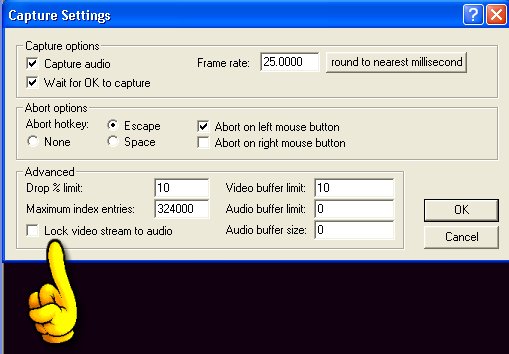
I've been trying for ages to figure out how to capture with Virtualdub. I want to capture my Pinnacle HDTV Pro Sticks TV signal. The program that came with it is hopeless. In the Past I've used Nero for my camcorder with no problem,but it refuses to record this stick. Also Media Center has huge audio delay and video stutter. I just need a reliable way to capture some tv programs. Any advice much appreciated. I also have VLC but haven't found a step by step for tv capture either. Thanks
 View Profile
 View Forum Posts
 Private Message




 Quote
Quote


 Visit Homepage


Similar Threads
-
Audio Sync Issues!!!!
By earthXDust in forum EditingReplies: 3Last Post: 29th May 2011, 23:23 -
audio video sync issues after converting to mpeg with "Burn"
By wsgoogoo in forum MacReplies: 4Last Post: 9th Nov 2010, 19:02 -
Blu-ray Audio Video Sync Issues
By nerouser in forum Authoring (Blu-ray)Replies: 1Last Post: 24th Feb 2009, 15:38 -
Audio Video Sync issues with AVI.net
By siratfus in forum Video ConversionReplies: 3Last Post: 9th Aug 2008, 00:13 -
Audio Sync Issues
By Pinata in forum DVD RippingReplies: 2Last Post: 28th Jan 2008, 08:38