


 View Profile
 View Forum Posts

I have an AVI file. It has 2 audio tracks:
Track 1 - Russian
Track 2 - English
I have searched this forum and a few people posted this same message that i am posting, but what i want to know is how do i remove track 1 audio and just keep track 2 audio using ANOTHER software apart from VirtualDub?? An easy to use software. Please dont say VirtualDub - it is too complicated to use and i have had major problems with it in the past.
Help would be appreciated. thanks.
+ Reply to Thread
Results 1 to 30 of 52
-
-
virtualdubmod. open file, select streams, stream list and then disable whichever audio track you want. go to video tab, direct stream copy and finally to file-save avi as.... Not got Vdubmod open but thats about the jist of it from memory. takes about 2 mins in total to do.
-
P.S. if prompted to rewrite header-select No.
-
AVI-Mux GUI.
N.B.: Read the PDF file carefully before trying the application. -
Thanks, i will look into it. There is a thread in this forum on how to use AVIMux and change the audio tracks, it was posted by a user in this forum. Do you know where i can find it?Originally Posted by El Heggunte
-
And you are sure you have two distinct audio tracks in the file ?
Read my blog here.
-
yes.Originally Posted by guns1inger
-
i no longer require help on this topic, i have solved my problem.
-
I'm a MEGA Super Moderator

- Aug 2000
- Sweden


And HOW did you solve it? It may help others that searches the site.
-
Well to be honest with you i didn't solve the problem, the only reason i said i solved it was because members such as thegeeman & El Heggunte dont bloody read what i bloody posted. I did clearly say i didnt want help on Virtual dub programs. Andl also the user El Huggunte gave me a link to AVI Mux, there was no bloody pdf file, and i also searched through this forum about removing audio tracks and look what i found:Originally Posted by Baldrick
https://forum.videohelp.com/topic266194.html
If you read carefully at the top it says:
A simple guide how to add, remove, or swap any single, dual or multiple audio tracks with or without subtitles in AVI files.
"Remove" - there is no bloody topic on how to bloody remove and ******* audio track!
Im sorry for my language but im so bloody pissed off with the ******* users here. I admire there consideration but they just dont bloody read what others clearly say and they dont stick to what they say they are going to say like in:
https://forum.videohelp.com/topic266194.html
And the only damn reason i joined this forum was to solve all my needs on video and dvd issues. and it seems like im bloody better off solving the problem myself without any dipsticks help! -
I'm a MEGA Super Moderator
- Aug 2000
- Sweden
-
There are not that many avi demultiplexers out there so it's not that easy to find any easier tools for just this. I doubt you want a command line solution (ffmpeg)...

Avimux gui is very tricky indeed, pdf -> http://www.alexander-noe.com/video/amg/avi-mux_gui.pdf -
Thank you, see what im talking about : Always answer the question in what the user wants to know and not something that doesnt. I dont want to be rude, but like i said before i can do this on my own and i have:Originally Posted by Baldrick
http://www.solveigmm.com/?Products&id=AVITrimmer - This can delete, add and edit avi files and flv files. Better than Virtual dub which uses many tools and alot of dll files.
And i almose forgot, your the administrator here, why dont you do something about this:
https://forum.videohelp.com/topic266194.html - the user said he was going to talk about how to remove an audio track, which he hasnt. The least you can do is inform him of this. -
You might have noticed that the person who started that thread was banned, so you won't be hearing anything from them again.
Read my blog here.
-
I also had an AVI with Russian and English audio track. However, I converted the AVI to a DVD using DVD Flick. It is very easy to cancel one of the audio tracks with DVD Flick.
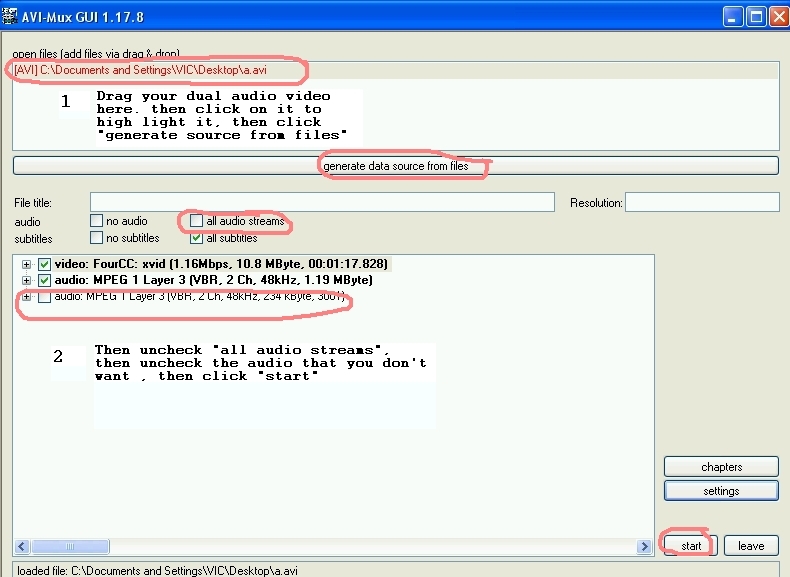
If you don't want to make a DVD, you can use Avimux Gui
to delete, or add audio track to avi, or extract audio track from avi.
To delete an audio track, follow the 2 steps. (see screenshot.)
-
I didnt notice that. Good for him anyway.Originally Posted by guns1inger
-
Thank you for that link, im gonna try it out again to see if it works and let you know if it worked. And do you know how long it takes to convert an 700MB avi file to DVD using DVD Flick?Originally Posted by jimdagys
I got loads of DVDs full with avi/xvid films. My dvd player supports avi files, i was wanting to convert them to dvd, but seeing that many programs take a long time to convert, and loses quality, i didnt bother. -
Personally, I do this in virtualdubmod simply because it is a few mouse clicks, no re-encoding, and it works. (Caveat : I only use this method for AVI files)
Read my blog here.
-
i have did what you said and it worked. and i also added an audio track. Now i can fit the avi file in a 1.36GB mini dvd disk.Originally Posted by jimdagys
-
the 2nd post in this thread describes a very simple solution, and is the same method I have always used to remove a unwanted audio track, I don't understand why it should be anymore difficult than that.
-
Another way, using Avidemux:
Open file.
Audio menu: select the"main track" (the one to keep)
May also be a good idea to "Build VBR time map", keeps in sync.
Then with the left format boxes for "Video" and "Audio" set to "Copy" (default), do "File/save/save video". -
I used ffmpegx to extract the english track from these files. Open the file in ffmpegx then choose movie to ac3 under target format then go to the audio heading and choose the track you want extracted (on these japanese videos english is usually track one) then choose encode
-
[QUOTE=alih786;1936396]
Originally Posted by jimdagys
Consider not using illegal obtained movies, that would save you BLOODY time. LOL*** Now that you have read me, do some other things. *** -
Awesome! thanks, I had the exact same problem as the OP and this worked perfectly!Originally Posted by thegeeman

-
Originally Posted by thegeeman
I know this is an old thread but thanks to google for finding this & thegeeman for posting it in the first place! my avi & mkvs are now well on their way to having only one audio stream - vdubmod is brilliant & the instructions given by thegeeman to disable/remove the streams are spot on! it really is as easy as he says & the vdubmod program is free! i have no idea how the original poster of this thread couldn't get it to work for him, even a relative numpty like me can make it work so how much of a moron must he be!!!! all that swearing and slagging people off, what an idiot!
Anyway, thankyou very very much thegeeman
-
ok i have a little problem and would like a little help.i have an avengers avchd film and also want to change the audio. but when i put the file in the programs ye mentioned above it will not use that file type. any help thanks? i'm new to this.
-
I use MKVMergeGui for this type of job - just import the avi file into it and untick the unwanted language and spit out a mkv container of the original avi file - very quick and no re-encoding. May not be the solution for all depending on what you are playing back on.
SONY 75" Full array 200Hz LED TV, Yamaha A1070 amp, Zidoo UHD3000, BeyonWiz PVR V2 (Enigma2 clone), Chromecast, Windows 11 Professional, QNAP NAS TS851 -
using wmp to play back best looking pic on any player i have seen. started it now and if this works sir i will have your babies! look on the internet the last 2 days it no where. but really thanks you so much
-
-
Highlight the track and on the tab Format Specific Options type in the 4th box down delay in ms, may be negative.
SONY 75" Full array 200Hz LED TV, Yamaha A1070 amp, Zidoo UHD3000, BeyonWiz PVR V2 (Enigma2 clone), Chromecast, Windows 11 Professional, QNAP NAS TS851 -
This thread needs some "jman" ........ no offense to alih786 ..... but a thread this wild isn't wild enough without him.

alih786, I hope you've found good solutions for your issues. It's common that some threads take twists and turns in forums that none of us could ever predict.
Happy Holidays to you......
 Quote
Quote
 Visit Homepage

![[_chef_]'s Avatar](customavatars/avatar30571_1.gif)

Similar Threads
-
How to remove audio track?
By MAAG in forum AudioReplies: 13Last Post: 13th Jun 2012, 18:19 -
How to choose audio track in avi file with two audio tracks
By newnews in forum AudioReplies: 3Last Post: 26th Oct 2010, 05:26 -
removing the commentary audio track from an AVI file with mpeg layer3 audio
By wildrthanevr in forum AudioReplies: 1Last Post: 10th Mar 2009, 01:29 -
Adding new audio track to avi file
By skaleton in forum AudioReplies: 5Last Post: 11th Apr 2008, 13:29 -
How to use only one audio track from a 2-audio-rack .avi File
By akulier in forum ffmpegX general discussionReplies: 2Last Post: 21st Feb 2008, 03:28