


 View Profile
 View Forum Posts


Hi
I would like to know if Media Player Classic can display subtitle. If yes, which subtitle format and where is the setting ?
+ Reply to Thread
Results 1 to 14 of 14
-
-
View -> Options -> Playback -> Output -> Direct Show Video -> VMR7 (renderless) or VMR9 (renderless).
[EDIT] Oh, and right click on screen -> Navigate -> Subtitle Language. Enable subtitles, and choose the language. Pull! Bang! Darn!
 -
.srt .sub .ssa .ass .smi .psb .txt .idx .usf .xss
-
Thanks fritzi93 & GreatScott,
When I go to Navigate .. the subtitle language option is greyed out. I can't select it ? Any suggestions or tips on this ? -
I'm a MEGA Super Moderator

- Aug 2000
- Sweden


what are you playing? dvd? svcd? avi? ogm? mkv? mp4?
or do you want to load external subtitles? -
in MPC's Subtitles option menu, it says
You have to set the radio button "VMR7 (renderless)" or "VMR9 (renderless)" at View -> Option -> Playback -> Output -> DirectShow VideoBefore you ask
Subtitling for DirectShow is available when the video renderer called "VMR7 (renderless)" or "VMR9 (renderless)" is set. VMR7 requires Windows XP, VMR9 requires DirectX9, and both requires a HW accelerated D3D video card. -
Hi Baldrick,
I have an Xvid file and a .sub file. Your question is spot on. Yes, I want to load external substitle.
Hi GreatScot,
Did I do it correctly ? Here is the screen shot.
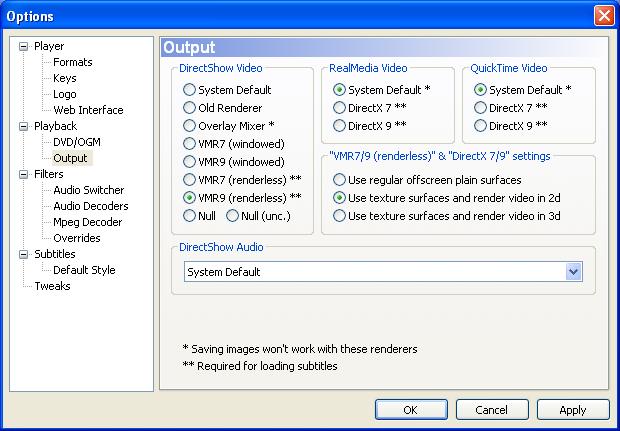
-
-
Hi GreatScott,
Thanks. Did a search on "how to display external subtitle" lead me to VobSub. I install it and it work fine now. Thank you very much. -
Hi. My movie has french subtitles. I changed the settings like you explained below but the subtitles still only appear in French. I downloaded VOBsub but the file is RMVB and this doesn't appear to be supported by vobsub. I'm using Media Player Classic. Any ideas? Thanks.
-
I need to see an .AVI movie with subtitles (.srt file named same as the .avi file) using Media Player Classic on a laptop that does not have a HW accelerated D3D video card.Originally Posted by GreatScott
How can I do that?
I have also tried to install VobSub but I still can't see subtitles.
Same video file on another computer with Windows7 on an ASUS EeePC-1000 played with MPC works great without VobSub.
Please help.
-
Bluray: Problem with forced subtitles
I ask for help to solve this problem.
forced subtitles are those subtitles that appear when a scene requires it and then disappear. This subtitle, other than permanent, turn on the actors speak a language other than the one selected, or when it is always a sign written in different languages.
In the case of film Angels and Demons (Italian version) in the opening scene (from 3.54 to 4.40 minutes) is spoken French language losing part of the meaning of the scenes, this is a very important fact for the understanding of a film.
This is the example of Bluray Angels and Demons seen with PowerDVD9 in Italian


Wonder if you can resolve this problem with some setting or codec would be a major step forward for this great player to play Bluray, but should be complete for the navigation of the menu, but I think this is still possible for a matter of licensing.
Thank -
hi forum i kind of have the same problem and if any1 can tell me how to fix it i will be very gratefull because i have had this problem for 2 years and i just watch movies without subs but there are kind of movies(like this one in particular) that u cant watch without subs , and i saw that u helped out the other dude who has some kind of sub problems and i figured lets upload a photo and see what will happen
Thank you for your time ! -
ik krijg ook geen ondertiltels bij de media player classic. ik heb alles gedaan wat fritzi93 schreef, maar nog steeds niks. hij heeft het wel altijd gedaan. inemand nog tips
 Quote
Quote
 Visit Homepage


Similar Threads
-
Problem using Media Player Classic home cinema player
By True Colors in forum Newbie / General discussionsReplies: 7Last Post: 18th Apr 2010, 07:30 -
Streaming FLV in WM Player or Media Player Classic
By jlz901 in forum Video Streaming DownloadingReplies: 0Last Post: 21st Mar 2010, 11:09 -
Media Player Classic (Subtitle Problem) !
By Bahez in forum Software PlayingReplies: 1Last Post: 2nd Jan 2009, 06:19 -
Problem playing wmv files in Windows Media Player and Media Player Classic.
By rayden54 in forum Software PlayingReplies: 4Last Post: 1st Aug 2008, 22:49 -
Media Player Classic and Windows Media Player 9.0
By siluet in forum Software PlayingReplies: 0Last Post: 26th Dec 2007, 10:01