


 View Profile
 View Forum Posts
 Private Message


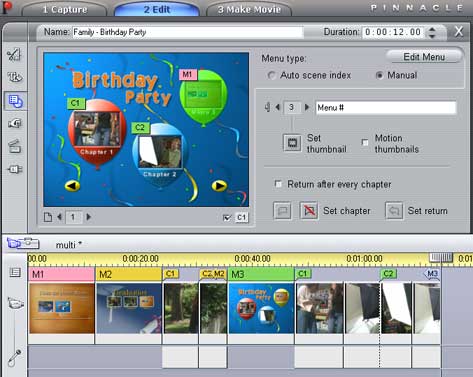
Multi leve menu in Pinnacle Studio.
I selected different menu for each one so it is clear which one is which. To make it simple I will create 1 main menu and two submenu. Tell you the trought, I never needed more than 2 levels. This is just a guide that can be modified to your needs.
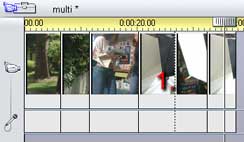
1. Place edited video on timeline.
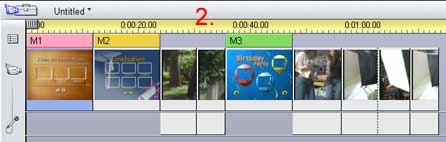
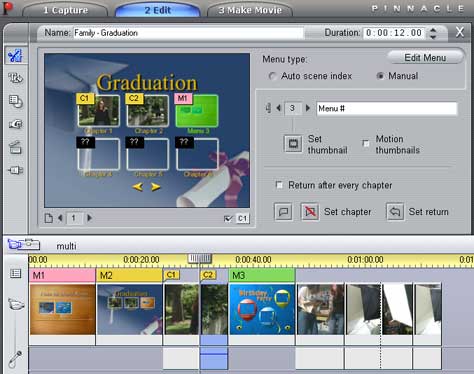
2. Place 1st "main" menu (M1) at the beginning of timeline. 2nd (M2)right after that one and 3rd (M3) whenever second part of your DVD should start.
Do not let PS add chapters automaticaly
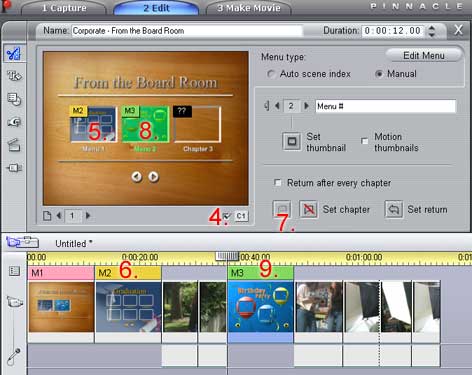
3. Oped first menu in editing mode by doubleclicking on it.
4. Enable displaying of chapter numbers. This way it is easier to see what is happening.
5. Click on first thumbnail picture.
6. Click on top of the 2nd (M2) menu in time line and make sure that scrubber is on the beginning of menu. It should move there automaticaly, but if not... just click on diferent clip and click back on M2.
7. Click on "Create chapter" button (or just press C). This will create link to 2nd menu.
8. Now click on 2nd thumbnail in menu M1.
9. Click on top of the 3rd (M3) menu in time line and repeat step 7.
Now you have main menu that points to two submenus. You can see on thumbnails that they are ponting to M2 and M3.
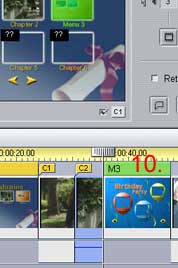
10. Oped 2nd menu in editing mode by doubleclicking on it and set manualy chapters like in steps 5, 6, 7, 8, 9, but this time instead of selecting menu select clips that are located after 2nd menu. Optionaly (I do this always) you can create link back to first menu by following same steps.
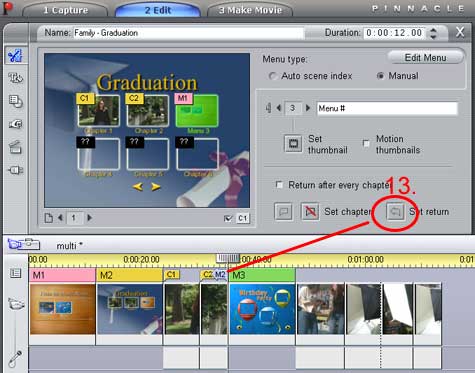
11. Now we need to create return to 2nd menu after clips are finished. So kepp 2nd menu open for editing and click on 3rd menu in time line. This will move scrubber on the beggining of menu 3.
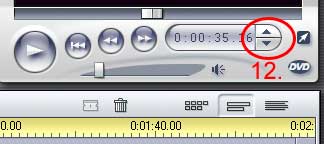
12. But we need to add retun on the end of clips, so in preview window click on "Bacward one frame" button (or press Y).
13. Click on set return (or press M). This will create return to menu 2.
14. Do same in menu M3.
And you are done....
Optional steps are
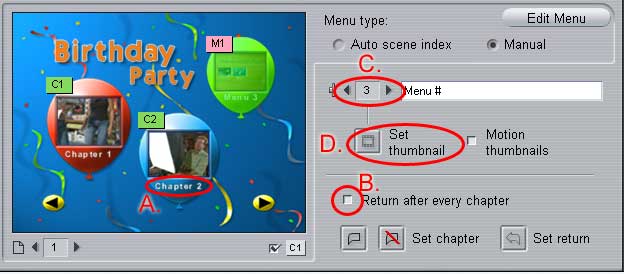
A. Change texts underneath buttons.
B. In menu select option "", which will make it return back to menu after each clip.
C. Instead of clicking on each thumbnail when you need to add next one you can use "Select next" or "previous" buttons.
D. Change thumbnail picture in menu by selecting it in edit mode, moving scrubber to any part in any video on timeline and pressing button "Set thumbnail".
+ Reply to Thread
Results 1 to 7 of 7
-
Pinnacle Studio 8 and DV home video editing (ver.9 already home)
-
Pedro,
thanks for a great guidektnwin - PATIENCE -

Very nice,
But have you managed to burn a DVD which contains a workable menu made by pinnacle Studio 8? -
Yes.Originally Posted by BoterdijkPinnacle Studio 8 and DV home video editing (ver.9 already home)
-
Is it possible to add a soundtrack for the menu' only?
Maybe that loops and do not restart if you choos a sub-menu! -
Yes it is.Originally Posted by SGResu
Sound will start from the begining of the sound in sub-menu.Originally Posted by SGResuPinnacle Studio 8 and DV home video editing (ver.9 already home) -
Hey Everyone!
I have a massive problem with Pinnacle Studio 12 DVD Menu creator. I created a DVD Menu with Play and scene selections and every scene is a different chapter. Now everything worked just fine. The only thing is that the Play button is not playing the entire movie!
I tried to manually set the return button to the end of the movie but it just won't let me!! What can I do? What am I doing wrong? Please, help!

 Quote
Quote
Similar Threads
-
Pinnacle Studio - DVD menu with motion backround and thumbn.
By donpedro in forum User guidesReplies: 28Last Post: 28th Aug 2011, 11:51 -
Pinnacle Studio - 2 Menu's.
By Apple 3.14 in forum Newbie / General discussionsReplies: 0Last Post: 17th Jun 2011, 17:34 -
DVD Menu bug in Pinnacle Studio 11
By P_Cherry in forum Newbie / General discussionsReplies: 6Last Post: 11th Dec 2010, 08:22 -
Pinnacle Studio 9 sound on menu
By JaceKiwi in forum Authoring (DVD)Replies: 4Last Post: 29th Jun 2009, 02:31 -
Pinnacle STudio 10.5 Menu
By Chris Lewis in forum EditingReplies: 0Last Post: 12th May 2007, 11:55